Category Archives: Updates

SetupDiag Illuminates Updates Too

About three months ago I wrote about the Microsoft SetupDiag.exe tool. In that February 17 post, I explained how it provides info about upgrade errors and gotchas. Although the Microsoft Docs article doesn’t really say so, SetupDiag Illuminates Updates too. That is: you can use it to gather information and intelligence about update errors, failures, and so forth. Because those occur more frequently than upgrades, this capability is perhaps even more valuable.

If SetupDiag Illuminates Updates Too, Then What?

A failed Windows Upgrade leaves a copy of SetupDiag.exe behind, in the $Windows.~BT/Sources folder. Windows Update does no such thing. Thus, would-be investigators should bookmark this link, from whence the latest and greatest version may always be downloaded:

Download SetupDiag

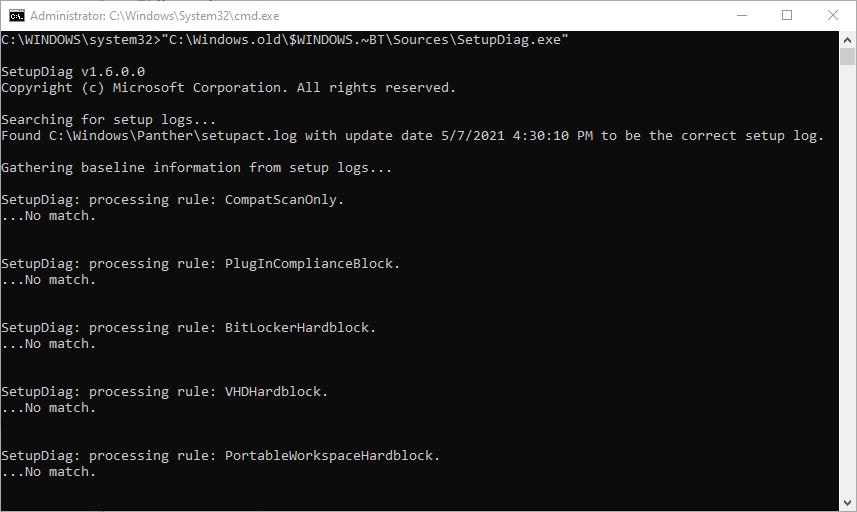
Once you have this tool in hand, open an administrative Command Prompt or PowerShell session, then enter its full path specification. I found one in the Windows.old folder hierarchy on a recently-upgraded Dev Channel test PC, and it produced the following (partial) output:

SetupDiag Illuminates Updates Too.output-example

Run a local copy of the program if you’ve got one, though it’s best to download a current version instead.
[Click image for full-sized view.]

Once SetupDiag runs through all of its log searches and processing rules, it will produce a report that provides the error code and error string (aka “bug check code” and “bug check string,” respectively). This is usually enough information to lead affected users to possible solutions. Just today, in fact, I read a story about update failures for the May 11 KB5003173 that used such data to diagnose possible issues with manual Microsoft Edge removals. It seems that leaving old directories behind will stymie the update. See this Windows Latest story for details.

The Consummation You Should Seek

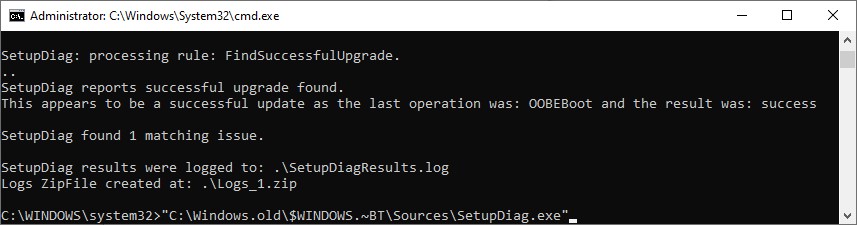
Be it upgrade or update, you’ll eventually want SetupDiag to show you something like this to indicate a successful outcome:

Once you’ve finished troubleshooting, and fixed things, SetupDiag should tell you something like this.
[Click image for full-sized view.]

Cheers!

Facebooklinkedin
Facebooklinkedin

KB5003173 Brings Critical Security Updates

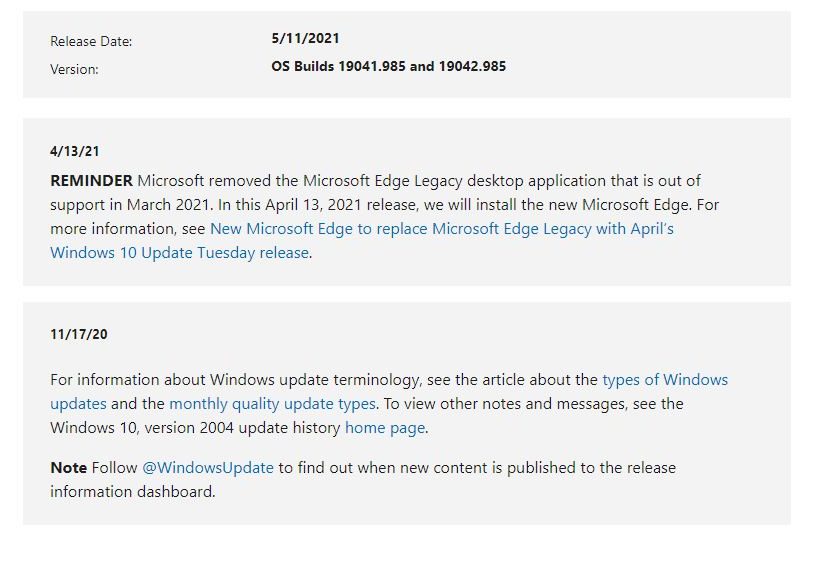
This month’s “Patch Tuesday” fell onĀ  May 11. Windows versions 20H2 and 21H1 went to Build Numbers 19041/42.985. The delivery vehicle KB5003173 brings critical security updates to users, including fixes for three zero-day attacks labeled “critical:”

  • CVE-2021-31204 – .NET and Visual Studio Elevation of Privilege Vulnerability. Affects Visual Studio 2019 version 16.0-16.9, .NET 5.0 and .NET Core 3.1 (reported straight from MS).
  • CVE-2021-31207 – Microsoft Exchange Server Security Feature Bypass Vulnerability. A Microsoft Exchange vulnerability previously used in the 2021 Pwn2Own hacking challenge, attributable to either Devcore or Team Viettel.
  • CVE-2021-31200 – Common Utilities Remote Code Execution Vulnerability (affects Microsoft’s Neural Network Intelligence (NNI) toolkit, and comes courtesy of Abhiram V/Resec System via Github.

Experts Urge Installing KB5003173 Brings Critical Security Updates

Most discussion of the new CU from security experts strongly recommends installing this update (see, for example, this BleepingComputer item). In addition to the 3 critical items already cited, this update fixes 55 vulnerabilities overall, one more of which is also labeled “critical”. 50 are designated “important” and one “Moderate.” To most people in the know, this makes the update worth installing, even though the three afore-mentioned vulnerabilities are not yet known to be exploited in the wild.

What Else Ya Got?

In the KB overview info, MS specifically calls out the following highlights (quoted verbatim from that source):

  • Updates to improve security when Windows performs basic operations.
  • ~Updates to improve Windows OLE (compound documents) security.
  • Updates security for Bluetooth drivers.

That document also mentions security updates to the Windows App Platform and Frameworks, the Windows Kernel, Windows Media, the Microsoft Scripting Engine, and the Windows Silicon Platform. A little bit of everything, in other words. For further details on all 55 items covered in this update, check the May entries in the Security Update Guide from MS.

I concur with the experts: this update is worth installing. Check it out, and make the call for yourself. For the record, I had no trouble with it on any of the half-dozen machines eligible for the update. No issues during install, and nothing noticeable afterwards. So far, anyway…


Facebooklinkedin
Facebooklinkedin