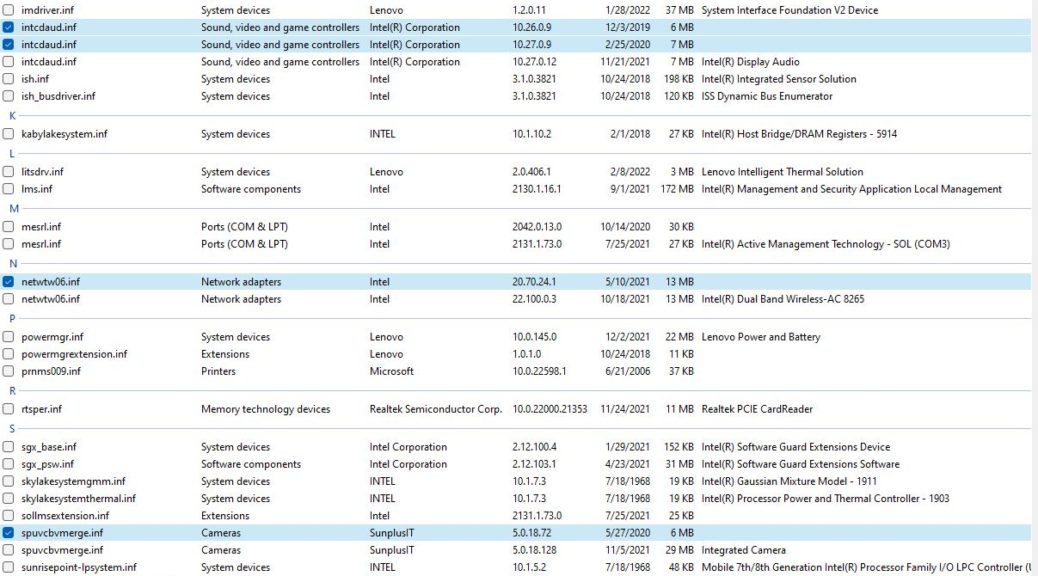
OK, then: here’s a “new-ish” behavior in Windows 11 that I don’t love. Once upon a time, you could use the update function in Device Manager to search the Internet for device drivers. No longer: if a driver is absent, the “Update driver” function can’t find anything to use. That explains why Windows 11 clean install overlooks certain drivers. If they’re not in the driver store built into the ISO image, they’re simply unavailable.
If Windows 11 Clean Install Overlooks Certain Drivers, Then What?
Take my recently clean installed Lenovo ThinkPad X380 Yoga. I happened to notice a half-dozen items under “Other Devices” in Device Manager yesterday. “Hmmm” I thought to myself. “Looks like the installer didn’t find some drivers while bringing the machine up.” Too true, as it turns out!
Fortunately, none of what was missing was essential to the laptop’s operation. Thus, that meant identifying the missing drivers, then finding and installing them. At first look, I saw 7 such devices. A quick hop to the Lenovo Vantage app (the company’s maintenance-update platform, which generally works OK or better) took care of three of them.
On a whim, I looked up LifeWire‘s story on the best free driver updaters (Tim Fisher updated it on April 4, 2022). It gives Driver Booster 9 Free the best rating (but the free version only updates 15 drivers, then requires users to pay ~US$23 to get a paid-up, for-a-fee version). It found 24 (!) drivers in need of update, so I concentrated on updating those that showed up with a “Driver Missing” label in that program’s output. Once identified, I knew I could handle the others on my own.
Back in the High Life Again . . .
Indeed, the free version of the program did the trick for me. You can see in the lead-in graphic from Driver Store Explorer (aka RAPR.exe) that I was able to update 7 drivers (they show outdated versions). Add in another 7 new drivers added to go from “missing” to “found” and my system is now fully up-to-date, with no remaining “Other” device entries. No Device Manager items with the yellow exclamation point, either.
The gurus at TenForums and ElevenForum generally recommend against driver scan/update tools. I generally concur. But this was a big enough kerfluffle that I was grateful for some automated search-and-update help.
I guess that means I’m willing to make an exception when the “don’t check the Internet for available drives” behavior in Windows 11 prevents the installer from providing a full slate of items. I understand why MS did this (to prevent driver changes from adversely affecting naive users). But as I said in my lead ‘graph: I’m not in love with this design decision and its impact on clean install completeness.
That’s life, here in Windows-World. I can live with it, and fix it myself, when I must. So that’s what I did. And now the clean install machine is nearly production-ready. Just a few more apps and applications to go!