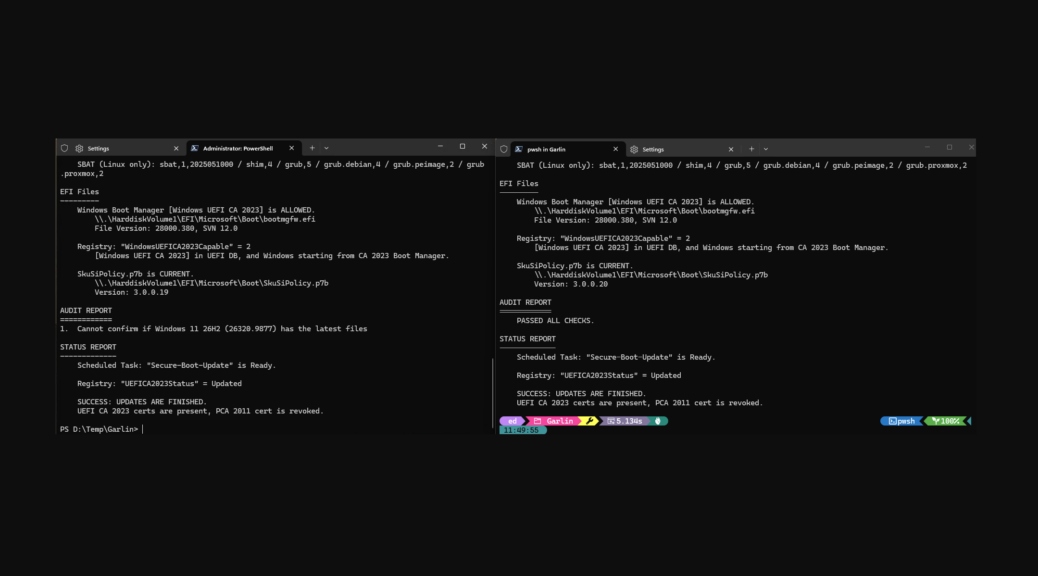
The most recent Patch Tuesday brought an interesting Secure Boot wrinkle to my Windows 11 test fleet. Production and Insider Preview systems now report different component versions, even though both appear fully updated. That sounds contradictory at first. A closer look says otherwise, even as Secure Boot values vary by version.
What’s Involved When Secure Boot Values Vary By Version?
On my production Windows 11 26H2 PCs, Garlin’s Secure Boot check reports SVN 12.0 and SkuSiPolicy version 3.0.0.20. My Insider Preview systems remain on Windows 11 25H2. There, the tool reports SVN 12.0 as well, but with a different associated file version and SkuSiPolicy 3.0.0.19.
The temptation is to assume that .19 is behind .20 and therefore needs fixing. Garlin says not. On both groups of systems, its final verdict is the same: “SUCCESS: UPDATES ARE FINISHED.”
Secure Boot State Matters More than Version Numbers
That result is the key to understanding what’s happening. Secure Boot servicing does not require every supported Windows branch to carry identical files. Microsoft says Windows 11 versions 24H2, 25H2 and 26H2 share a common servicing foundation. Version 26H2 can be enabled on eligible systems through an enablement package.
At the same time, Microsoft’s November 10, 2026 security update continues the Secure Boot certificate transition. Microsoft says the update adds more high-confidence device targeting data, expanding the population eligible to receive newer Secure Boot certificates automatically through Windows Update.
Windows release identity, individual Secure Boot component versions and Secure Boot remediation state are related. But they are not the same measurement, and they need not line up in synch.
SVN 12.0 Is Reassuring
For me, the most important common value is SVN 12.0. Both Production and Insider Preview have reached that security version number even though their SkuSiPolicy revisions differ.
That makes the .19 versus .20 split look like a branch-specific payload distinction rather than an incomplete update. I have found no Microsoft documentation that says SkuSiPolicy 3.0.0.20 is mandatory before Secure Boot remediation is considered complete.
Garlin’s identical success result reinforces that take. The tool sees both configurations as having completed the applicable Secure Boot update sequence.
Insider Doesn’t Mean Every File Is Newer
There’s another useful lesson here. We often think of Windows Insider Preview as automatically ahead of Production. That is true for many operating-system changes, but it does not mean every individual serviced component must carry a higher version number.
Right now my Production systems have moved to the Windows 11 26H2 designation, while my Insider Preview installations still identify as 25H2. Production also happens to have a newer SkuSiPolicy revision.
If It Ain’t Broke…
I won’t copy SkuSiPolicy 3.0.0.20 from Production to those Insider machines merely to force congruence. Secure Boot is specifically intended to maintain a trusted boot chain. Manually transplanting policy files because one version number looks newer would substitute my judgment for Windows servicing.
For now, the practical rule is simple. Check the security state, not just individual file versions. If SVN is current, Secure Boot is operating normally, and Garlin reports “UPDATES ARE FINISHED,” differing payload revisions can still describe fully serviced Windows installations. Here in Windows-World that means Secure Boot is A-OK. Good!
One More Thing…
After the Production update, I DID have to run Update_UEFI-CA2023.ps1 -SkuSiPolicy and reboot my production machines. That’s what took that value from 3.0.0.19 to 3.0.0.20 on those machines. After that Garlin’s check tool reports complete success as shown in the right-side half of the lead-in graphic. This is becoming a “thing to check” for Windows admins after applying Windows Update packages, especially Patch Tuesday CUs.

