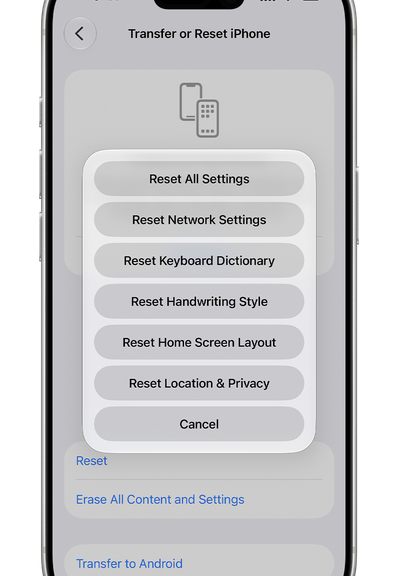
Recently, my iPhone 12 developed a particularly inconvenient communications problem. SMS messages from multiple online services simply stopped showing up. Ordinary phone use looked normal, but two-factor authentication (2FA) did not. When a site wanted to send me a one-time code by SMS, that code often went MIA. That turned routine account maintenance into an obstacle course, and provoked an iPhone SMS failure 2FA cascade. Let me explain…
Finding & Fixing Iphone SMS Failure 2FA Cascade
After doing the usual checking, I called Spectrum, my wireless provider. That turned into a surprisingly positive support encounter. The network support representative worked the carrier side while I worked on the iPhone.
The prescription was straightforward. I reset the iPhone’s network settings (item 2 in lead-in graphic) while Spectrum reset and resynchronized things on its end. Apple’s documentation confirms that Reset Network Settings removes saved network settings, including Wi-Fi networks and passwords, cellular settings, and VPN and APN settings. It does not amount to erasing the phone.
Once both sides had been refreshed, SMS delivery returned to normal. Verification codes started arriving again. That’s the outcome that matters most. Whatever had become unsynchronized between handset and network was apparently cleared by rebuilding the relationship from both ends. I’m not sure what caused this, but it started happening aftera recent iOS update (26.7.2) on October 26.
Next Comes Account Cleanup…Sigh
Restoring SMS did not magically undo everything that happened while those messages were missing. Now I’m going through affected online accounts to make sure authentication, billing, and other notices are behaving normally.
That exercise immediately produced an unwelcome surprise at Box.com. I discovered a $500-plus invoice for online file-exchange service. The subscription covers three seats even though I’m using none (and don’t really need the subscription anymore).
Getting Outside the Box
I started investigating how to reduce that bill. Box’s published support information says paid accounts subject to its seat-reduction policy have a three-seat minimum. It also says seat decreases can be processed only at the end of the account term. Removing users by itself does not reduce subscription charges.
Refund language isn’t particularly comforting, either. Box says services are prepaid and generally non-refundable, including renewed accounts. Its support material does allow eligible customers to request a refund for a renewal charge through Billing, but that is a request, not a promise.
Those rules may make contractual sense from Box’s point of view. From where I sit, though, paying more than $500 for three seats when I’m using none makes little sense. If I cannot unwind a freshly discovered renewal, this may end a very long business relationship.
A Bigger Lesson For Yours Truly
The episode started as an iPhone messaging problem and turned into an account audit. That’s probably a useful takeaway. When SMS-based 2FA stops working across multiple unrelated services, don’t assume every account has suddenly broken. The common dependency may be the phone or carrier connection.
In my case, resetting network settings while Spectrum refreshed its side fixed my immediate SMS problem. The follow-on work is less pleasant, but perhaps equally valuable. I’m now checking the accounts that depend on those messages, fixing what needs fixing, and reconsidering services whose billing arrangements fall outside my pain threshold. Sometimes a communications failure tells you more than you expected to learn. Here in Windows-World, that means “It’s Tuesday.”

