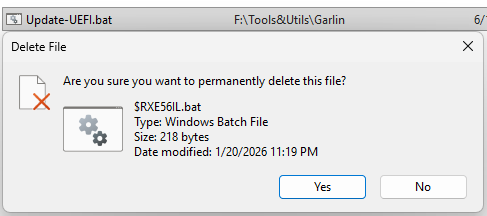
Take a look at the lead-in graphic. It shows the File Explorer listing for a recently deleted file in Recycle Bin, with the confirmation dialog below. Notice the original filename is Update-UEFI.bat (above) but the confirmation identifies that file as $RXE56IL.bat. All Windows versions with the June 9 updates show such a changed file name. Hence my claim that Patch Tuesday delivers odd recycle bin glitch.
What Patch Tuesday Delivers Odd Recycle Bin Glitch Means
Two things. First, something is exposing the internal filenames that the Recycle Bin always employs to users. Second, the glitch is benign. You can go ahead and confirm the deletions, even though the name appears to point at something unknown and unrelated. It’s just another little Windows glitch. Fortunately, it’s nothing to worry about.
You can read more about it in the Windows 11, June 2026 Issues List. The relevant item is entitled “Deleting a file from the Recycle Bin displays an internal filename in the dialog.” It ties the issue to KB5095051. MS also says further:
We are working to release a resolution in a future Windows update and will provide more information when it is available.
Not Much to See; Go About Your Business
While interesting and possibly amusing or annoying, depending on your inclination, this little glitch doesn’t appear to pose any threats. Even though the name has changed, the recycle bin functions as it always has. As you can see from the lead-in screencap, you can keep things straight by dropping the confirmation dialog atop the File Explorer window in which Recycle Bin is open.
Just another brick in the wall, I guess, here in Windows World. It gave me a chuckle, though. I hope you find it likewise diverting. Cheers!
Note Added 1+ Hours Later…
Just saw Kevin Okemwa’s story at Windows Central right now. It’s equally odd that he and I would come up with nearly identical titles for our coverage of this topic independently. Have to give props and recognition to observe this occurred by coincidence, not copying.

