Point-in-Time Restore (PITR) is one of the most interesting recovery features Microsoft has added to Windows 11 in recent memory. It arrived quietly through cumulative update KB5095093 in June 2026. Yet it brings a welcome new option for users who want a fast way to roll back their systems. PITR works by capturing snapshots of key system areas. These snapshots let you return your PC to an earlier state when something goes wrong. The idea is simple, and the execution is surprisingly smooth. In fact, I’d say MS has delivered a nearly perfect PITR to the OS.
What Makes It Nearly Perfect PITR, and Nor More or Less?
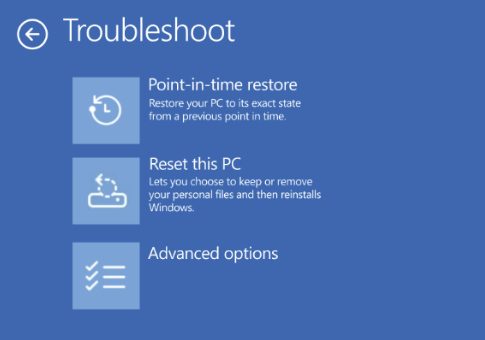
PITR creates restore points that include system files, settings, and some application data. These snapshots live on the local drive. They also tie into Microsoft’s cloud services when available. This hybrid approach gives PITR more flexibility than older tools like System Restore. It also makes the feature more resilient when local files become damaged. With the release of KB5095093, PITR gained a major upgrade: it now appears directly inside WinRE. That means you can access PITR even when Windows won’t boot. You can see it as a Troubleshoot option in WinRE in the lead-in graphic.
Seeing PITR listed in the WinRE Troubleshoot menu feels like a big step forward. It signals that Microsoft wants PITR to serve as a real recovery tool. You can boot into WinRE, choose Point-in-Time Restore, and pick a snapshot to roll back to. The process is quick and clear. It also avoids the complexity that sometimes comes with older recovery methods. For many users, this will be enough to fix common problems.
What Limits Warrant a “Nearly Perfect” Label?
Still, PITR is not a full replacement for image-based backup solutions. Tools like Macrium Reflect and Hasleo Backup Suite offer deeper protection. They create complete disk images that capture every sector of a drive. These images can be mounted like virtual disks. That means you can browse them, copy files out of them, and inspect their contents. PITR cannot do that. Its snapshots are not mountable. They do not support file-by-file access. They also do not cover the entire disk.
This difference matters when you need more than a simple rollback. If a drive fails, PITR cannot help. If you need to recover a single file from a past state, PITR cannot help there either. Image backups shine in these situations. They give you full control over your data. They also let you restore a system even when the internal drive is gone. PITR is faster and easier, but it is not as complete.
Even so, PITR fills an important gap. It offers a middle ground between System Restore and full image backups. It is quick, lightweight, and built into Windows. The addition of WinRE support makes it far more useful. You can now rely on PITR when Windows refuses to load. That alone makes it worth enabling.
Worth Enabling, But Not A Panacea
In the end, PITR is a welcome addition to Windows 11. It is not perfect, but it is close. For everyday problems, it may be all you need. For deeper issues, image backups remain essential. The best approach is to use both. PITR gives you speed. Image backups give you safety. Together, they create a strong recovery strategy for any Windows system.
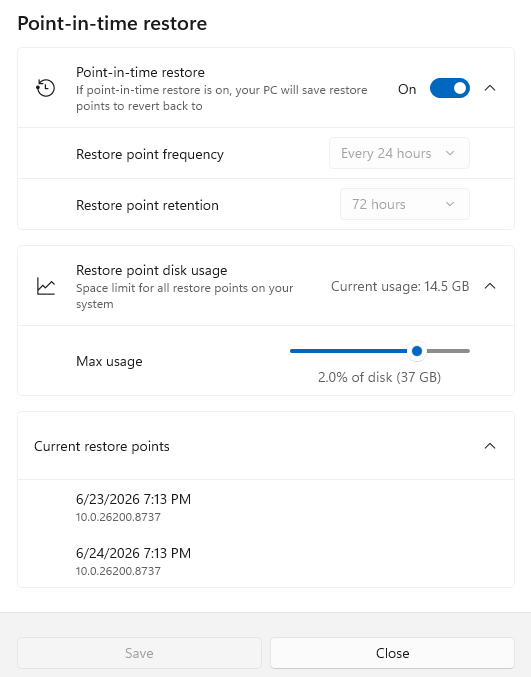
To check PITR and it settings visit, Settings > System > Recovery > Point-in-time restore. On my systems it’s enabled by default with a single PITR restore point every 24 hours, 72 hour retention, and a space ceiling 2.0% of disk capacity. YMMV. Check it out: seems like a nearly perfect addition to Windows 11’s recovery capabilities.
 To learn more about PITR, read this June 23 Windows IT Pro blog post “Point-in-time restore for Windows 11 is now generally available.” Lots of good stuff in there!

