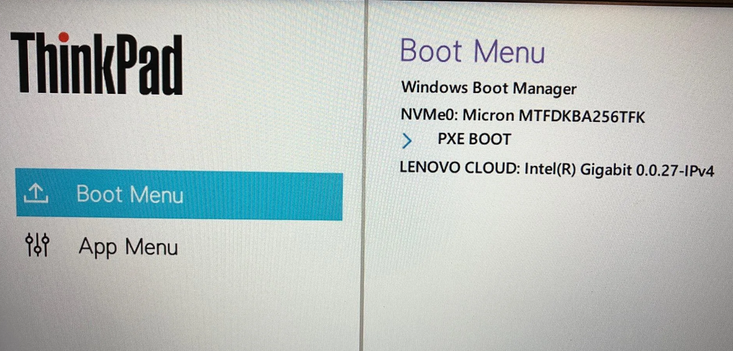
Boy, howdy. I just spent the best part of a day figuring out I can’t fix a boot problem on one of my laptops. The Lenovo ThinkPad X12 Hybrid is a capable and compact Windows device, but its UEFI firmware has strict requirements for external boot media. After extensive troubleshooting, it’s clear that continuing repair attempts without a native USB-C flash drive won’t work. This post explains why that process must pause until the correct media shows up. Until it does, I’ve put the X12 boot fix on hold. Let me explain…
Why Put the X12 Boot Fix on Hold?
The X12 Hybrid’s UEFI boot environment is designed to recognize and boot only from a narrow set of external devices. Specifically, it supports:
- Native USB-C flash drives
- Native USB-A flash drives (when connected directly to a built-in USB-A port; my X12 has only two USB-C ports & no USB-A ports)
- SD cards (on models equipped with an SD slot)
Alas, I’ve confirmed by experiment that it does not boot from:
- NVMe enclosures
- SATA enclosures
- USB-A drives connected through USB-A-to-USB-C adapters
- USB hubs or multiport dongles
Even when such devices appear in the boot menu, the firmware rejects them during handoff to the bootloader. My problem right now is that I don’t own a USB-C flash drive.
Why the Current Media Fails
During troubleshooting, multiple external boot media were tested:
- USB-A flash drives: Not recognized as bootable when connected through an adapter.
- Modern NVMe enclosures: Enumerated in the boot menu but immediately returned to the boot selector when chosen.
- Older NVMe enclosures: Presented themselves correctly as USB Mass Storage devices but were still rejected by the firmware.
These behaviors indicate that the X12 Hybrid’s boot ROM enforces strict transport and device-class requirements. Only a native USB-C flash drive meets all these constraints. Sigh: I’ve got a US$28 Kingston DataTraveler 70 on order from Amazon (delivery : 7/1).
Why a USB-C Flash Drive Is Required
A native USB-C flash drive provides:
- Direct USB-C connectivity without adapters or bridges
- USB Mass Storage Class (BOT) compatibility
- Reliable FAT32 formatting for UEFI boot
- Full compatibility with Windows installation media
This combination ensures that the X12 Hybrid’s firmware can properly read and execute the Windows bootloader.
The Practical Decision: Pause and Wait
Given the firmware limitations and the consistent rejection of all other media, I can do no further troubleshooting until a USB-C flash drive appears. Once in hand, the following steps will occur:
- Format the USB-C drive as GPT + FAT32
- Rebuild the Windows installation media
- Boot the X12 Hybrid from the new drive
- Repair or rebuild the EFI System Partition (ESP)
Pausing now avoids wasted effort and boosts the odds that my next troubleshooting step will help.
Still Waiting…
The troubleshooting process for the X12 Hybrid now sits where the correct hardware is needed. A native USB-C flash drive is the only reliable path forward for UEFI boot and system repair. Once it arrives, the repair process can continue with confidence. Or so I hope: here in Windows-World there’s always the chance that a (nearly) sure thing turns out otherwise. Sigh again: I’ll be finding out!


It’s hard to believe that a USB-A flash drive connected to a USB-A to USB-C adapter isn’t recognized by your Lenovo ThinkPad X12 hybrid! What is the model of your adapter? I use a JSAUX USB-A to USB-C adapter (shown below) and have never had this issue.
https://www.amazon.com/JSAUX-Adapter-Compatible-MacBook-Samsung/dp/B07BS8SRWH/ref=asc_df_B07BS8SRWH/?tag=hyprod-20&linkCode=df0&hvadid=693712892536&hvpos=&hvnetw=g&hvrand=12285433279286776736&hvpone=&hvptwo=&hvqmt=&hvdev=m&hvdvcmdl=&hvlocint=&hvlocphy=9017940&hvtargid=pla-861953242290&psc=1&mcid=b1664898fe2b3253a28bedb05850e518&gad_source=1
Is it possible that your USB-A to USB-C adapter is not USB 3.0 compatible?
Perhaps it is, but the inside plastic tongue is blue (usually means USB 3.0 compatible) and my Amazon purchase history tells me it’s supposedly rated at USB 3.0. I don’t think so, further, because it delivers near-native USB 3.0 performance when I’m not trying to use it with boot media. But thanks for asking: good thought!
–Ed–
Seems that there’s a tangible difference (for the X12 Tablet, anyway) between using a native USB-C UFD and a USB-A UFD through an A-to-C adapter. I absolutely, positively couldn’t get any of my USB-A UFDs to boot the X12 using an adapter. It booted on the first try when I plugged in the Kingston USB-C UFD. Files, formats and storage layouts were otherwise identical. Don’t know why Lenovo built it this way, but my experience is that’s how it works. Go figure!
–Ed–