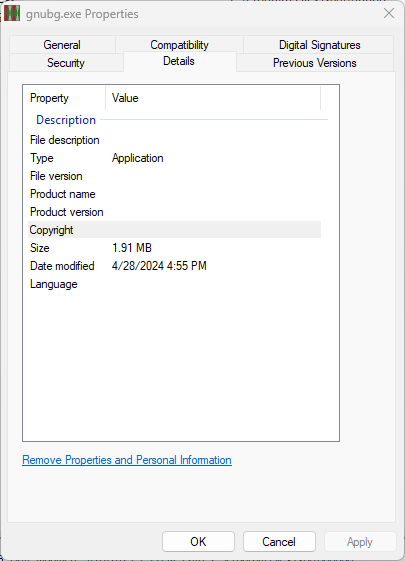
The old saying goes “There’s one in every crowd.” One of what? In this case, an app for which WinGet handles packages that doesn’t play by the rules. That’s OK in this case: the app is Gnu Backgammon (aka GnuBG, runs as “gnubg.exe”). I’m willing to forgive these foibles because it’s the best-ever digital version of Backgammon around. It’s so good, in fact, I have to turn down its capabilities or it will beat me 9 games out of 10. That said, a quick look at the Gnubg Properties windows explains winget pin on this executable.
How GnuGB Properties Window Explains WinGet Pin
WinGet handles GNU Backgammon under the ID GNU.gnubg, But as a quick look at the properties window for gnugb.exe shows, it doesn’t self-report file version, product name or product version info (see lead-in graphic up top). That last item is an important part of what WinGet uses to figure out if updates apply to one of the packages in its custody. Indeed, this appears at the head of the next screencap, which shows output from two WinGet commands: pin list and show GNU.gnubg.
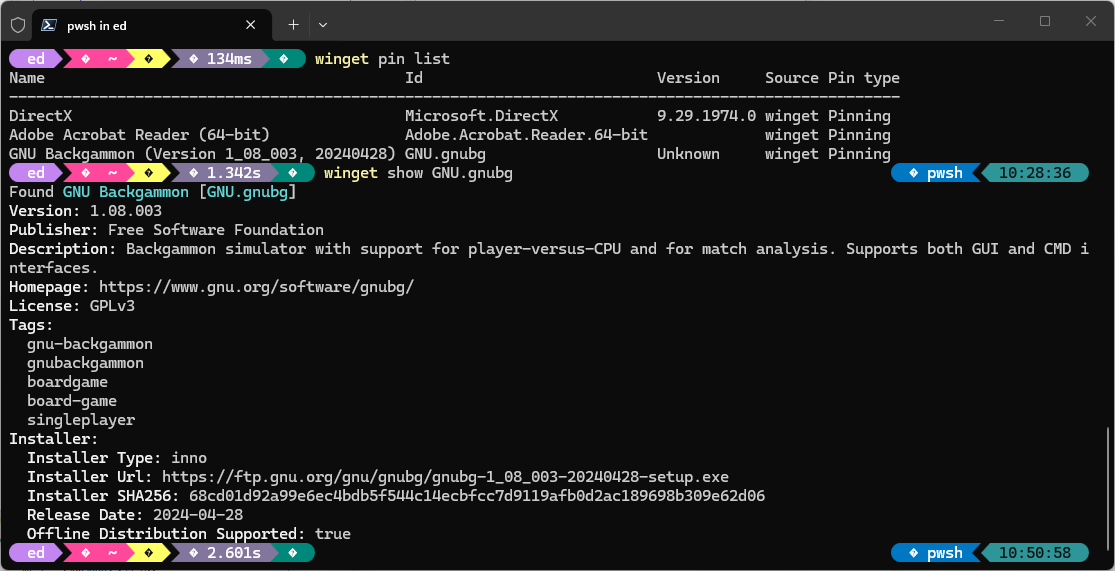 In particular, it’s noteworthy that Version info for GNU.gnubg shows up as “Unknown.” That reports the missing properties info obliquely, and explains why WinGet always attempts to upgrade that program unless I pin it up out of the way.
Indeed, that’s one of the main points of the WinGet pin command. And it works to prevent the package manager from trying to update something for which no update is available. It’s only because the app doesn’t self-report a version number that an issue presents. Pin provides the fix, and I’m glad.
Here in Windows-World, one must take one’s jollies when one can. I choose to be amused and entertained in this case. But I’m glad the WinGet team had the forethought to anticipate and fend off this kind of thing. ‘Nuff said.

