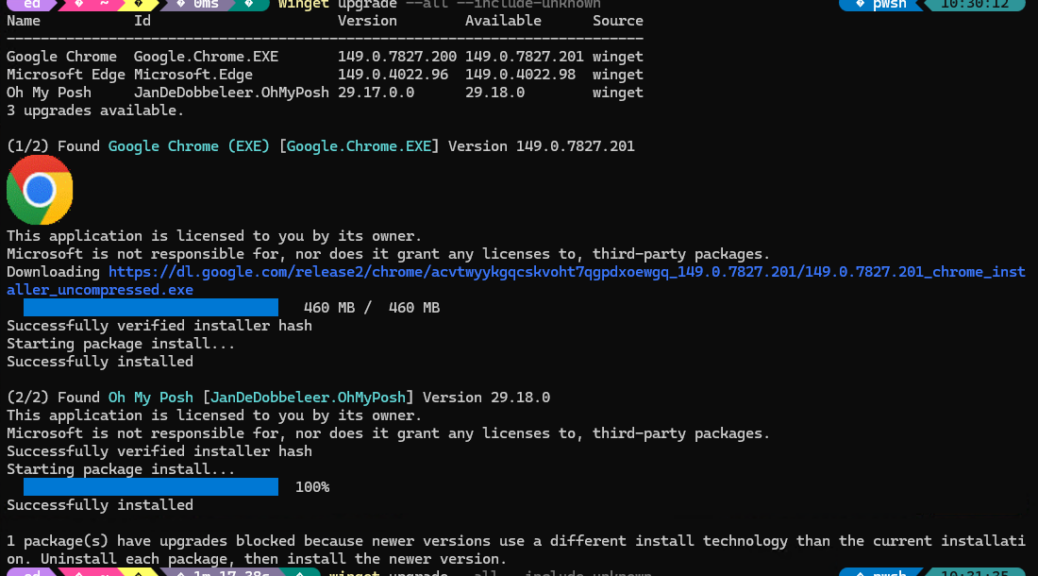
In running through my usual morning Winget Upgrade drill, I noticed that it found 3 upgrades, but applied only 2. As you can see in the lead-in screencap, it concluded its efforts with a line that reads “1 package(s) have upgrades blocked because newer versions use a different install technology…” To me, this means that WinGet Upgrade knows more than it says, because process of elimination reveals that Microsoft Edge is the missing item.
Why Say: WinGet Upgrade Knows More Than It Says
Microsoft Edge is deeply embedded into the Windows 11 OS. Indeed, Windows 11 uses WebView 2 as a system component. That also powers the Settings app, widgets, Copilot, Teams, Outlook (new), the MS Store, and more. That’s why Edge usually updates more easily from within its own UI anyway.
In this particular case, something about the install technology changed moving from Version 149.0.4022.96 to Version 149.0.4022.98. That forces WinGet to keep its mitts off, unless users uninstall the old and then install the new in two separate operations.
I elected to jump into the app, do the upgrade, then returned to Windows Terminal to run WinGet Upgrade –all –include-unknown again. As you can see in the lead-in graphic (if you right-click that image to display it in its own browser tab), with Edge manually updated already beforehand, the next check returns “No installed package found matching input criteria.” In WinGet parlance that means “no items need updating here.”
In Windows-World, what you see can sometimes tell you more than what your app or tool output tells you. This is a definite illustration, and explains why I assert that the Windows package manager (i.e. WinGet) and its upgrade facility knows more than it says. Cheers!

