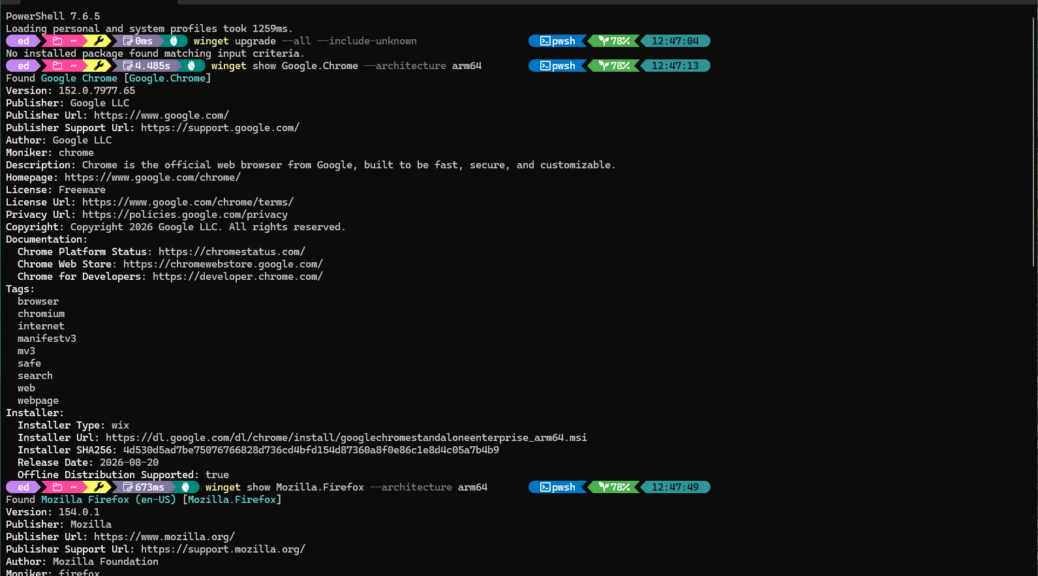
If you run winget upgrade --all on an ARM-based Windows 11 PC (e.g. an Asus Zenbook A14), you may notice something odd: Chrome and Firefox don’t show in the upgrade list, even when they’re out of date. On an x64 desktop, winget catches them without fail. So what gives? Briefly put, and for various reasons, WinGet misses ARM browser updates for certain implementations.
It turns out there are four overlapping bugs and design gaps at play. All of them affect ARM64 PCs. None of them are your fault, either. But together they form a perfect storm that makes WinGet effectively blind to certain browsers. For now, anyway.
TLDR: On ARM64 Windows PCs, WinGet fails to detect and upgrade Chrome and Firefox due to four compounding issues: a name-normalization bug (winget-cli #6490), a registry hive mismatch, a broken ARM64 manifest entry for Chrome, and an architecture-selection bug (winget-pkgs #424881). Until Microsoft patches these, a handful of workarounds fill the gap. Here goes…
Diving in: Why WinGet Misses ARM Browser Updates
On x64 machines, the registry is simple: one hive, one architecture tag, and manifests that have been battle-tested for years. WinGet’s upgrade logic originates from that x64 worldview. Alas, things on ARM64 aren’t quite so simple, and all four failure modes described next come out of various diversions from the x64 situation.
Four Root Causes
- The ARP Name-Normalization Bug (winget-cli #6490)
Winget matches installed apps to its catalog by reading Add/Remove Programs (ARP) registry entries and normalizing display names. It strips “x86” and “x64” — but has no handling for “arm64” or “ARM64.” When Chrome or Firefox registers with an ARM64 architecture suffix on a Snapdragon device, winget cannot correlate it to the catalog entry and silently drops it. The app becomes invisible to winget upgrade.
- The Registry Hive Mismatch
ARM64 Windows splits app registrations across 3 registry hives:
| Hive | Contents | Who Writes There |
| SOFTWARE\…\Uninstall | Native ARM64 apps | ARM64 installers |
| SOFTWARE\WOW6432Node\…\Uninstall | x64-emulated apps | x64 installers (Chrome, Firefox legacy) |
| HKCU\SOFTWARE\…\Uninstall | Per-user installs | Either architecture |
If Chrome or Firefox were installed via an x64 installer — the only option before both browsers shipped native ARM64 builds — it lives in WOW6432Node. Winget, running as a native ARM64 process, reads the native hive first and, when name normalization is also broken, frequently misses those emulated entries entirely.
- The Broken Chrome ARM64 Manifest
Even when winget finds Chrome, the Google.Chrome manifest in the community repository lists an arm64 installer entry with a blank SHA256 hash. Winget requires a valid hash to verify any upgrade — blank means the ARM64 path is present on paper but non-functional. The Google.Chrome.EXE package ID does carry a properly populated hash, which explains why some users get inconsistent results depending on which package ID is in play.
- The Architecture Selection Bug (winget-pkgs #424881)
Even with a complete, valid manifest, winget’s upgrade logic has a documented bug where it selects the x64 installer over arm64 on Windows on ARM machines. Best case: you get the slower, emulated build pushed onto your ARM device. Worst case: the upgrade fails outright.
Viable WinGet Workarounds
Until Microsoft ships fixes, here are some WinGet options — from most precise to most blunt:
- Force the architecture explicitly: Use
winget upgrade Google.Chrome --architecture arm64andwinget upgrade Mozilla.Firefox --architecture arm64. This bypasses both correlation and selection bugs in one go. - Use the Chrome EXE package ID:
winget upgrade Google.Chrome.EXE --architecture arm64hits the manifest entry that actually has a valid SHA256 hash for ARM64. - Let the browsers self-update: Both Chrome (Google Update/Omaha) and Firefox (Mozilla Maintenance Service) are fully architecture-aware. Help → About in either browser triggers an immediate, correct ARM64 update — no winget involved, no ARM64 drama.
- Add
--include-unknownas a catch-all:winget upgrade --all --include-unknownis a blunt instrument, but it sometimes remcatches apps that fail normal ARP correlation.
The real, true fix requires Microsoft to patch name-normalization and upgrade architecture-selection logic in winget-cli. Two of the four bug reports were filed in the last few days, so movement could come soon. Until then, –architecture arm64 is the cleanest workaround on your Zenbook A14 — or any other Snapdragon-powered Windows machine. In Windows-World, knowing where the bodies are buried is half the battle.

