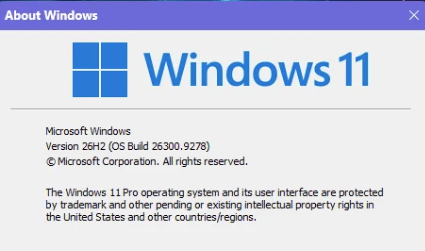
If you’re running Windows 11 24H2 or 25H2, the next annual upgrade aka Windows 11 26H2 is almost here. For many users, the upgrade experience should be pretty low-key. Microsoft pushed Build 26300.9278 into the Release Preview Channel on August 27, 2026. That signals general availability (GA) is on track for September or October. Hence my proclamation about Version 26H2 coming soon via eKB. What’s that?
Qualifying devices won’t sit through a multi-gigabyte download or a lengthy offline install. Instead, they’ll receive a tiny enablement package (eKB) that flips the version number after a single restart.
TLDR: Windows 11 26H2 (Build 26300.9278) is in Release Preview now and coming this fall. It lands as a ~174 KB enablement package (KB5121794) for 24H2 and 25H2 users. Windows 11 23H2 and older face a full ~6.5 GB feature update. Windows 10 users, of course, need a full OS upgrade. And 26H1 (the Arm-only branch) has no standard eKB path to 26H2 at all. For them, a clean install is the only way to go forward.
What Is an Enablement Package?
An enablement package (eKB) works because 24H2, 25H2, and 26H2 share the same underlying servicing branch and codebase. Most of what defines 26H2 has already been delivered to your PC through monthly cumulative updates. Indeed, the eKB simply activates it, changes the build string to the 26300 series, and reboots. The download for KB5121794 weighs in at around 174 KB, and is smaller than most web images. One prerequisite: your system must already have KB5120998 (Builds 26200.9278 or 26100.9278) installed before the enablement package can run. A quick visit to Settings > Windows Update confirms if you’re current (or not).
As Paul Thurrott reported on Thurrott.com, for the first time, Microsoft is releasing a new Windows version to the Insider Release Preview ahead of general availability. That’s a sign that the company wants broader validation before the full rollout. The official announcement comes from Stephen Lines via the Windows Insider Blog.
Upgrade Paths: Know Where You Stand
Your path to 26H2 depends entirely on which version you’re running today. This table lays things out:
| Current Version | Upgrade Method | Download Size | Restarts |
|---|---|---|---|
| Windows 11 25H2 | Enablement Package (KB5121794) | ~174 KB | 1 |
| Windows 11 24H2 | Enablement Package (KB5121794) | ~174 KB | 1 |
| Windows 11 23H2 | Full feature update (different servicing branch) | ~6.5 GB | Multiple |
| Windows 11 26H1 (Arm) | Separate core branch — no standard eKB path | N/A | N/A |
| Windows 10 | Full OS upgrade or clean install | ~6.5 GB+ | Multiple |
As TechPowerUp’s AleksandarK noted, devices on 23H2 and older sit on a different servicing branch. Thus, there’s no eKB shortcut for them. And 26H1, built specifically for new Arm silicon such as Snapdragon X2 Elite devices, runs a separate Windows core and won’t roll forward via the standard enablement path. Microsoft has said those devices will eventually receive a path to a future Windows release. Those who wish to jump that gun must, as I said earlier, do a clean install.
What 26H2 Actually Delivers
Let’s be blunt: 26H2 is a stability and lifecycle-reset release, not a features spectacular. Thanks to Microsoft’s continuous innovation model, most of what carries the 26H2 label has already landed on your device via monthly updates. That said, commercial customers do get a handful of features enabled by default for the first time: Windows Settings Backup, app-specific Taskbar actions, and several File Explorer enhancements.
The bigger prize is the support lifecycle reset. That is, 24H2 Home and Pro reach end of updates on October 13, 2026. Thus, upgrading keeps you beneath the security update umbrella.
How to Get It Now
Windows Insiders in the Release Preview Channel can grab 26H2 today via Settings > Windows Update using the seeker experience (enable “Get the latest updates as soon as they’re available”). For everyone else, wait for GA. At that time, Microsoft will offer 26H2 as an optional install first, then push it automatically as 24H2 nears its support deadline. If you’re still on 23H2 or older, the smartest move right now is upgrading to 24H2 or 25H2, so that when 26H2 arrives, it costs you 174 KB and one reboot instead of a 6.5 GB weekend project.
Here in Windows-World, it’s wise to get ahead of the curve when the opportunity presents. This is one such opportunity. I plan to jump on it as soon as I can!

