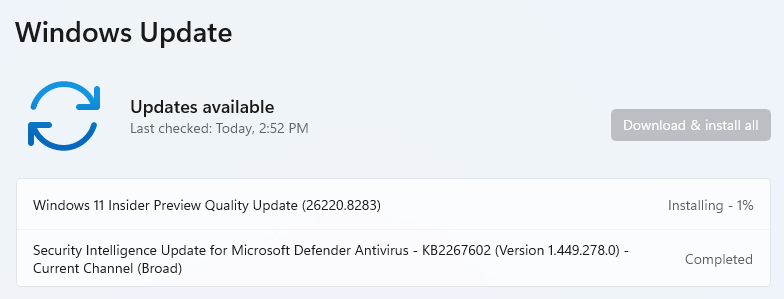
OK, then, today’s the day. Earlier, MS promised to change up its Insider Channel line-up. This morning, MS published an item to the Windows Insiders blog entitled “We’re moving to Experimental and Beta!…” Amusingly enough, this means that the former Canary and Dev channels are collapsing into a single Experimental channel, while Beta stays Beta (at least, for now). So, of course, I had to download and install the latest Beta onto X380 to see what things looked like, as MS kicks off new Insider Channels. Let’s check…
As MS Kicks Off New Insider Channels, I Wait…
As you can see in the lead-in graphic above, the latest Beta version shows up as a “Windows 11 Insider Preview Quality Update” (Build 26220.8283). It took about 5 minutes to download, but install seems poised to take somewhat longer. It’s been 3 minutes and it’s 12% done, so that means ~42 minutes total? Gosh, I hope that’s wrong… And indeed, it got to the “Restart now” button 27 minutes later. By the time I got through everything and back to the desktop total time elapsed was 35 minutes.
To my great disappointment, the view of Insider Channels from the latest Beta release is unchanged. It still shows Canary, Dev, Beta and Release Preview channels. Here’s what I used to (and still) see:
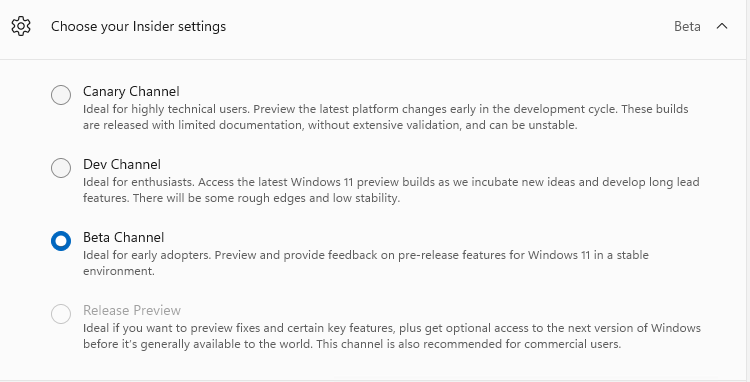 I guess I need to stand up a Canary PC or VM and see if it shows anything different. Here in Windows-World, I’m often reminded of the old French saw “The more things change, the more they stay the same.” I’m sure change is coming, but it hasn’t made it to Beta just yet.

