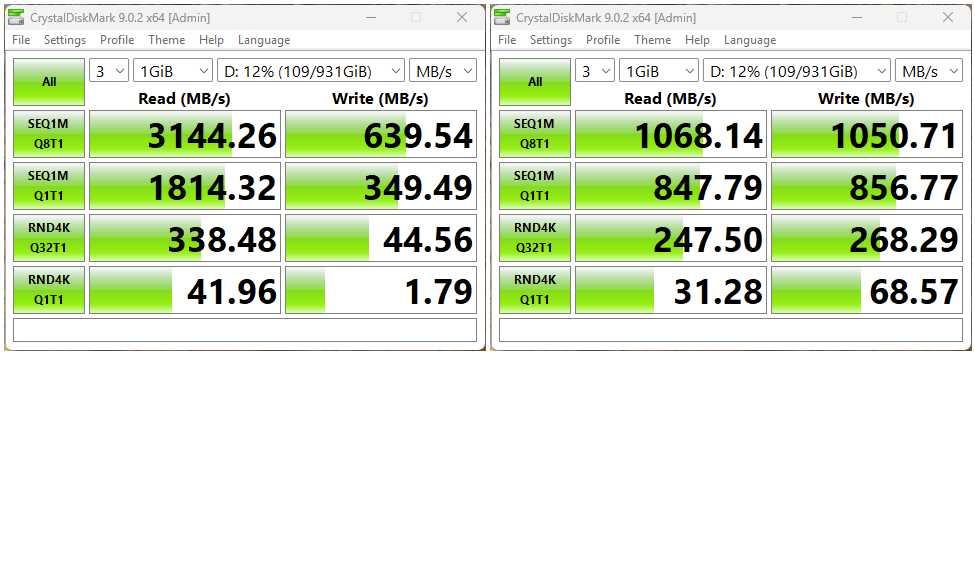
I’m happy to admit that Copilot makes many of my Windows adventures easier to undertake. It certainly helps a great deal with PowerShell scripting stuff. But just this morning I was reminded that it’s always smart to question — and verify — everything Copilot tells me. In testing a USB4 NVMe enclosure just now, I asked it which of the ThinkPad X12 Detachable Gen 1 left-side USB-C ports is faster, remembering that one is 10Gbps (UASP) and the other 40Gbps (TB4). It replies “the lower port,” so I run CrystalDiskMark on both to check its answer. Once again, I confirm that testing catches Copilot errors. Let me explain.
How Testing Catches Copilot Errors
Simply put, checking what Copilot tells you will either confirm that it’s correct, or show that it’s wrong. As you can see in the lead-in graphic, which places the upper USB-C port left, and the lower one at right, large reads are MUCH faster on the left. That means the upper port MUST be the TB4 one because UASP/10Gbps can’t deliver more than 1,000 – 1,200 MB/s for either reading or writing.
When I showed Copilot the CDM results, it responded as follows:
I had it backwards — apologies for the bad call. The source I pulled from apparently described the ports in board-schematic order rather than physical top-to-bottom position as you see them on the tablet. Your bench test is the definitive answer.
And if you’re seeing typical UASP numbers (~1,000 MB/s sequential) from the lower port right now, that confirms it’s the USB 3.2 Gen 2 controller — exactly what you’d expect at 10 Gbps with protocol overhead.
At least, it doesn’t fight with me when I knock it over the head with contrary results. And when it writes scripts, the PowerShell mostly either works or it doesn’t. In the latter case, Copilot may fumble around for a while but it eventually gets things right.
Trust, But Verify
It’s not unreasonable to believe much, or perhaps even most, of what Copilot tells you. But if you don’t check its work, you’re setting yourself up for trouble. It’s good at finding stuff and presenting theories and explanations. It’s by no means infallible, as I have just shown. Take that into account, when you start leaning on it for help…

