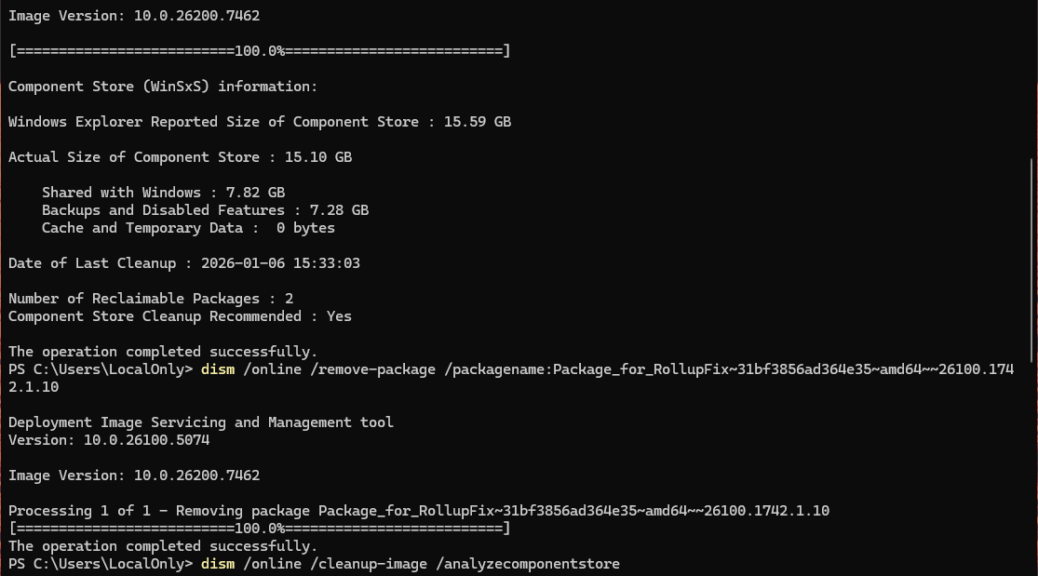
Don’t ask me why. But every now and then, MS drops a couple of old, outmoded, and obsolete packages into its Windows 11 updates. They also show up should you perform an in-place upgrade repair (“Reinstall now” via Settings > System > Recovery). Ditto for a clean install. I call them spurious reclaimables because they shows up in DISM … /cleanup-image if you run /analyzecomponentstore. Well, they showed back up on my Lenovo ThinkStation P3 Ultra yesterday. With more spurious Win 11 reclaimables to clean up, that’s just what I did. Here’s how…
Handling More Spurious Win 11 Reclaimables
Through repeated exposure to this phenomenon, and repeated prior cleanups, I’ve learned the names of the packages involved. I’ll also note they come in both AMD64 and ARM64 flavors. If you look at the lead-in graphic you can suss those names out. I repeat them here for readability:
Package_for_RollupFix~31bf3856ad364e35~amd64~~26100.1742.1.10

Microsoft-Windows-FodMetadataServicing-Desktop-Metadata-Package~31bf3856ad364e35~amd64~~10.0.26100.1742
These go into the following DISM command for easy removal (if they’re not present, the command will fail gracefully with no damage to a Windows image):
dism /online /remove-package /packagename:
Paste the package name right after the colon at the end of the string (no spaces). For ARM64 installations change the “amd” in “amd64” in the preceding package names to “arm” (e.g. “arm64”). That’ll do it.
Note: upon double-checking this info on another PC just now, I observed that removing the rollupfix package also removes the FodMetadataServicing package. Thus, a manual attempt to remove the latter fails. Never fear: a quick check of reclaimable packages in DISM shows the count at zero (0). Good-oh! On ARM64 PCs, however, both items (with the stipulated replacement above) MUST be done separately.
Why Do These Spurious Reclaimables Occasionally Come Back from Oblivion?
Copilot explains this as something that’s a “known defect baked directly into the original Windows 11 24H2 installation media.” Apparently this means they will come back in 24H2 and 25H2 images from time to time. When updates that include them are applied, it’s like the movie Poltergeist: “They’re heeeeeere!”
When that happens you can leave them alone. Or, if you tend toward OCD in seeking clean Windows images, you can use DISM to return them to the oblivion they so richly deserve. That’s the way things go occasionally, here in Windows-World. I enjoy such things, in case you can’t tell…
Note: I’ve written on this topic repeatedly. Run this Google search if you’d care to scan some of my other musings on these little zombies.

