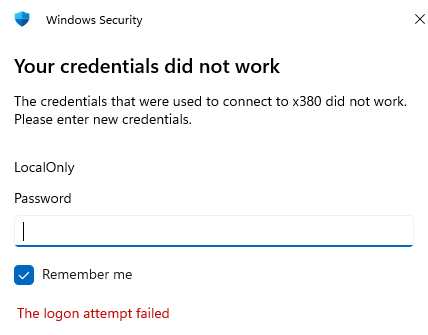
Every so often, I run into Windows 11 behavior odd enough to make me scratch my head. Occasionally, I’ll observe that my Microsoft Account (MSA) logins work perfectly at the local console. But they fail constantly if used within Remote Desktop Connection. The error? A familiar one: ‘Your credentials did not work. The logon attempt failed.’ Today, I’ll explain what worked for me when fixing failed MSA remote login.
In the meantime, I’d been working around this issue by setting up a Local account named “LocalOnly.” You can see it mentioned in the lead-in graphic for this blog post. If my upcoming technique doesn’t restore your MSA’s remote access as it did mine, you can use a local account to remote into a balky remote host if your MSA won’t work.
Refusal of Known, Good, Working Login
You may see this message while trying to RDP into a Windows 11 machine using an MSA. If so, you know how frustrating it is. Especially when you know those credentials are correct, and you can use them locally, no problem. What gives?
As it turns out, the answer lies in a complex and sometimes fragile identity stack that underpins Windows 11’s user authentication . Let’s unpack what’s going on under that hood.
Windows 11’s identity model for MSAs is built on three interdependent layers:
- SAM (Security Account Manager) – The local account database. It stores user SIDs (Security Identifiers) & basic account metadata.
- WAM (Web Account Manager) – The token broker that handles cloud authentication for MSAs. It’s responsible for storing and refreshing tokens so services like RDP can validate your identity.
- Ngc (Next Generation Credentials) – This layer handles Windows Hello and TPM-tied credentials, like PINs & biometric logins.
When all these layers are working and cooperating, things go swimmingly. Sometime though, particularly on Insider builds where MS is messing with this identity stack, things can get weird. Over time changes can mean an MSA works locally but not remotely.
A Swicheroo Is Key to Fixing Failed MSA Remote Login
Here’s what was happening on my ThinkPad X380 Yoga. I could log in locally using my MSA. But RDP logins would consistently get refused with the error message that serves as the lead-in graphic. After ruling out more obvious causes (e.g. network issues, RDP settings, firewall rules) I thought about the situation. Because local login worked, SAM and Ngc layers were probably OK. That presented WAM as a likely cause.
The fix, then, was simple. I rebuilt the WAM token cache, to make sure all pieces harmonized. Here’s what I did:
1. Log in locally using MSA
2. Visit Settings > Accounts > Your info
3. Change to “Sign in with a local account instead”
4. Sign out, or Reboot PC
5. Login locally using local account name/pwd
6. Visit Settings > Accounts > Your info
7. Change to “Log in with a Microsoft account”
8. Reboot PC
The switcheroo undid the link between the MSA and the account, made it local, then re-established a new connection. That completely rebuilds the whole infrastructure, including the WAM.
After that switcheroo (MSA > Local > MSA) RDP worked fine from my Flo6 primary desktop into the X380. The odds are good this technique will work for you, if you get caught in this situation. Here in Windows-World, a switcheroo sometimes works wonders. It did here, anyway!

