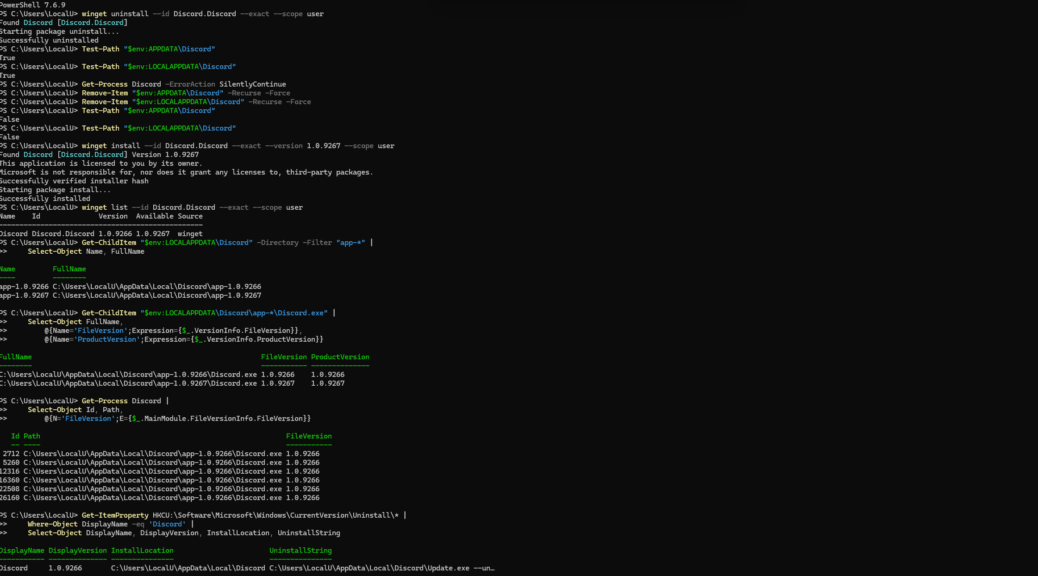
Sometimes an update problem gets more interesting after the obvious fix succeeds. That just happened to me with Discord on Windows. WinGet insisted version 1.0.9267 was available, while my PC remained on 1.0.9266. Even stranger, forcing the upgrade did not change the reported installed version.
I tried WinGet, UniGetUI and Discord’s in-app updater. Nothing moved the needle. Eventually I performed a clean uninstall and reinstall. That exercise exposed what was really happening: version 1.0.9267 had downloaded, but Discord was still running 1.0.9266. That’s how I found myself engaged in more Discord Follies: unactivated download is present, but inert. WTF?
Unpacking More Discord Follies: Unactivated Download
The basic inventory command showed the mismatch clearly:
winget list --id Discord.Discord --exact --scope user
It reported 1.0.9266 installed and 1.0.9267 available. Discord was installed at user scope, which also produced an instructive side trip. An elevated WinGet session refused to uninstall the per-user package. Switching to a normal Windows Terminal session fixed that.
winget uninstall --id Discord.Discord --exact --scope user
After the uninstall succeeded, I checked for leftovers:
Test-Path "$env:APPDATA\Discord"

Test-Path "$env:LOCALAPPDATA\Discord"
Both returned True. With no Discord processes still running, I removed those directories and verified that both paths returned False. That gave me the clean slate I wanted.
The Clean Install Surprise!
Next came an explicit installation of the supposedly newer release:
winget install --id Discord.Discord --exact --version 1.0.9267 --scope user
WinGet found 1.0.9267, verified its installer hash and reported a successful installation. Yet another winget list still showed 1.0.9266 installed, with 1.0.9267 available. At first glance, that looked impossible.
The file system told a better story. I enumerated Discord’s version directories:
Get-ChildItem "$env:LOCALAPPDATA\Discord" -Directory -Filter "app-*" | Select-Object Name, FullName
There were two of them: app-1.0.9266 and app-1.0.9267. Checking the Discord.exe files confirmed that each directory contained the version its name advertised. Again: WTF?
Installed Is Not Activated, Apparently
The decisive check was to examine the running processes instead of trusting package inventory alone:
Get-Process Discord | Select-Object Id, Path,

@{N='FileVersion';E={$_.MainModule.FileVersionInfo.FileVersion}}
Every running Discord process came from app-1.0.9266. I then checked the per-user uninstall registration:
Get-ItemProperty HKCU:\Software\Microsoft\Windows\CurrentVersion\Uninstall\* |

Where-Object DisplayName -eq 'Discord' |

Select-Object DisplayName, DisplayVersion, InstallLocation, UninstallString
Windows likewise registered Discord as version 1.0.9266. In other words, WinGet was not hallucinating. Version 1.0.9267 really existed on disk, but 1.0.9266 remained the registered and active release.
The Nub of This Discord Folly Is…
Discord’s current generic stable update manifest identifies 1.0.9267 as the host version. I also found installation-specific manifest results that still identify 1.0.9266. That makes staged update selection a plausible explanation for this split state, though the local evidence alone doesn’t completely illuminate Discord’s rollout policy.
Here, the important lesson is more general. When an updater says success but inventory disagrees, inspect three layers: package registration, files on disk and the executable that’s actually running. Those views might disagree: here they did so spectacularly.
For now, I’m leaving both Discord directories alone. Manually deleting the active release or rewriting its registration would create more, not less
Discord’s current generic stable update manifest identifies 1.0.9267 as the host version. We also found installation-specific manifest results that still identify 1.0.9266. That makes staged update selection a plausible explanation for the split state, although the local evidence alone cannot prove Discord’s rollout policy.
The important lesson is more general. When an updater says success but inventory disagrees, inspect three layers: package registration, files on disk and the executable actually running. Those views can disagree, and here they did spectacularly.
For now, I am leaving both Discord directories alone. Manually deleting the active release or rewriting its registration would create more, not less uncertainty. Here in Windows-World, sometimes the best troubleshooting means knowing exactly why you should stop troubleshooting. I’m done for now, and will wait to see what Discord does next. Sigh.
Further Reading
Discord stable Windows x64 update manifest
Discord Support, Windows Corrupt Installation

