
For several days, my Lenovo ThinkPad P16 seemed stuck halfway through Microsoft’s Secure Boot certificate transition. The new 2023 certificates were present, but the Secure-Boot-Update task would not finish the job. Then I revoked the old Microsoft Windows Production PCA 2011 certificate. Finally, it looks like revoking P16 CA-2011 breaks Secure Boot stalemate!
The resulting Garlin check_UEFI-CA2023 audit is the kind of output Windows admins like to see, including yours truly. Every check passes. The Windows UEFI CA 2023 trust chain is active, the newer Boot Manager is in use, and the old PCA 2011 path is revoked.
What changed, and why did revocation apparently matter? That question is worth examining because this 2011-to-2023 transition is becoming increasingly important for Windows PCs.
P16 Breaks Secure Boot Stalemate
Before the final change, this P16 was not exactly broken. Secure Boot was on. Windows booted normally. The 2023 certificates had made their way into the firmware databases. Yet the overall migration remained incomplete.
Repeated efforts to trigger the Microsoft Secure-Boot-Update scheduled task did not transition to the expected state. The task sat at Ready, and Garlin’s checks continued to show that more work remained.
That distinction is useful. A system can remain operational while sitting between the old and new Secure Boot states. Seeing a scheduled task at Ready also does not prove that the complete certificate transition has occurred.
Microsoft Makes It a Staged Transition
Microsoft’s documentation helps explain why. Moving from the 2011 Secure Boot certificates to their 2023 replacements involves more than dropping a certificate into firmware. Microsoft says the change includes new Secure Boot certificates and a Windows Boot Manager signed by the updated trust. All those pieces work together as an explicit design.
Microsoft also treats revocation carefully. Its CVE-2023-24932 guidance warns that Secure Boot revocations can have persistent consequences. Once applied, they cannot simply be undone while Secure Boot remains in use. That’s a real reason why Microsoft has rolled related mitigations out in stages rather than treating them like an ordinary monthly update.
Enterprise guidance makes another dependency explicit. Adding Windows UEFI CA 2023 and untrusting Microsoft Windows Production PCA 2011 requires cooperation from device firmware. Differences among hardware and firmware therefore matter.
Revocation Supplies the Missing Shove
On my P16, requesting the PCA 2011 revocation was the move that finally altered the outcome. I would not claim that revoking PCA 2011 repaired a defective scheduled task. I cannot see enough of the task’s internal decision-making to verify that.
Nevertheless, the observable evidence supports a narrower and more useful conclusion. The machine had reached an intermediate Secure Boot state. Applying the revocation caused Windows and the firmware to complete the remaining transition work. Only then did the audit report the Secure Boot state as functionally complete and up-to-date.
That’s an important troubleshooting insight. When Secure-Boot-Update appears intransigent, the visible task state may be a symptom rather than the underlying cause. Certificate state, firmware state, Boot Manager signing and revocation state all need inspection.
Confirmation: (Mostly) Clean Garlin Check UEFI Results
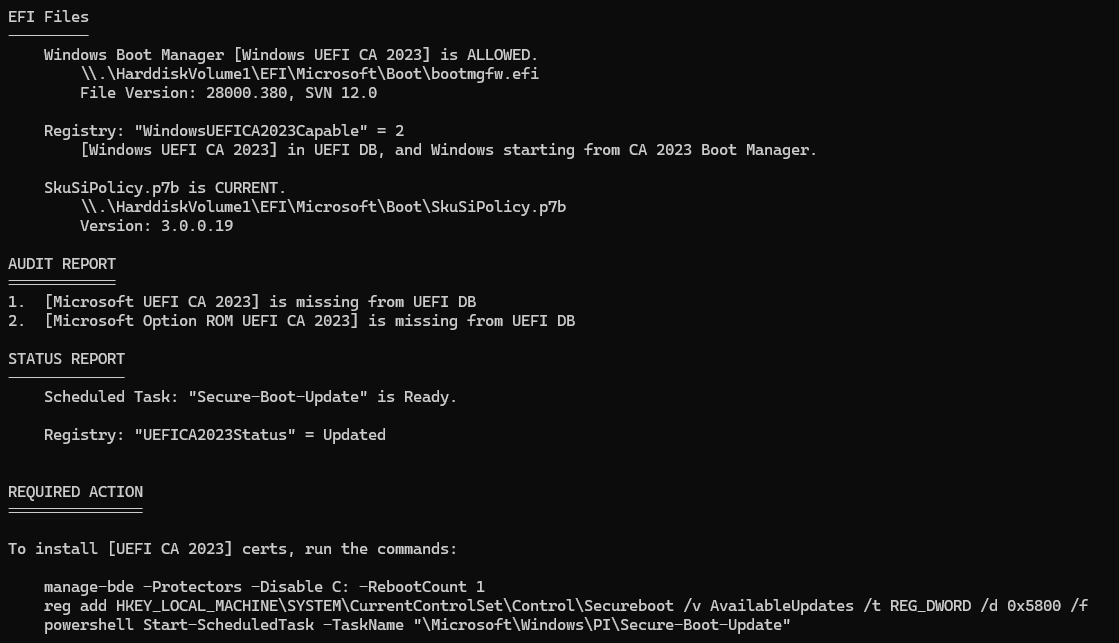
That said, Garlin still reports two missing certificates.
These missing certificates serve different purposes from Windows UEFI CA 2023:
- Microsoft UEFI CA 2023 signs third-party UEFI boot loaders and EFI applications.
- Microsoft Option ROM UEFI CA 2023 signs third-party option ROMs.
They replace broader third-party trust previously supplied by the 2011 Microsoft UEFI certificate. Microsoft split the replacement into two certificates for finer control over third-party boot loaders and option ROMs.
Questioning the Final Garlin Repairs
However, the P16’s DB listing does not contain the old Microsoft Corporation UEFI CA 2011 certificate. Microsoft says the update task adds those two replacement certificates if the old Microsoft Corporation UEFI CA 2011 certificate exists in DB. It doesn’t so neither do they. Garlin’s script accurately observes that these two third-party certs are missing, but they don’t seem to interfere with proper boot behavior.
The decisive lines appear in the lead-in graphic as:
Windows Boot Manager [Windows UEFI CA 2023] is ALLOWED.
Registry: "WindowsUEFICA2023Capable" = 2
Registry: "UEFICA2023Status" = Updated
Windows BootMgr SVN 12.0
SkuSiPolicy.p7b is CURRENT.
The next screencap shows the tail-end of the Garlin check script results. I’ve run this repair three or more times and it never makes an impact on P16. That’s why I think it’s done, even though the check script still calls for those certs. Copilot says the 0x5800 modifier has a special meaning — namely:
- 0x0800 requests installation of Microsoft Option ROM UEFI CA 2023 into DB.
- 0x1000 requests installation of Microsoft UEFI CA 2023 into DB.
- 0x4000 is a conditional modifier. It tells Windows to install those two certificates only if DB already contains the old Microsoft Corporation UEFI CA 2011 certificate.
Add ’em all together and you get — wait for it — 0x5800. ‘Nuff said.
 As far as I’m concerned, the P16 is fully updated and compliant. I had to do some learning to understand why. I did, and now I’m satisfied.
Further Reading
Microsoft Support, “How to manage the Windows Boot Manager revocations for Secure Boot changes associated with CVE-2023-24932” (KB5025885).
Microsoft Support, “Enterprise Deployment Guidance for CVE-2023-24932” (KB5053946).
Microsoft Support, “Updating Windows bootable media to use the PCA2023 signed boot manager” (KB5053484).
Microsoft Support, “When Secure Boot certificates expire on Windows devices” (KB5079373).

