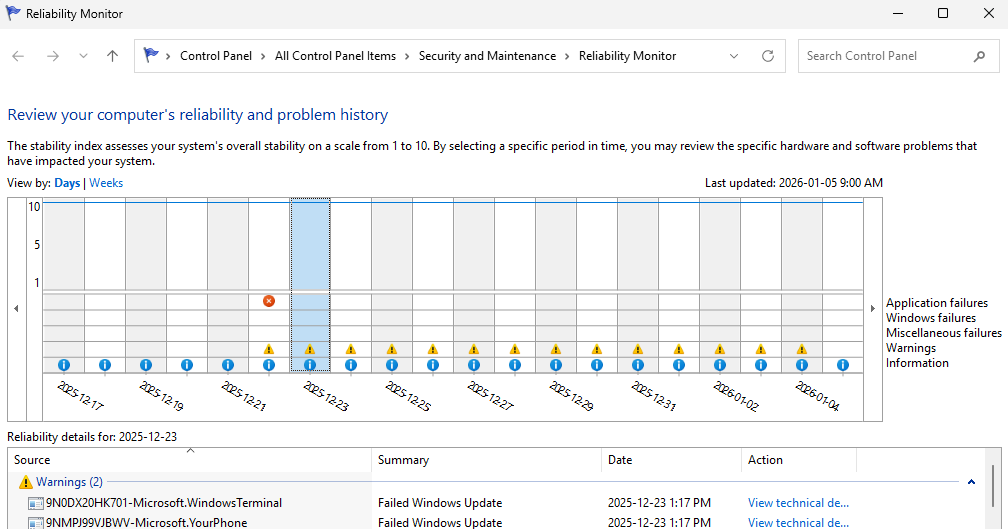
Here’s an interesting one. I just took a look at Reliability Monitor on one of my Canary channel test PCs (the venerable ThinkPad X12 Hybrid Tablet). As you can see in the lead-in graphic, it shows 14 days’ worth of “Warnings.” All of them mention Windows Terminal and YourPhone with a “Failed Windows Update” summary. But a manual Store update clears ongoing errors, and everything is hunky-dory now. Let me explain…
Why Manual Store Update Clears Ongoing Errors
I’m in the habit of leaving Windows Terminal open on many of my PCs. That’s because I run WinGet and other CLI utilities on them on a near-daily basis. But although this strategy is convenient, it sometimes means that Store updates won’t complete successfully because they don’t want to affect a running and related process.
Running a manual store update (Click Upates & downloads in the left column, then click the “Check for updates” button at upper right) forces the Store to interrupt things and start with a clean slate (Copilot calls this a “clean install path”). That means it restarts the Store install service, flushes any stale metadata, closes the running Terminal processes, pulls dependencies in the necessary order and forces a high-priority update job.
Thus, what’s stuck inside the automated daily update tasks that Store handles in the background is stuck no longer. The update goes through and the program shows itself running the latest version — namely, 1.23.13503.0 — without issues. And indeed, the same thing applies to Microsoft.YourPhone (showing the same error over the same period — it runs in the background automatically).
Not All Automatic Updates Always Succeed
This heading is the “moral of the story.” It emphasizes that occasional manual intervention may be needed, especially for processes that run in the background by themselves. But hey — that’s the way things go here in Windows-World sometimes. Happy New Year!

