I have a pretty high tolerance for Windows Update weirdness. Running Insider Preview builds on multiple machines practically guarantees an occasional hiccup. But there comes a point when repeated troubleshooting stops being persistence and starts looking more like an argument with the update installer.
That is where I landed with the Windows 11 Insider Preview Quality Update for build 26320.10003. On not one but on two PCs, RyzenOfc (AMD B550) and AsusSnap (Snapdragon X1), the update repeatedly marched through the GUI install process. When it reached roughly the 80% neighborhood, it failed. Again. And again.
After enough attempts, repairs, and reboots, the message finally became hard to miss: “It ain’t workin’!” I can only understand this as an Insider Preview install foul-up of some kind. Let me explain…
Why I’m Calling It an Insider Preview Install Foul-up
The first failure on RyzenOfc didn’t worry me much. This is an Insider machine, after all. Updates fail sometimes, particularly preview-quality updates. A second attempt seemed entirely reasonable.
Then AsusSnap failed on the same update. That changed the character of the exercise. RyzenOfc and AsusSnap are different PCs, with very different architectures, yet both were exhibiting essentially the same behavior. Windows Update downloaded the package and began installing it normally. Progress advanced well into the installation, then things fell apart at about 80 percent.
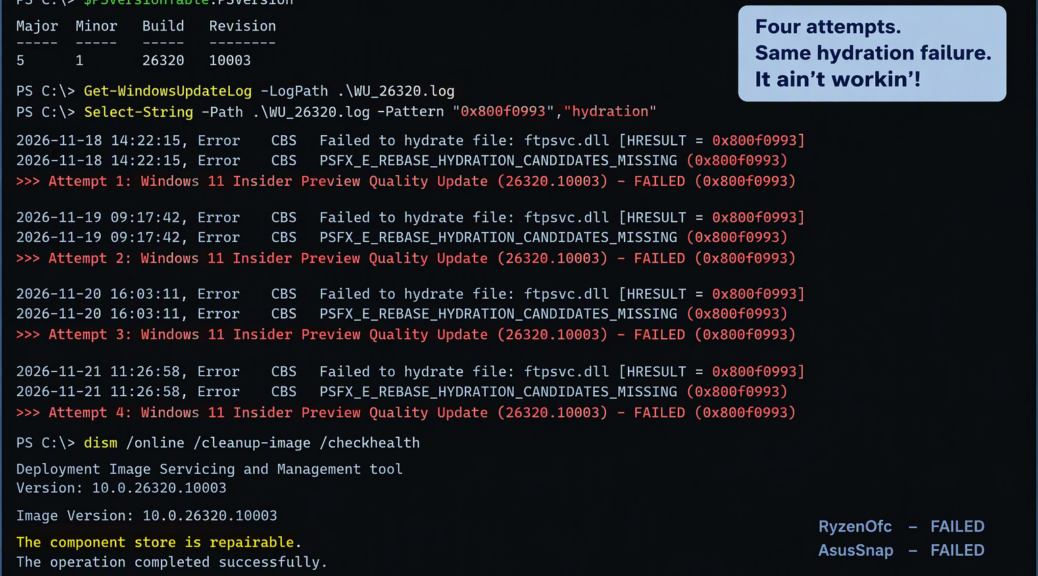
The repeated error history also mattered.I kept seeing the 0x800f0993 error code, over and over. Then I started seeing 0x800f0993. Never even got to the post-GUI install. So I dug into the CBS (Component Based Servicing) log file that tracks the installer at work.
CBS Points at Hydration
Digging into CBS output supplied the useful clue. The failures pointed toward PSFX hydration trouble: Windows servicing could not reconstruct one or more files from the component candidates it saw. In related November 2026 reports, 0x800f0993 appears as PSFX_E_REBASE_HYDRATION_CANDIDATES_MISSING. That’s a more interesting diagnosis than the Windows Update GUI offers.
In my own investigation, four hydration failures stood out in the relevant servicing output. That is the material I wanted front and center in the Windows Terminal graphic for this post. When the same class of servicing failure keeps resurfacing, blindly pressing Retry becomes progressively less compelling and more irritating.
Naturally, I Tried the Usual Repairs
I did not arrive immediately at surrender. Quite the opposite. There were many repeated update attempts. There were restarts. There were component-store checks and repairs. There was the familiar DISM servicing routine, followed where appropriate by System File Checker. Then came another reboot and another visit to Windows Update.
Those are sensible moves when Windows Update trips over damaged local servicing data. They also give me something I value in troubleshooting: evidence. If DISM repairs the component store, SFC comes back clean, the machine restarts normally, and the very same update still falls over in approximately the same place, the odds increasingly favor an update-side servicing problem rather than random local corruption.
That conclusion became still more persuasive because I could reproduce the experience on both RyzenOfc and AsusSnap. Different hardware, same update, same general failure point. Sometimes repetition really is diagnostic data.
When Stuck in a Hole, Time to Stop Digging
There is an old troubleshooting temptation to assume that one more command will crack the case. I am as susceptible as anybody. If DISM did not do it, perhaps clearing update state would. If that isn’t it, perhaps another reboot will. And if that fails, perhaps one more manual inspection of CBS.log will expose some magic line.
Sometimes that instinct pays off. Sometimes it just produces a cleaner machine that still cannot install the update.
That’s where I’m at here. Both PCs continue to operate normally. The failure is repeatable. The servicing logs identify the same general class of problem. Repairs and reboots haven’t changed the outcome. There’s little value in escalating to increasingly invasive repairs merely to force a preview-quality update onto otherwise functional machines. I’m backing off…
Insider Builds Sometimes Require Patience
Build 26320.10003 is a Beta-channel Insider Preview release. That matters. Insider participation is partly about encountering problems before broadly released Windows users do. When two machines hit matching servicing failures, reporting the evidence and waiting for the servicing pipeline to catch up seems a rational next move.
That doesn’t mean I’m ignoring those machines. I’ll keep watching Windows Update, servicing health, and subsequent builds. If Microsoft changes the package or delivers whatever servicing content these systems need, the next attempt may succeed. If the error changes, that’s new data and the investigation starts again.
For Now: It Ain’t Workin’
Troubleshooting is as much about knowing when to stop as knowing what to try. RyzenOfc and AsusSnap gave me the same answer often enough. I listened.
The machines are healthy enough to keep using. DISM and SFC have had their turns. Reboots have been plentiful. Windows Update has received more than a fair number of retries. Yet 26320.10003 keeps stumbling late in the GUI installation phase.
Thus my current technical assessment can be expressed without an HRESULT, a CBS parser, or even PowerShell: It ain’t workin’!
For the moment, that’s okay. Sometimes here in Windows-World, the smartest repair is to quit repairing, document what happened, and give the next update a chance to fix things. In the meantime, I’m standing by…

