Imagine my surprise this morning when I sat down at Flo6, my trusty B550-based homebrew desktop. Instead of taking me to the desktop, I faced a login prompt. “Hmmm,” I thought to myself, “Looks like an update came through.” Sure enough, when I checked I found MS pushed one yesterday to fix issues following last week’s Patch Tuesday. And indeed, OOB KB5129195 impacts LAN access via RDP to at least one of my machines. Let me explain, and provide more details.
How OOB KB5129195 Impacts LAN
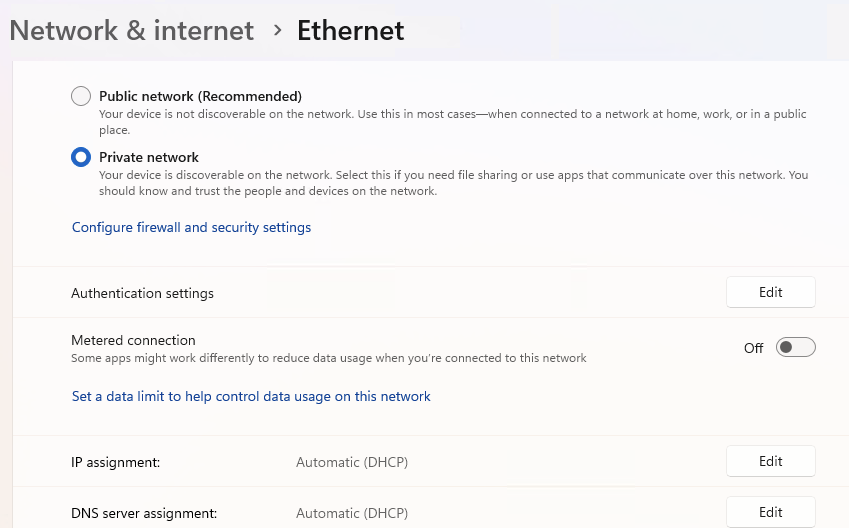
When I tried to RDP into the ThinkStation P3 Ultra Gen 2 (aka TSP3Ultra2), the machine name wouldn’t resolve. Using Advanced IP Scanner, however, I was able to get in through its IP address. I quickly determined that the update had toggled the Network type from “Private” to “Public” (in that latter situation, Machine Names don’t work). Resetting the toggle to “Private” put things back in the pink.
TLDR: OOB KB5129195 in Brief Bullets
- OOB KB5129195 shipped September 14, 2026, outside the normal Patch Tuesday schedule, to hit my PCs last night.
- It fixes RDP instability, Hyper-V folder sharing, USB audio failures, and a partially unpatched privilege escalation flaw.
- Five of my eight home PCs received and installed the update.
- Two machines required manual restarts; only one flipped its LAN profile from Private to Public afterward.
- Fixing the profile flip takes about two minutes in Settings;be sure to check for it.
The OOB Release Trigger
September’s Patch Tuesday update, KB5122880, introduced several nasty regressions. Remote Desktop Services became unstable, causing RDP failures and server hangs. That alone would justify an emergency fix. Hyper-V Plan9 folder sharing also broke for Linux VMs, a real headache for developers. USB Audio Class 1.0 multichannel playback went sideways on some affected systems too.
On top of all that, a privilege escalation flaw, CVE-2026-62721, was only partially patched in the original release. That flaw lives in the Windows User-Mode Power Service. KB5129195 addresses all these regressions. After installation, Windows 11 24H2 machines move to build 26100.9457. Windows 11 25H2 machines land on build 26200.9457. Eventually.
The Upgrade Hit 5 of 8 PCs Here at Chez Tittel
I run eight PCs in my home lab here in Round Rock. Five of them flagged KB5129195 as applicable and pulled it down. The other three were unaffected, likely due to differing configurations. The five affected machines automatically downloaded the update. Microsoft’s documentation puts installation time at roughly ten minutes. That tracked closely with what I observed across my fleet.
Auto-restart systems finished cleanly: Three of my five affected PCs are set to auto-download, install, and reboot via Windows Update. All three finished the update with zero drama. No errors, no failed installs, no post-reboot surprises. That is the experience Windows Update is supposed to deliver. I wish every update went so smoothly.
Manual Restarts on P16 and TSP3Ultra2: Two machines required manual restarts: my Lenovo ThinkPad P16, which I call the P16, and the TSP3Ultra2. Both showed KB5129195 as pending restart in Windows Update. I manually triggered the restart on each machine and waited. Both came back up fine after the reboot.
Then I noticed something off. On the TSP3Ultra2, the LAN network profile had flipped from Private to Public. This is a known side effect that occasionally follows cumulative updates. It matters more than you might think. I fixed it by going to Settings, then Network and Internet, then Ethernet properties, and switching the profile back from Public to Private.
Why the LAN Profile Flip Matters
Windows treats Public and Private network profiles differently. The Public profile blocks most incoming connections and disables network discovery. That can silently break file sharing, remote access, and other local network features. The Private profile enables discovery and sharing, which is what you want on a trusted home or office network. After any significant Windows update, I now make a habit of checking the network profile. Go to Settings, then Network and Internet, then click on Properties. Confirm the profile reads Private. If it says Public, flip it. It takes about thirty seconds.
KB5129195 is a necessary update, and I am glad Microsoft moved quickly to ship it. Most machines handled the install without any fuss. The LAN profile flip on the TSP3Ultra2 was an annoyance, but nothing a quick settings change couldn’t handle. If you apply OOB KB5129195, do yourself a favor: check your network profile afterward. A few seconds of verification can save head-scratching later. That’s a good thing, here in Windows-World where reasons for such behavior pop up all the time!

