Here’s something I’ve been chewing on for the past few weeks. I’ve had help from a persistent and curiously passive interlocutor at ElevenForum.com. I still use Macrium Reflect to back up at least half of my PC fleet.
For whatever reason, the Macrium Software team has yet to update its Rescue Disk creation to accommodate Secure Boot requirements. That’s what led me to scripting Macrium Rescue Disk repair using Copilot and PowerShell. Therein hangs today’s post…
What’s Involved in Scripting Macrium Rescue Disk Repair?
Basically, I asked Copilot to build a PowerShell script to fix the Macrium Rescue Disk for Secure Boot. Why? I use Secure Boot on all my PCs.
I can’t restore a Reflect boot image unless the Rescue Disk will actually BOOT the target PC. Only then can I perform the restore operation.
For the record, I’m using Macrium Reflect X, not the older versions numbered 8.x or lower. Working with Copilot, I had to chunk through three, then four versions before the script worked on my PC.
That PC is Flo6, my B550-based desktop. It has an MSI MAG Tomahawk MAX motherboard, Ryzen 7 5800X, NVIDIA RTX 3070 Ti, and 64GB RAM.
Using Copilot Requires LOTS of Trial and Error
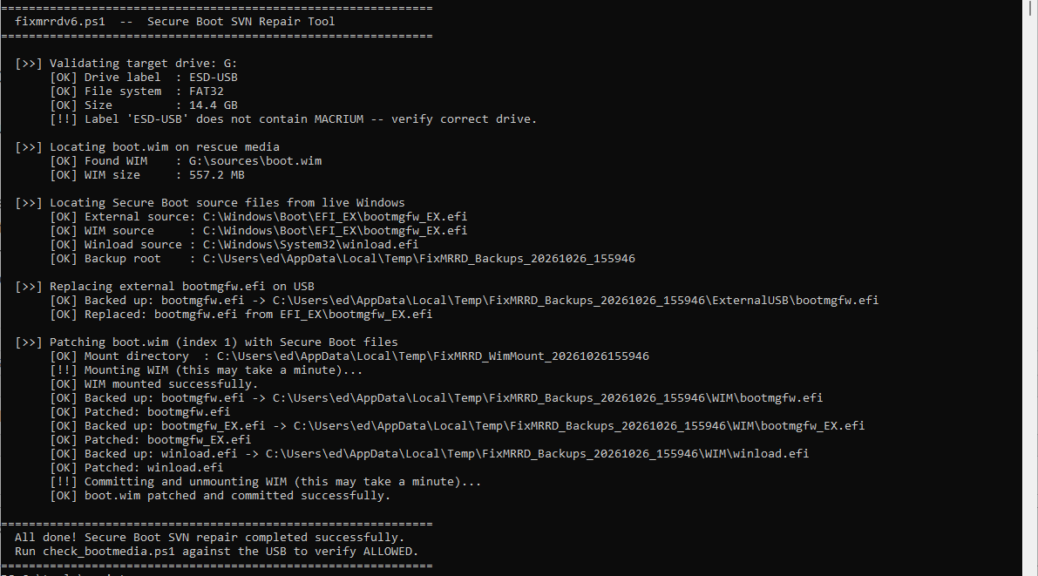
The output from the script itself documents what it does pretty well, so I reproduce it here:
==============================================================
  fixmrrdv6.ps1  --  Secure Boot SVN Repair Tool
==============================================================
   [>>] Validating target drive: G:
       [OK] Drive label  : ESD-USB
       [OK] File system  : FAT32
       [OK] Size         : 14.4 GB
       [!!] Label 'ESD-USB' does not contain MACRIUM -- verify correct drive.
   [>>] Locating boot.wim on rescue media
       [OK] Found WIM    : G:\sources\boot.wim
       [OK] WIM size     : 557.2 MB
   [>>] Locating Secure Boot source files from live Windows
       [OK] External source: C:\Windows\Boot\EFI_EX\bootmgfw_EX.efi
       [OK] WIM source     : C:\Windows\Boot\EFI_EX\bootmgfw_EX.efi
       [OK] Winload source : C:\Windows\System32\winload.efi
       [OK] Backup root    : C:\Users\ed\AppData\Local\Temp\FixMRRD_Backups_20261026_155946
   [>>] Replacing external bootmgfw.efi on USB
       [OK] Backed up: bootmgfw.efi -> C:\Users\ed\AppData\Local\Temp\FixMRRD_Backups_20261026_155946\ExternalUSB\bootmgfw.efi
       [OK] Replaced: bootmgfw.efi from EFI_EX\bootmgfw_EX.efi
   [>>] Patching boot.wim (index 1) with Secure Boot files
       [OK] Mount directory  : C:\Users\ed\AppData\Local\Temp\FixMRRD_WimMount_20261026155946
       [!!] Mounting WIM (this may take a minute)...
       [OK] WIM mounted successfully.
       [OK] Backed up: bootmgfw.efi -> C:\Users\ed\AppData\Local\Temp\FixMRRD_Backups_20261026_155946\WIM\bootmgfw.efi
       [OK] Patched: bootmgfw.efi
       [OK] Backed up: bootmgfw_EX.efi -> C:\Users\ed\AppData\Local\Temp\FixMRRD_Backups_20261026_155946\WIM\bootmgfw_EX.efi
       [OK] Patched: bootmgfw_EX.efi
       [OK] Backed up: winload.efi -> C:\Users\ed\AppData\Local\Temp\FixMRRD_Backups_20261026_155946\WIM\winload.efi
       [OK] Patched: winload.efi
       [!!] Committing and unmounting WIM (this may take a minute)...
       [OK] boot.wim patched and committed successfully.

==============================================================
  All done! Secure Boot SVN repair completed successfully.
  Run check_bootmedia.ps1 against the USB to verify ALLOWED.
==============================================================
To debug this script, I kept catching error messages as it ran, reporting them to Copilot, and re-running rewritten versions until it produced a clean Rescue Disk on Flo6. How did I define that? By running Garlin’s check_bootmedia.ps1 script against it until it returned a clean result (all boot managers use CA 2023, show up as ALLOWED, use SVN 12.0). And indeed it works on Flo6 right now just fine.
What Works for Me, May Not Work for YOU
What I’ve learned from my interlocutor on ElevenForum.com is the following. Though the script runs on Flo6, it doesn’t run on his PC. Based on the errors he’s reporting, I think I know what’s going on. Writing files into a mounted WIM is tricky, as I’ve learned, and requires extensive mucking about with permissions. System ownership must be taken over, writing work done, then restored to pristine condition. This takes work and some understanding of how ACLs and the Trusted Installer work in modern Windows OSes (10 and 11, basically, though the same behaviors also hold in current Windows Server versions).
When things go wrong for me with a script like this one, I attack them with Copilot until they work. My interlocutor, apparently, isn’t inclined to do this himself. But that’s what it takes to make things work on YOUR PC here in Windows-World: a dogged determination to keep iterating until the error messages no longer appear, and the resulting functionality does what you want it to do.
Post some comments here to let me know if you’re OK with this “exercise is left to the reader to fully complete” approach. Those who really want the script to fix their Macrium Reflect X Rescue Disks can ask for it, and I’ll send it to them. But they’ll have to be ready to make it work on their PCs to achieve its intended use!


The best advice I can offer is to steer clear of Macrium Reflect since they turned into another greedy company when they retired their free version.
I strongly recommend Aomei Backupper Professional, since I bought a 5 PC license with lifetime updates for $90 back in November 2025. The Aomei full image backup speed (without compression) is comparable to Macrium Reflect free.
I’ve never encountered any issues with making an Aomei USB rescue (boot) disk or with Aomei system restores. By the way, I always make monthly Windows11 full image backups on (4) Windows11 laptops.
FWIW, I agree that new buyers may not be inclined to buy into the Macrium Reflect X future update subscription stream. I’ve had good luck with Aiomei as a free alternative. That said, I wanted to figure out what I had to do to repair Reflect’s Rescue Disk to work with Secure Boot. I believe I have done so. Just concluded a successful test wherein I used the repaired rescue disk to successfully boot into Macrium’s tailored WinPE where I could restore a MR image file if I had really needed to. For me, that’s good to know. For others, their mileage may vary!
Thanks for sharing your perspective.
–Ed–
Macrium Reflect’s yearly subscription fees are outrageous compared to Aomei Backupper Professional’s (5) PC license with lifetime updates. I was a dedicated user of Macrium Reflect until they retired their free version and became greedy with a yearly subscription requirement. I vastly prefer the Macrium Reflect user interface, but I refuse to pay their yearly subscription fee which is highway robbery.
I’ve also looked at Hasleo Backup Suite, but Aomei has a very impressive list of business partners (see the link shown below).
https://www.aomeitech.com/partners/
Thanks for sharing that info. Interesting stuff. As I said, because I’ve already paid, I wanted to see what would be necessary to fix the Rescue Disk so it would work with an up-to-date Secure Boot setup. Now I know!
Thanks again,
–Ed–
This has been so helpful after using Macrium Reflect 7 free for a while, then purchased a license for 4 pack to Macrium Reflect 8 ediiton, then i decided to go ahead and subscribe to Macrium Reflect X as i still enjoy the program and it works pretty well when its needed
After using the script you made Ed Tittel, the Macrium RE Rescue media boots just fine
So eventually all this Secure Boot CA 2023 stuff will be finalized and hopefully behind us all, and won’t have to fiddle with scripts much anymore
Glad you found it useful. It was a valuable learning experience for me, and greatly boosted my appreciation for Garlin’s ongoing scripting work.
–Ed–