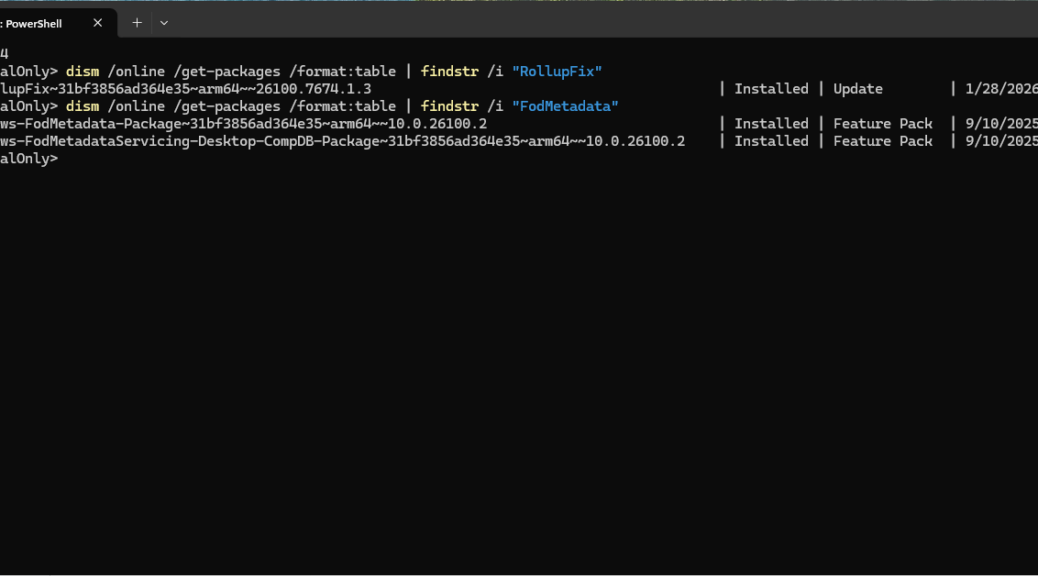
For the past couple of years, I’ve watched various Windows updates and upgrades introduce and re-introduce what I call “spurious reclaimables.” These are windows packages that show up in the component store that (a) don’t need to be there and (b) refuse removal using dism /online …. /StartComponentCleanup. Just yesterday, Copilot helped me figure out how to yet again make them go away. That’s because I saw a familiar set of returning spurious reclaimables removed on the ARM-based ThinkPad T14s Gen 6.
Getting Returning Spurious Reclaimables Removed
There are two such packages in this mix, each with characteristic, fairly unique substrings — namely “RollupFix” and “FodMetadata.” So that’s what I used to find that stuff in the package store:
dism /online /get-packages /format:table | findstr /i “RollupFix”
dism /online /get-packages /format:table | findstr /i “FodMetadata”
Those commands let me find the precise package names that I would go on to use to remove the spurious ones from the package store. Indeed, Windows 11 24/25H2 continues to surprise even seasoned Windows hands with its servicing behavior—especially on ARM64 systems. Here’s a short but hopefully illuminating dive into how ARM64 handles staged vs. installed packages, and why some packages appear removable even when they aren’t.
Working Through the Process: RollupFix
Here’s my starting point — namely, two RollupFix Packages. One is staged and the other installed. On the T14s laptopn DISM /get-packages listed two versions of the RollupFix package:
– A staged version: 26100.1743.1.3
– An installed version: 26100.7674.1.3
Both appeared to be reclaimable. So I started with the older, staged version, and provided a DISM command to remove it:
dism /online /remove-package /packagename:Package_for_
RollupFix~31bf3856ad364e35~arm64~~26100.1743.1.3
(Note I stuck a CRLF into that line to make it lay out better. To cut’n’paste that item, stick into Notepad and turn it into a one-liner.)
DISM happily complied with that command and responded with: “Processing 1 of 1 – Removing package … The operation completed successfully.” So far, so good. But the next step revealed something interesting, as I attempted to remove the newer, installed RollupFix package (same syntax as above, new package name).
This time, DISM responded with an error message, to wit: “Error: 0x800f0825 — the package is permanent or not applicable.” That means once the staged version got removed, the installed version became the baseline and couldn’t be removed. This mirrors AMD64 behavior, though ARM64 expresses things more forcefully. Removing the superseded version effectively locks in the newer one, making it “permanent” and non-removable.
Further into the Process: FodMetadata
The T14s also offered up two versions of the FOD metadata servicing package, one staged, the other installed:
– Staged: 10.0.26100.1743
– Installed: 10.0.26100.7674
Again I started with the staged version. This time DISM responded with Error 0x800F0805 “the staged package is already gone.” ARM64 appears to auto-clean the staged FOD metadata package when the staged RollupFix package is removed.
That’s a subtle but important difference from AMD64, where the FOD metadata package is removed automatically only when the installed RollupFix is removed. Thus, removing the installed version worked as it should, and that operation completed successfully.
Final Check: Clean Component Store
When I ran a followup /analyzecomponent store check in DISM after those various attempted and successful removals, I got clean store billing, as reported in these output lines for that command:
Number of Reclaimable Packages: 0
Component Store Cleanup Recommended: No
That means the component store is clean, and there are no more reclaimable packages, spurious or otherwise, to get rid of. That’s what I like to see! You can see further confirmation in the lead-in graphic which shows only “Installed” versions for the two packages that previouly included older, obsolete staged versions prior to the cleanup moves I described above.

