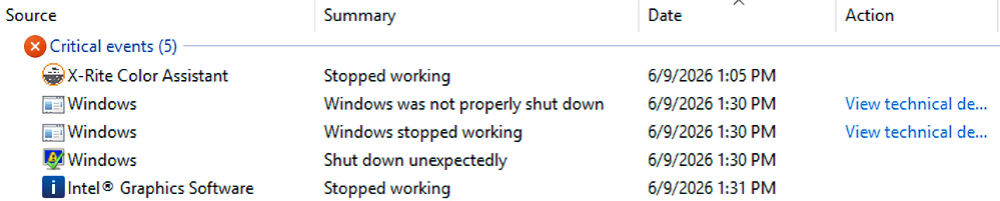
When better ways to shoot myself in the foot become available, I’ll invariably make use of same. Today, I found myself cleaning up after a surprise bluescreen (aka BSOD for “Blue Screen of Death”). This time, I did it to myself because I used a remote access session to drive updates for both my Intel and NVIDIA GPUs on the Lenovo P16 Gen 3 Mobile Workstation. Indeed, upon investigation, this rare update BSOD proves benign. You can see the error cascade from the Intel GPU update in the lead-in graphic (click that image to see the whole thing: it includes a “Shut down unexpectedly” error).
Why Say: Rare Update BSOD Proves Benign?
I couldn’t find any lingering bad behavior or unwanted side effects from this unexpected crash. Indeed, both Intel DSA (the tool I used to update the Intel ARC GPU) and the NVIDIA app (the tool I used to update the RTX Pro 5000 GPU) reported clean, successful installs when I fired them up to check what happened.
Indeed, that raises the interesting question: “Exactly what happened that caused the P16 Gen 3 to BSOD?” Short answer: me. Longer answer, courtesy of Copilot:
When you install a graphics driver over Remote Desktop:
- Windows switches to a virtual display driver (RDPDD / Remote Display Adapter)
- The real GPU driver is still being installed in the background
- This creates a weird overlap between:
- kernel graphics stack (dxgkrnl)
- RDP virtual driver
- the new GPU driver being initialized/unloaded
That’s exactly the kind of situation that can cause:
KERNEL_MODE_HEAP_CORRUPTION (0x13A)→ driver stomping memory during unload/reload. Even a perfectly “healthy” driver can crash in that transition.
The Devil Made Me Do It!
I confess: I prefer to work from my production desktop, even when I’m working on another PC. It’s a combination of convenience and laziness. Convenience, because I’ve got two big, clear 27″ monitors I can work from. Laziness, because I don’t have to get up from one chair in my office and move 8 feet over to the other desk where the P16 Gen 3 is running.
Occasionally, this means I get bitten or borked because I’m remoting in, rather than working on the machine directly. Here in Windows-World, I’ve learned to troubleshoot with a certain wry appreciation that I am often the cause of my own woes. Today was one of those days! That said, it all ends well because the system recovered completely upon a successful reboot.

