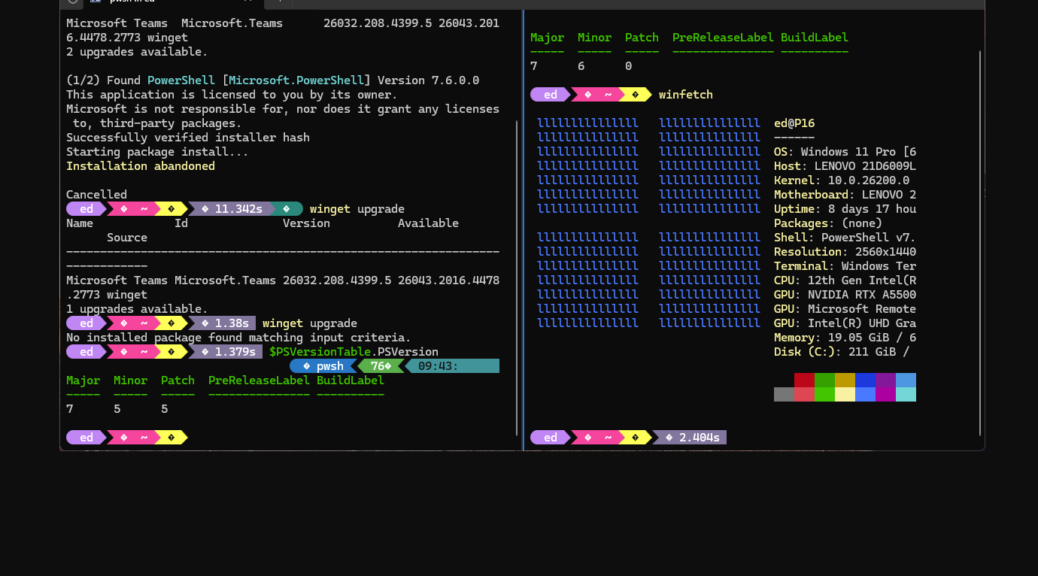
As is my usual practice, my workday starts off with a cruise over the mini-fleet of PCs here at Chez Tittel. I look for upgrades, updates, changes, and glitches. Today, I ran into something interesting on the Lenovo ThinkPad P16 Gen 1 Mobile Workstation. A PowerShell (PS) upgrade happened — and succeeded — even though its parent WinTerm session shows WinGet reporting “Installation abandoned.” That’s the source of this particular PS version bump WinTerm oddity. Let me explain…
Exploring PS Version Bump WinTerm Oddity
As you can see in the lead-in screencap, the left-hand WinTerm pane is running PowerShell v7.5.5. You can also see that WinGet gets going on a v7.6.0.0 upgrade, but reports “Installation abandoned” at its apparent conclusion. Indeed, most readers might be tempted to conclude from this that the installation failed. Not so!
As you can see in the right-hand pane, opened after the apparent WinGet failure, the PS version there is 7.6.0(.0). The update succeeded but it can’t show itself in the parent pane for a very good reason. PS v7.5.5 is running that pane, and the developers didn’t include logic to halt that process and swap in a new version as part of the way that PowerShell works.
It’s a kind of Catch-22 (“How can you see you have flies in your eyes, if you have flies in your eyes?” as Orr asks in the famous WWII novel). With the older version running, you can’t really get the newer one to report itself right there at that moment. But as the right-hand pane shows, you need only open a new PS Session and presto! the new version is up and running therein.
Self-Update Is a Tricky Thing
This is an age-old gotcha in computer science. When the thing being updated is also running (and indeed, running the update tool in use), certain compromises and workarounds are needed to prevent things from falling over. For PowerShell, that means reporting a cancelled installation even though the installation itself completes and succeeds. The session that did the work simply can’t see and report on that particular change, because it itself would have to change to do that. Start a new session, and a new and changed context lets that happen.
Here in Windows-World, change is a constant. When the changer itself is changing, things get interesting. WinGet’s report of a “cancelled installation” for PowerShell shows how a specific compromise happens at runtime when PowerShell participates in its own update process. Fun!

