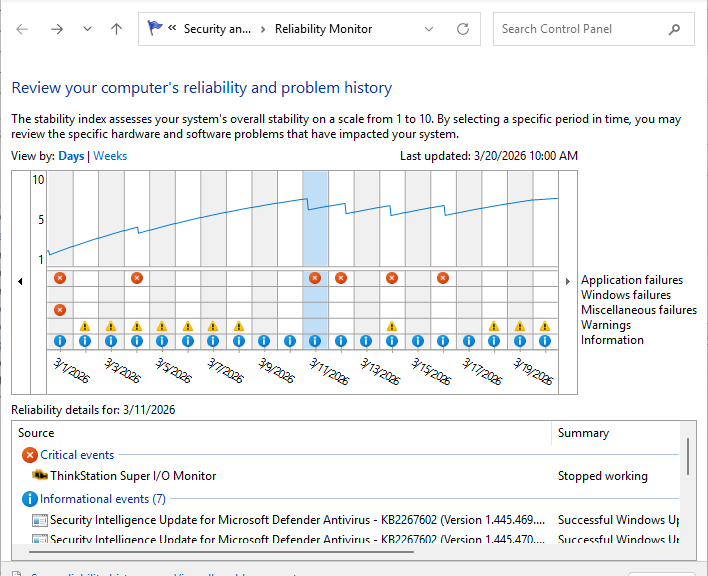
In reviewing Reliability Monitor for my peppy and capable ThinkStation P3 Ultra Gen 2, I saw recent repeated APPCRASH errors. If you could drill down into the lead-in graphic — as I did — you’d see 3 between March 11 and 14. So I asked Copilot to tell me more about this error. I learned that this utility is recommended, not required. I also learned that what’s blowing up reflects some kind of telemetry error when the app tried to phone home. So I uninstalled it. This Alexandrine solution fixes ThinkStation Diagnostics (think: Gordian knot) and smooths out my reliability ratings.
How the Alexandrine Solution Fixes ThinkStation Diagnostics
In this context I’m reminded of the well-known DCOM Event 10016 error, which pops up dozens to hundreds of times a day in Windows 10 and 11. It’s not really an error, it’s the result of a design choice that tries a series of component object model (COM) and distributed COM (DCOM) components as it performs routine tasks such as running shell components, search indexing, UWP apps and background services. It appears as an error, even though the actual work to which such errors are tied actually succeeds. Noise, in other words.
In the same vein, the ThinkStation Diagnostics (TD) software is:
1. Recommended, not required
2. The “critical error” relates to the software’s operation, not the system it monitors
3. Copilot reports that Lenovo documents numerous cases where TD fails this way owing to external device voltage issues, unsupported cables or dongles, power state transitions (sleep/resume)
Indeed the error is something on the back end, not in the system itself, and doesn’t really signal an actual problem. Ironically, it’s the system for reporting problems that’s itself causing problems.
Noise, Not Signal Makes Alexander Right
Nobody could untie the Gordian knot, so they couldn’t get in the door, either. Alexander cut it off, and got the door open right afterward. I’m taking the same approach with this tool. It’s not because I don’t want it to tell me useful stuff; it’s because I don’t want it to crash for uninformative reasons.
Here in Windows-World, there’s always a certain amount of noise to go along with valid signals. When I feel like the noise is swamping the signals, I’m glad to remove a source of such noise. There are plenty of ways for me to find out what’s going on, using other means. Basta!

