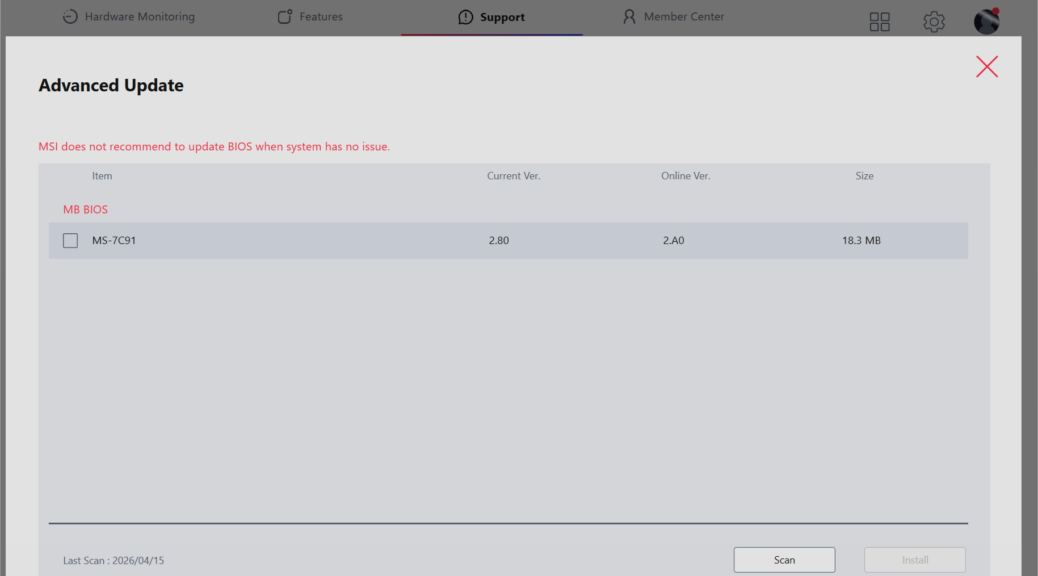
I’m still getting settled in with my new production desktop environment. ICYDK, it’s built around an MSI MAG Tomahawk B550 mobo, with Ryzen 5800X, NVIDIA 3070Ti GPU, and 64GB DDR4 RAM. This morning, I started digging into the MSI Center app that orchestrates other system utilities, and handles updates for drivers and firmware. In my investigation, I discovered a “new” update for the mobo firmware. In turn, that has me pondering UEFI updates.
Where Does Pondering UEFI Updates Take Me?
I had to figure out that MSI’s once-standalone “Live Update” utility now sits beneath its top-level Support tab (top middle of option bar in the lead-in graphic). Then I had to figure out that UEFI updates appear only when one clicks the “Advanced” button, rather than the more pedestrian “Scan” button (which scans only for driver updates).
As you can see in that graphic, the company shares its guidance in eye-catching red text at the head of the MB BIOS list. That guidance reads: “MSI does not recommend to update BIOS when system has no issue” in somewhat fractured English. However rough the wording might be, the guidance is still pretty good. Let me explain…
If It Ain’t Broke, Don’t Fix It!
The reason why I recently rebuilt my Flo6 desktop stemmed from UEFI problems with the previous ASRock B550 Extreme4 mobo. It kept sticking halfway between Secure Boot old/updated data sets. That resulted in extreme boot requirements, when I might sometimes have to reset CMOS just to get the PC to boot.
Most of the time I had to shut it down, and cut power, then wait a while to bring it back to life. That went on for weeks before I made the switch to the MSI board. Since then, boot and update operations have been blissfully boring. Things just work, and I can use all of the various boot options and related keyboard options to do exactly what I want.
Reading over Copilot’s summary of what UEFI v2.A0 brings me, as compared to the running v2.90, I don’t see anything I need. Nor do I see anything that would improve Flo6’s currently rock-solid and dependable, fully caught-up Secure Boot Status.
Hence my decision: I’m not going to update. Nothing is causing problems. Everything is working dependably and reliably. Secure Boot is golden. This time, I’ll pass… Maybe next time?

