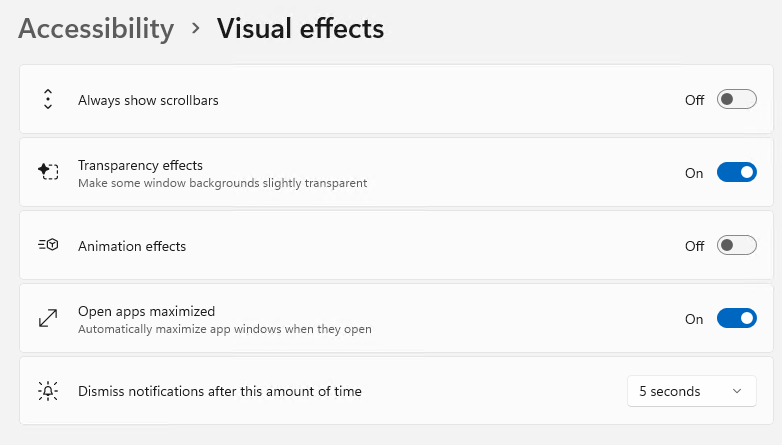
With the release of Beta Build 26220.9223 last Friday (Aug 21), MS now includes an “Open apps maximized.” It shows up in Settings > Accessibility > Visual effects, shown in the lead-in screencap. The feature is pretty handy, even for those who don’t work around visual impairment. Indeed, Open apps maximized is nice for all kinds of users, including your humble author. Indeed, I usually work with key tools (e.g. Office apps, text editors, WinTerm, networking tools, and so forth) maximized anyway.
If Open Apps Maximized Is Nice, Do You Use It?
It’s a matter of working style. If you regularly use apps maximized, it can be a small time-saver, that’s for sure. Interestingly, for apps with restricted max window sizes (e.g. PC Manager, CPU-Z, Core Temp, and so forth), the windows still open at their normal sizes. So it doesn’t ALWAYS fill a display with the app windows you open. That only happens for apps that allow themselves to cover that whole space already.
Even better, if you open an app in full-screen mode courtesy of this new Settings option, you can still click the “Restore down” button to return the window to whatever size you had it set at beforehand. At that point, you can still re-size the app window however you like it. Windows remembers this setting, so with “Open apps maximized” toggled on, it will return to the current sizing when you click the middle button in the top right trio (Minimize/Maximize (up) or Restore Down/Close).
Who Needs “Open Apps Maximized?”
Anybody who wants it. It’s a simple and easy UI behavior option. Personally, I like it in concept. I need to live with it for a while to see how I like it in practice. My intuition, such as it is, tells me MS might benefit from refining this further into a per-app control (e.g. Apps > Default apps or Apps> Startup do this already).
Here in Windows-World, setting default behaviors can be good or bad. You must decide what works best for you, and act accordingly. I’m still deciding if the new “Open Apps Maximixed” works for me or not. When I make that decision toggling this setting on could become part of my standard Windows set-up actions, or not. We’ll see. But it’s cool and potentially helpful nevertheless.

