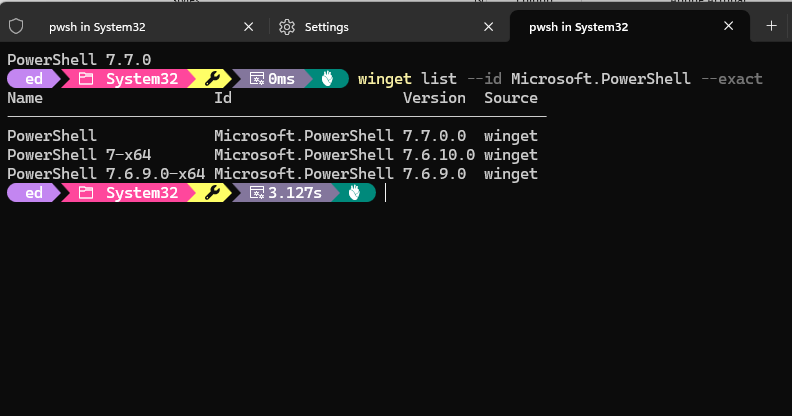
Usually, I think of an LTS release as the conservative choice: solid, supported and deliberately behind the leading edge. Thus I had to laugh when Windows Update (WU) brought one PowerShell branch forward, while WinGet immediately pointed to something newer. What looked like a routine update turned into a useful lesson about PowerShell packaging. For a moment, though, it looked very much like a case of dueling PowerShell updates. Cue the banjos!
Why Say Dueling PowerShell Updates?
On the one hand, after WU did its thing, my working PowerShell landed at 7.6.10. That is the shell reached through C:\Program Files\PowerShell\7\pwsh.exe. And indeed, it remains first in the $PATH variable. A quick $PSVersionTable.PSVersion confirmed 7.6.10 was running.
On the other hand, winget list –id Microsoft.PowerShell –exact showed PowerShell 7.6.10 with 7.7.0 available right after that upgrade. PowerShell 7.7 reached GA on November 10, 2026. Microsoft calls it the next Standard Term Support, or STS, release, and it moves PowerShell onto .NET 11. Curiously enough, it too shows a release date of November 10, 2026 at GitHub.
WTF? Two PowerShell updates on the same day, different versions and — as it turns out — different lineages.
When An Upgrade Is More Than That…
Here’s where things get interesting. WinGet did not upgrade my installed 7.6.10 copy. Instead, it reported that the newer version uses a different install technology. Microsoft’s current installation documentation explains the reason. Beginning with PowerShell 7.6, WinGet uses MSIX by default. Beginning with PowerShell 7.7.0, there is no MSI package at all. WinGet installs only MSIX.
I checked the Microsoft Store, but 7.7.0 failed to appear there as an update to my existing installation. WinGet itself supplied a better clue. That is winget show –id Microsoft.PowerShell –exact identified 7.7.0 as an MSIX installer and pointed to the official PowerShell 7.7.0 MSIX bundle on GitHub.
Install Succeeds Where Upgrade Fails
Rather than downloading the bundle manually, I stayed with WinGet. From a normal, non-elevated PowerShell session I ran the user-scoped install shown below. That succeeded. The important distinction is that WinGet could not convert my existing installation in place, but it could install the new MSIX package separately.
winget install --id Microsoft.PowerShell --exact --source winget --scope user
3 Powershells Walk Into a PC…
Afterward, winget list showed three entries: PowerShell 7.7.0, PowerShell 7.6.10 and an older 7.6.9 installation (see lead-in graphic). That sounds messier than it is. Typing pwsh still resolves first to the 7.6.10 executable under Program Files. The 7.7.0 MSIX exposes an application execution alias under my WindowsApps path. So, if I want to run 7.7.0, I must launch it inside 7.6.10 using the PS command string:
& "$env:LOCALAPPDATA\Microsoft\WindowsApps\pwsh.exe".
Here, I’m using the explicit, complete path to the executable to call it directly (that decodes to C:\Users\ed\AppData\Local\Microsoft\
WindowsApps\Microsoft.PowerShell_8wekyb3d8bbwe\pwsh.exe as far as I can tell).
Launching that alias explicitly started PowerShell 7.7.0 inside the same Windows Terminal pane. $PSVersionTable reported 7.7.0, while Get-Process showed the executable running inside the afore-mentioned directory path. In other words, both branches are installed and usable, while 7.6.10 remains my default.
Lessons Learned
The useful lesson is that WinGet can know a newer package exists without being able to upgrade the installation already present. Here, “different install technology” was literal: the path forward crossed from the older installer world into MSIX-only PowerShell 7.7.
For now, keeping 7.6.10 LTS as my default and launching 7.7.0 STS separately provides a usable way to test the new release without disturbing the known-good shell. Sometimes an update failure is not really a failure. Here in Windows-World, this time it’s informing you that the packaging rules for PowerShell have changed. As I mess around with both versions, I’ll get a feel for other changes that might impact my work habits and flow. Stay tuned!
Further Reading
Microsoft Learn, “Install PowerShell 7 on Windows”; PowerShell Team, “Announcing PowerShell 7.7 GA Release” (November 10, 2026).
NeoWin, “PowerShell 7.7 Built on .NET 11 is now generally available” (November 11, 2026).
Microsoft Learn, “What’s New in PowerShell 7.7?” (September 22, 2026).

