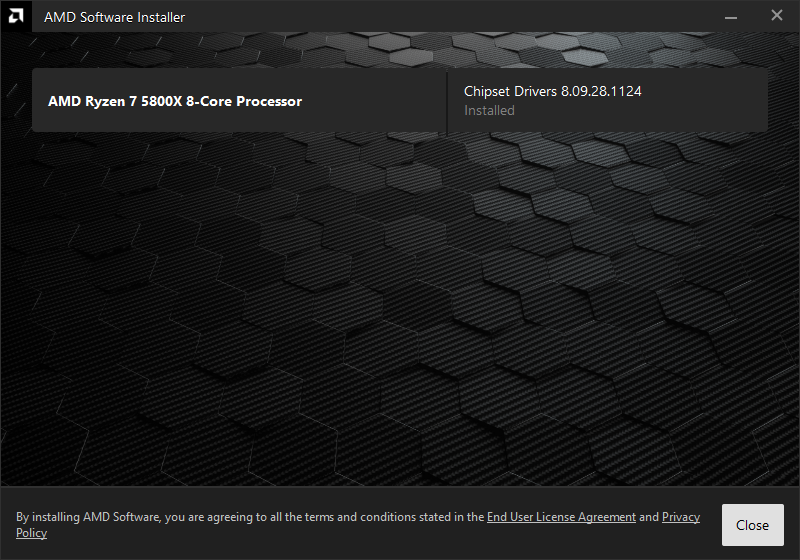
I was reading through TechPowerUp‘s driver news and download threads yesterday when various chipset and device updates caught my eye. That led to the obvious question: what shape are my AMD chipset software and drivers in on my Ryzen 7 5800X desktop? TechPowerUp currently lists AMD Ryzen Chipset Drivers 8.09.28.1124 as the latest package. Time to see what Flo6 actually has. Here’s how I answered the query: Are AMD chipset SW & drivers current?
Checking: Are AMD Chipset SW & Drivers Current?
This is something AMD could make easier. Indeed, Intel offers the Driver & Support Assistant (DSA) for this very purpose. The company describes the tool as a way to identify products, and obtain their latest driver and software updates. On my AMD systems, the only one-stop tool checks the chipset driver itself, not device drivers (see lead-in graphic; note the lack of install date info). So instead, I’ll turn to PowerShell.
That’s not horribly challenging. But it makes me chuckle that checking motherboard plumbing for currency involves some actual detective work.
First: the Installed Chipset Package
I started with the Windows uninstall registry entries. The depicted query checks both normal and WOW6432Node uninstall locations and filters them for AMD chipset entries.
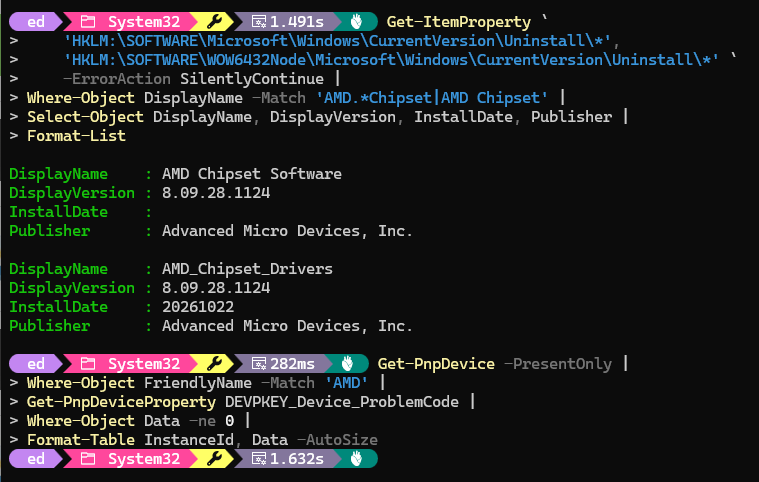
Flo6 reported two registrations, AMD Chipset Software and AMD_Chipset_Drivers. Both showed version 8.09.28.1124. The second also supplied an install date of 20261022, or October 22, 2026. That’s a reassuringly consistent answer rather than two package versions arguing in the registry.
Next: Inventory AMD Drivers
The package version is only half the story. I next queried Win32_PnPSignedDriver and selected entries whose provider matches AMD. Flo6 reported AMD GPIO controllers at 3.0.5.0 and 2.2.0.137, AMD PCI at 1.0.0.90, AMD PSP 11.0 at 5.46.0.0, and AMD SMBUS at 2.0.0.25.
I also ran Get-PnpDevice -PresentOnly and filtered FriendlyName for AMD. Every returned device showed Status OK. That included the PCI, GPIO, USB, PSP, processor and SMBUS entries. A follow-up query for PnP problem codes returned precisely what a troubleshooter likes best: no targets.
Now: Compare to AMD’s Current List
AMD’s release notes identify Ryzen Chipset Driver 8.09.28.1124 as the current package and list support for Ryzen 5000 desktop processors and AM4 chipsets including X570, B550, A520, X470 and B450. The published component table also matches several of Flo6’s installed versions exactly, including PCI 1.0.0.90, GPIO2 2.2.0.137, Windows 11 PT GPIO 3.0.5.0 and PSP 5.46.0.0.
TechPowerUp likewise labels 8.09.28.1124 its latest AMD Ryzen chipset package. In other words, the registry package version wasn’t merely plausible. It lined up with the current published package.
One Version Number Deserves Restraint
Flo6’s SMBUS entry reports 2.0.0.25 while AMD’s package table lists AMD SMBUS Driver 5.12.0.44. I am not treating that discrepancy as a repair invitation. The current AMD package is installed, the hardware reports OK, and there are no PnP problem codes. Those facts provide no evidence that manually forcing a different SMBUS driver onto the machine would improve anything. Consider further that the last AMD chipset updater I ran in August didn’t update that driver, either, and it had the chance to do so.
That’s an important troubleshooting rule: a number that looks different is a reason to investigate, not automatically an update trigger.
Flo6 Gets a Clean Bill of Chipset Health
The checks tell a satisfying story. Flo6 has AMD Chipset Software 8.09.28.1124, installed October 22. Its important AMD chipset devices are present. Their status is OK. No PnP problem codes appear. And the umbrella package matches the current AMD release.
Would I prefer an AMD equivalent to Intel DSA that simply said all of that for me? Absolutely. I enjoy PowerShell, but I don’t believe every driver-status question needs to become a small systems-administration project.
Still, when the convenient button isn’t there, Windows already contains the evidence. A few targeted PowerShell queries expose the package version, individual drivers and device health. Compare those results with AMD’s release notes, and the mystery disappears. Here in Windows-World, there’s ALWAYS another way to get information, if a custom- built tool isn’t available. It just takes a little work…

