Here’s a scenario many Windows users will recognize. You open a terminal and run winget upgrade to freshen up your apps. Everything looks normal — until you spot Discord sitting there labeled “pinned.” You never pinned it. You have no idea why it shows up that way. Sound familiar? Turns out that WinGet mistakenly reports Discord as Pinned for its own, somewhat murky reasons.
This WinGet Discord pinned situation surprises a lot of people. It looks wrong, or like WinGet won’t update a much-used app. Neither is true.
Take a breath. Discord is fine. WinGet is fine. There’s a perfectly logical explanation — and once you see it, the whole thing makes complete sense. Let me fill you in…
Why WinGet Mistakenly Reports Discord as Pinned
WinGet uses the “pinned” label for two very different situations, and it doesn’t distinguish between them visually. The first situation is one you control: you run winget pin on a package, and WinGet holds that app at its current version. That’s an intentional, user-driven pin.
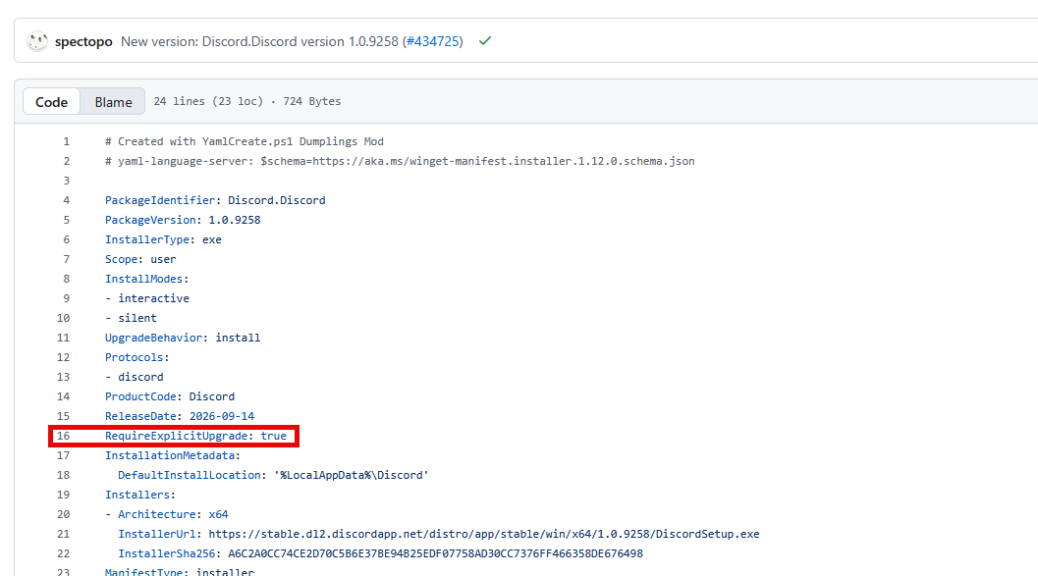
The second situation involves the app’s own manifest. Package maintainers can set a field called RequireExplicitUpgrade to true inside their installer’s YAML file. When WinGet sees that flag, it skips the package during bulk upgrade runs. Then, it labels it as “pinned” in the output.
Discord’s manifest resides in the winget-pkgs repository. ICYDK, that’s the Microsoft community Windows Package Manager manifest repository on GitHub. There, its manifest carries RequireExplicitUpgrade: true across many versions, including 1.0.9005, 1.0.9166, and 1.0.9188. WinGet groups both user-set pins and manifest-driven flags under the same display label. That shared label is the root of all this kerfluffle.
Why Discord Sets RequireExplicitUpgrade
Discord ships with its own built-in auto-updater. Most of the time, Discord updates itself quietly in the background without you lifting a finger. It doesn’t need WinGet’s help to stay current. It runs by default each time you open the app (or restart your PC).
Setting RequireExplicitUpgrade: true in the manifest tells WinGet to stand down during bulk winget upgrade runs. This prevents WinGet from downloading and launching a full installer that could interfere with Discord’s own update mechanism. Two updaters competing for the same app can be a recipe for trouble.
This is actually a smart, deliberate design choice. Thus, it’s not a bug, nor an oversight. The Discord team and the winget-pkgs maintainers made a deliberate call to keep things tidy. WinGet and Discord each do their own job, without stepping on each other.
How to Check the Discord Manifest
Want to see Discord’s package details for yourself? Start with this command:
winget show --id Discord.Discord
This output gives you useful metadata — the current version, publisher, installer URL, SHA256 hash, and release date. What it does not show is the RequireExplicitUpgrade field. winget show surfaces display metadata, not every field in its YAML manifest.
The file Discord.Discord.installer.yaml does not exist on your local PC. It lives only on GitHub. To find it, go directly to this URL in your browser. (Swap in whatever the current version number is for 1.0.9258 if needed.) Once there, look for RequireExplicitUpgrade: true in the YAML. That single line is what tells WinGet to treat Discord as a skip-by-default package during bulk upgrades. You can see it highlighted in the lead-in graphic at line 16 of that YAML file, in fact.
Upgrading Discord Through WinGet Anyway
Maybe you want WinGet to handle the Discord update on your terms. No problem. You can override the RequireExplicitUpgrade flag with a single targeted command:
winget upgrade --id Discord.Discord --force
This tells WinGet to update Discord explicitly, bypassing the manifest flag just for this one run. It’s a clean, safe way to push a WinGet-managed update when you want one.
That said, most of the time you won’t need to bother. Discord’s own updater does its job reliably and quietly. The WinGet Discord pinned label looks alarming, but your Discord client is almost certainly already up to date. Check the app’s version in its settings if you want confirmation.
WinGet Category Conflation Explains All
The “pinned” label WinGet shows for Discord is not a real user-set pin. Again, you did nothing wrong, and nothing is broken. It reflects the RequireExplicitUpgrade: true field baked into Discord’s own manifest That tells WinGet to step aside and let Discord’s built-in updater do its thing. Once you understand the distinction, WinGet’s behavior makes perfect sense. This behavior is simply misreported as “pinned” not “RequireExplicitUpgrade.”
Now that you know what’s going on, you can look at that “pinned” label and nod knowingly instead of scratching your head. That’s what understanding tools is all about. That makes you a sharper and better-informed inhabitant, here in Windows-World.

