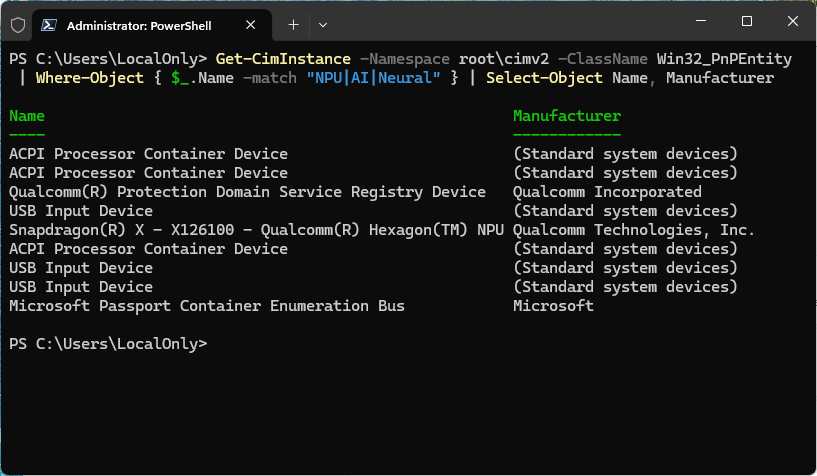
OK, then. I’ve been playing and working with the Lenovo ThinkCentre neo 50q for a couple of weeks now (see my Jan 9 first looks post). Now that it’s been in harness for a bit, I can speak more to what this tiny PC can — and can’t — do. I’ll lay out this ARM desktop (Neo 50q) pros and cons for your consideration. Let’s go…
Considering ARM Desktop: Neo 50q Pros and Cons
The lead-in graphic speaks indirectly to one of my profound reservations about this otherwise nifty mini-PC: the CPU is too under-powered for it to qualify as a Copilot+ PC. Note the model appears as X126100. Its NPU is rated at 45 TOPS but it’s neither a Snapdragon X Elite nor X Plus model. Thus, it doesn’t make the grade, and ships without the Copilot AI namespace, and does not appear on the Microsoft Copilot Plus list. This quibble boils down to: why acquire an ARM desktop if it’s not Copilot+ capable? Good question!
Neo 50q Pros
That’s where the pros for this unit come into play — namely:
- Compact form factor: works well for small footprint workspaces
- Incredibly quiet operation: I’ve heard the fan come on only a handful of times in two weeks. When it does it’s still pretty quiet.
- Low power draw: the overall PC sips rather than sucks power (5-9 W at Windows desktop, 10-18 W normal load; 26 W peak)
- Instant-on startup: ARM works well with Modern Standby so the unit wakes in 2-3 seconds. Boot & restart times are also speedy.
- Enough oomph for everyday computing: handles office apps, surfing & email, Teams & Zoom sessions with aplomb
- Enterprise-friendly security capability: Pluton support, hardened drivers, Secure Boot & Modern Standby make Neo 50q a good fit for managed environments and secure for standalone use
- First ARM desktop available, and reasonably affordable at US$589 (does need monitor; mouse & keyboard included)
Neo 50q Cons
Let’s contrast this to the Neo 50q’s various cons — to wit:
- No Copilot+ capability may deter some users, but only 2-5% of PCs sold today meet those requirements
- USB-C port does not support Thunderbolt 4 or USB4
- Limited upgradeability: RAM is soldered. only 1 M.2 slot, no PCIe expansion
- ARM still imposes some compatibility and performance limitations: some apps won’t run while others run more slowly
- ARM Adreno GPU limits graphics so it won’t handle serious games nor heavy creativity workloads
Net-Net: Good for Students & Office workers
I give the Neo 50q lots of points for cute, quiet, low power and minimal maintenance requirements. But it’s not a powerhouse by any stretch. It fits well into dorm rooms, home offices and business workspaces for people who need basic computing services. The Neo 50q won’t serve well for those who need more horsepower, who write code or create/edit videos. It can’t (and won’t) do much AI stuff of any kind.
All in all, it’s a niche product that fills that niche well but can’t wander outside those narrow boundaries. Given that the Lenovo IdeaCentre Mini X — a real Copilot+ mini-desktop — lists for US$1365, the next step up is a pretty big one. This will make the Neo 50q very appealing for some, and not at all for others. For myself, I like it very much for what it is and can live with what it isn’t.


The biggest con we’ve found with the few ARM machines we have is that Canon has not updated their old printing apps so we used to be able to select Glossy Photo Paper, Matte Photo Paper, etc. (many variations). The built-in Win 11 printer properties available pale in comparison to what I can control from our Intel/AMD machines. No sign that Canon is interested in making ARM-native apps so far.
I think you need to do more research on the WiFi external antenna. The majority of Lenovo mini PCs only have a single WiFi external antenna which does not support 2×2 MIMO operation. That means the WiFi only works in 1×1 mode, which is much slower than 2×2 MIMO.