Here I go again. I read this morning on Neowin that AMD had dropped a new version of its chipset drivers, including the B550 in my Flo6 and RyzenOfc desktops. Time for an upgrade! I found what I needed at the Chipset Driver Release Notes 8.01.20.513 page (a 62.5MB download named amd_chipset_software_8.01.20.513.exe). After applying that file, AMD gets new chipset driver upon reboot. What happened on my ASRock system was a little more vexing…and complicated. Let me explain…
After AMD Gets New Chipset Driver, Comes a Reboot
The UEFI on my ASRock B550 Extreme4 motherboard is a little tetchy. Whenever the firmware or drivers get touched (updated or replaced), it tends to hang on a black screen after a reboot intended to flush out old stuff and bring in new. Sure enough, that’s what happened after the AMD chipset installer fired off a restart with my express permission.
I had to do a deep cold start to bring the motherboard back to life. That meant:
1. Hold the power button down until the system turns off
2. Turn off the PSU
3. Hold the power button down another 10-15 seconds to discharge any capacative devices
4. Turn off, then unplug the power cord from the PSU
5. Wait 2-5 minutes for everything to turn itself completely off
6. Plug the PSU back in, turn on its power switch
7. Use the front power switch to start the PC back up
Fortunately, that worked and the unit came back to life.
Checking the Install
I’m learning to make doubly-darned sure that an update actually gets applied, thanks to some recent misadventures with Secure Boot. I visited Device Manager and made sure no yellow triangle warnings popped up, nor did anything appear under the always-annoying “Other Devices” heading.
At Copilot’s urging, I also checked the install dates for all of my AMD drivers. Copilot also confirmed that those dates matched the latest ones in the afore-linked release note (and hence, should be current).
I used this handy PowerShell one-liner to elicit the data shown in the next screencap:
Get-WmiObject Win32_PnPSignedDriver | Where-Object { $_.DeviceName -like “*AMD*” } | Select-Object DeviceName, DriverVersion, DriverDate
Here’s the resulting output:
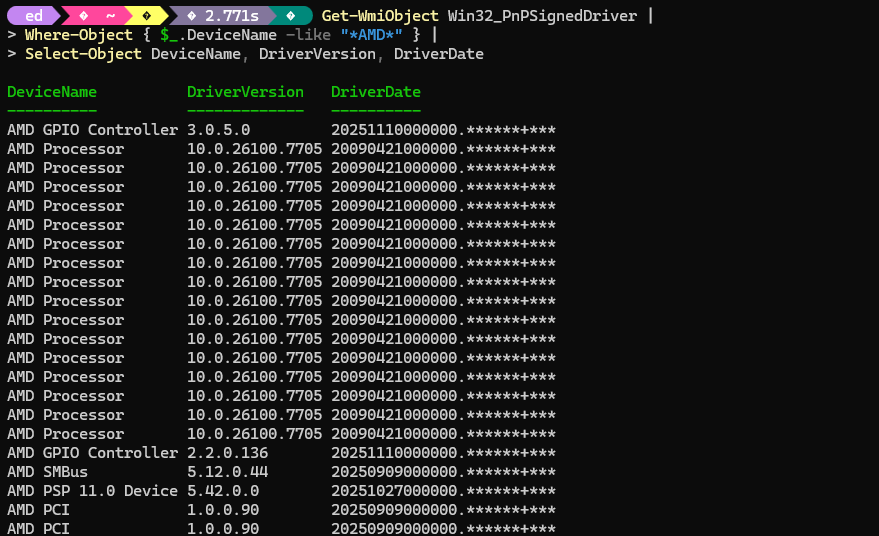
After checking these against the release notes, reported dates = current dates.
It looks like the chipset update got properly applied. Copilot tells me other UEFIs will reboot after a chipset update without the 7-step polka the ASRock board needed. I wish I had another AMD system around here to verify that claim. But here in Windows-World we don’t always get what we want. Good enough for now, I guess!

