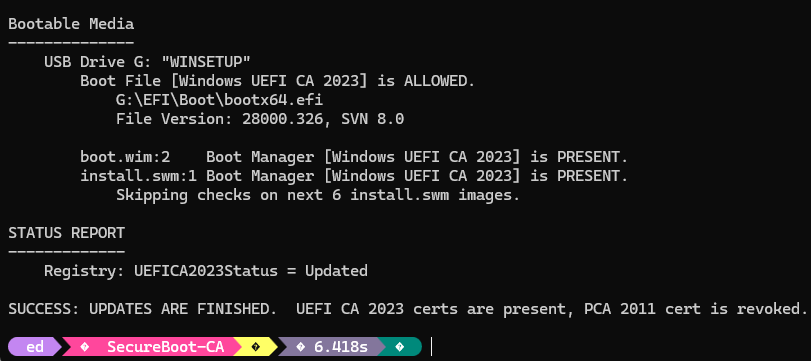
There’s the thing about working in Windows IT long enough. You develop a finely tuned instinct for when something sounds simple but absolutely isn’t. Microsoft has been gradually rolling out Secure Boot CA-2023 support, and the boots-on-the-ground question I needed to answer was about as plain-English as it gets: is the bootable USB drive sitting on my desk actually CA-2023 compliant, or not? A yes-or-no question. It took me a while, but I finally got the answer: As of 4/30/2026, MCT now delivers CA-2023 bootloader and compliant WIM (or, in this case, “split WIM” aka .swm) files.
Determining That MCT Now Delivers CA-2023 Bootloader
At first, I got sidetracked by Copilot. It recommended the PowerShell command Get-AuthenticodeSignature to check status. Alas, the bootloader is “dual-signed” which means it’s signed with BOTH CA-2011 AND CA-2023 certificates. And because the 2011 gets picked up first, the PS command reports it ONLY as signed with the older certificate. It was indeed signed with CA-2023 (and compliant) but my check couldn’t tell me that. Sigh.
So I changed gears and used Garlin’s wonderful (and entirely accurate) Check_UEFI-CA2023.ps1 script from ElevenForum. You can see its output in the lead-in graphic. In a nutshell, it shows the USB stick as CA-2023 compliant. Flo6 ditto, with CA-2011 revoked.
But First, You Must Be Punished…
I dithered around with Copilot for an hour or so trying to “replace” the CA-2011 bootx64.efi file with a CA-2023 compliant version. Until I switched to the Garlin script, I didn’t realize already WAS CA-2023 compliant. That’s when I figured out that indeed MCT now provides CA-2023 compliant bootloaders and image files.
How so? That definitive answer comes from the afore-named PowerShell diagnostic script — a tool specifically designed to tell you, clearly and unambiguously, whether your Windows system and its boot media are CA-2023 ready. The syntax for that check is:
.\check_UEFI-CA2023.ps1 -bootmedia -verbose
My recommendation: run the Check_UEFI… script to check your system, and bootable USBs. Even if you’re confident that your MCT media is fresh and your system is current, Garlin’s script is the only way to get a clean yes-or-no on your specific configuration. Think of it as the verification step that turns “I think I’m good” into “I know I’m good.”
Between MCT now generating compliant media by default and a trustworthy diagnostic tool available to confirm it, the CA-2023 story is getting meaningfully less murky. We’re not all the way there yet — but for once, things are actually trending in the right direction. I’ll take it. Here in Windows-World, that’s about as good as it gets!

