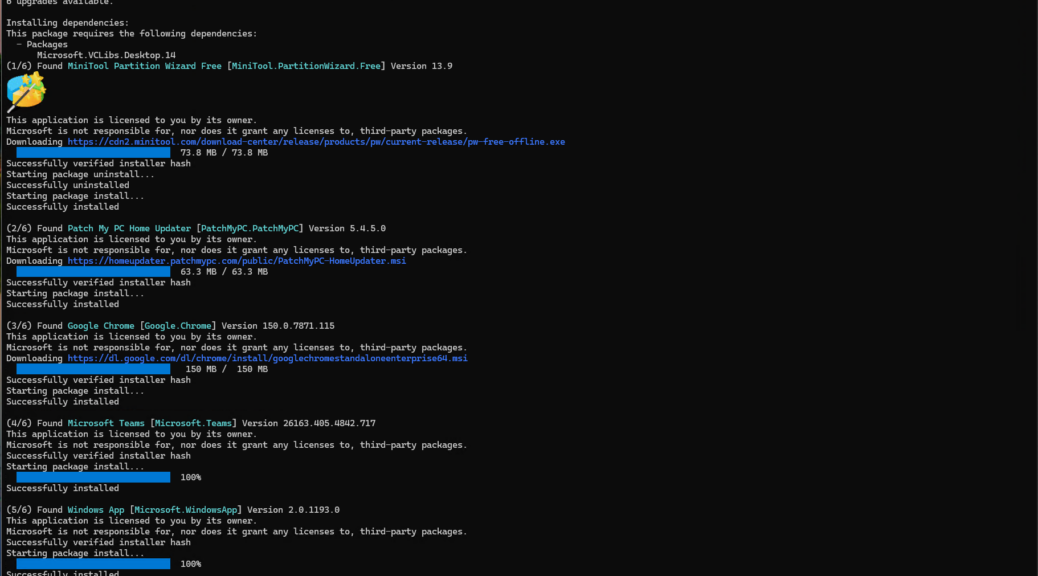
If you run winget upgrade --all --include-unknown regularly, you have probably noticed something odd. The packages listed in the upgrade table rarely install in the order they appear. I hit this recently on my ThinkPad X12 Hybrid Tablet, where six packages needed attention: Google Chrome, Microsoft Teams, MiniTool Partition Wizard Free, Oh My Posh, Patch My PC Home Updater, and Windows App. They were listed in one sequence but installed in a noticeably different one. The explanation stems from WinGet’s dependency resolver. It’s worth understanding, and explains why WinGet list and install orders seldom match each other.
Why Do WinGet List/Install Orders Seldom Match?
As you can see in the lead-in screencap, the upgrade table that WinGet displays before installation is sorted alphabetically by package display name — that is the first (Name) column, not the Id column. It’s purely cosmetic: WinGet queries its source index, collects available updates, and orders the results for human readability. The order in that table carries no weight when determining which package installs first. Think of it as a shopping list arranged by aisle label, not a build sequence.
Install Order Shows a Dependency Graph
Before the first installer touches the PC, WinGet’s dependency resolution engine reads every package manifest in the upgrade set. It constructs a directed acyclic graph (DAG) of declared dependencies. Next, it runs a topological sort namedGetInstallationOrder() on the winget source. That produces an install sequence where no package arrives before its pre-reqs are satisfied. This re-ordered queue need not follow name or ID order.
The X12 Hybrid Tablet Run
In the screencap, you see the raw WinGet output from a recent run on the X12 Hybrid Tablet. Six packages are available, listed in alphabetical order by display name — Chrome, Teams, MiniTool, Oh My Posh, Patch My PC, Windows App. The three declared VCLibs and Windows App Runtime dependencies follwing that list reinforce that notion that other elements than those that appear are in the mix. In the end, the actual install order was MiniTool Partition Wizard, Patch My PC…, Chrome, Teams, Windows App, and finally, Oh-My-Posh.
When List Order and Install Order Do Align
Occasionally the two sequences match — but that is coincidence, not design. It happens when none of the packages in the upgrade set declare inter-package dependencies and WinGet’s internal queue order happens to mirror alphabetical sequence. As soon as one package declares a dependency on another — or on a shared runtime — the topological sort reshuffles the queue and the coincidence evaporates.
A Practical Takeaway
No need to manage this manually. Winget’s dependency resolver handles the sequencing reliably. Indeed, fighting it with flags like --skip-dependencies is rarely worth the risk. Tyring to drive this yourself, you might end up with a package that installs against a runtime version it does not actually support. Trust the DAG, watch the dependency notice block that appears before the first installer fires, and you will get a clear picture of why the WinGet upgrade install order looks the way it does.
Next time you notice that WinGet installs packages out of listing order, check the dependency notice block at the top of the install run. That block is where WinGet “shows its work.” That’s where the topological sort result gets laid out in plain text. It is one of those quiet, well-engineered behaviors that rewards users who take a moment to read the output carefully.
Further proof of my earlier contention (see this June 27 post) that “WinGet knows more than it says.” I think so, but you can make your own judgement. Here in Windows-World, there’s plenty of room for multiple takes on what’s REALLY going on. This is mine…and I’m sticking to it!

