After recently clean installing the 2021-vintage Lenovo ThinkPad X12 Detachable Tablet Gen 1 I decided to leave it running a production build. That means I needed a new Canary channel test machine. So this morning, I upgraded the 2025-vintage ThinkPad P16 Gen 3 to that Insider Preview level. Unsurprisingly, this “Canary jump” sows predictable chaos. Let me tell you what happened, and what I did to recover…
Why Say: Canary Jump Sows Predictable Chaos?
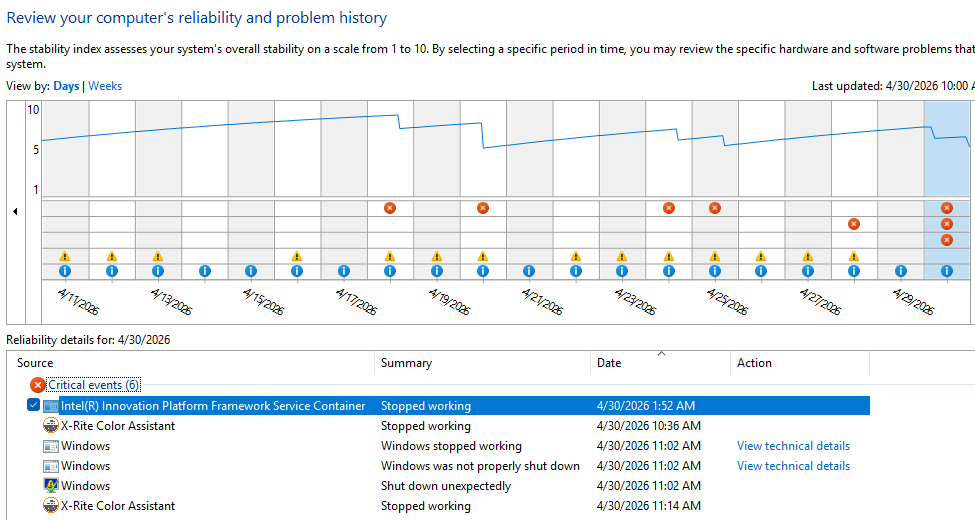
No sooner did I reboot into Canary Build 26300.8246 than did all hell start breaking loose. As is my usual practice, I remoted into that PC from my Flo6 desktop — but not for long. In under less than a minute the PC crashed, and threw a slew of interesting “Critical events” as it went down. You can see them depicted in the lead-in screencap.
Of the 6 items in that list, numbers two through five are relevant. That’s because all cluster in the same minute (11:02 AM) and all are related to my remote session failing, then Windows crashing. The X-Rite Color event simply reflects the program’s unhappiness with running in a remote session (it appears again as item 6, when I start my next remote session).
The others are worth visiting in a little more detail:
• Windows stopped working comes from a bugcheck. Copilot tells me this is most likely owing to firmware or driver issues between the laptop and this bleeding edge release
• This provoked the “not properly shut down” as Windows crashed
• It culminates in the “shut down unexpectedly” as Windows turned itself off
At the start of this sequence an illegal memory reference kicked things off. This is why firmware and drivers are suspects: they’re the most likely perpetrators of such untoward acts.
Chaos Cleanup on Aisle 7!
I now understand my cleanup, had it been performed before upgrading to Canary, might have prevented the crash that occurred. I visited Lenovo Vantage, found a new UEFI update, and installed it. I ran Intel DSA, found four new drivers, and installed them. I ran the NVIDIA app, found new driver version 596.36, and installed it, too.
Now the P16G3 laptop seems to be purring right along. I’ll take it as a lesson learned (and probably re-learned) that it’s a good idea to update firmware and drivers before making major OS changes. Now that I actually stop to THINK about it, that makes pretty good sense. Even in Windows-World, it’s better to plan and aim before firing…


If you have Fast Startup enabled, you’re playing with fire. Disable that sucker ASAP.
If you have Fast Startup enabled, you’re plaing with fire. Disable that sucker ASAP!