I just got back from my morning constitutional. Windows prompted me for a PIN upon login. Then, the “Welcome” screen took 30-plus seconds to spin before I got to the desktop. “Hmmm,” I said to myself, “whaddya bet an update’s been applied to Flo6?” And indeed, upon inspection of the Update History, out-of-band (OOB) KB5086673 pops up at the head of the Quality Updates list.
Why Say: OOB KB5086672 Pops Up?
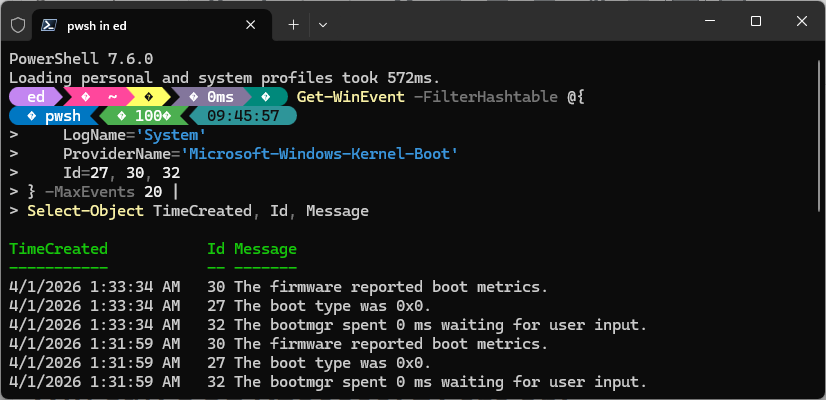
Flo6 is set up for maximum stability. Thus, it doesn’t sleep. So, for it to prompt me for system entry, I was pretty sure the PC had rebooted. So I asked Copilot to write me a PowerShell check. And sure enough, the results of running said script (see lead-in graphic) show two quick reboots back-to-back just after 1:30 this morning.
The boot type for both shows up as “0x0” which indicates a cold boot that otherwise proceeded and concluded normally. And indeed certain updates — including this one, as shown — do require a pair of reboots to successfully complete their efforts. Copilot says “That 95-second gap is textbook CU finalization timing” and “the reboot…was Windows completing the update you saw in Update History.” Good stuff!
How the Pop-Up Happened
I’ve got the toggle for “Get the latest updates as soon as they’re available” turned on. I’ve also got active hours set from 7AM to 6PM. So when the update triggered last night nothing stopped it from getting downloaded, applied, and rebooting on its own schedule. That’s how the pop-up happened, and why I saw a login prompt when I sat down in front of Flo6 this morning.
Here in Windows-World, things work the way they’re supposed to quite often behind the scenes and (mostly) unnoticed. The login prompt drew my notice, and I’m happy to say “nothing more to see here.” Let’s get back to work, shall we?

