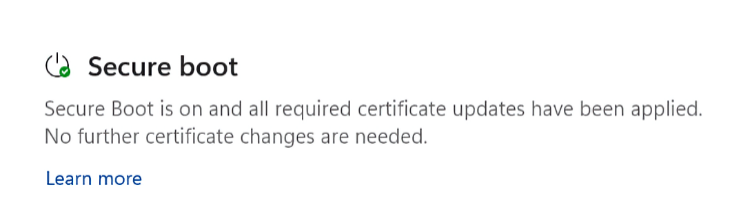
I just read at WindowsLatest that the Windows Security app now includes a Secure Boot check beneath its Device Security left-column head. I checked all of the PCs in my office to make sure (7 of them). Sure enough. each now lists Secure boot amidst its elements. As the aforelinked story shows, when Windows Secure checks Secure Boot status it uses one of three visual symbols as quick indicators:
- Green checkmark indicates Secure Boot is basically OK. There’s more going on here than meets the eye, as I’ll explain later.
- Yellow exclamation (warning) indicates Secure Boot is running but the latest certificate (CA-2023) is not yet in place or use.
- Red X (stop sign, error/problem) indicates the device cannot receive required updates to keep the Windows boot process secure.
Why Windows Security Checks Secure Boot Now
Microsoft added this new entry because Secure Boot certificates from 2011 are expiring in 2026. Thus, Windows needs a user‑visible way to show if a device has received the updated 2023 certificates. Up to now, Secure Boot status was invisible unless users dug into UEFI or used PowerShell.
But with certificates — CA-2011, specifically –expiring, Microsoft now needs some way to:
- Tell users whether their system is still protected
- Indicate whether the new certificates have been applied
- Warn users if action is required (firmware update, OEM tool, etc.)
- Provide a simple green/yellow/red indicator instead of forcing people to inspect UEFI variables
That makes the new Secure Boot section in Windows Security essentially an approachable, easy-to-grasp health dashboard for the certificate update.
It’s Not as Easy as It Looks?
The WindowsLatest story shows the same green checkmark text as the lead-in graphic for this story. But when I checked a couple of my other machines, I saw something different. Here ’tis:
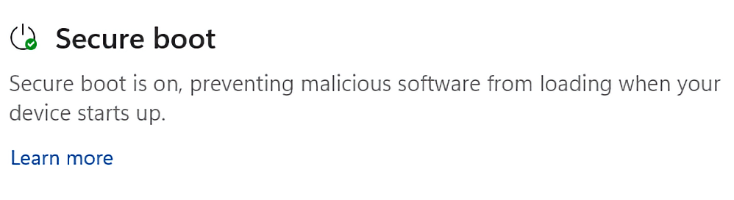 Note the difference in the text output here. Even though both forms proffer the green checkmark to denote Status=OK, the first one reads “Secure Boot is on and all required certificate updates have been applied. No further certificate changes are needed (bold emphasis mine).” However, the second one simply says “Secure boot is on, preventing malicious software from loading when your device starts up.”
The second doesn’t say “No further certificate changes are needed.” At first, I thought the difference might be that on some PCs the CA-2011 certificate had already been revoked (all OK PCs must have the CA-2023 cert installed, in use, and recognized in the boot loader to qualify for that status). But on one PC with the simpler message, the CA-2011 certificate shows revoked (it’s in the UEFI DBX Certs database, which means it’s blocked). And on the other PCs with the “no further” language the CA-2011 certs are still enrolled (they’re in the UEFI KEK and UEFI DB databases, and NOT in the UEFI DBX database).
So I’m still wondering exactly what’s going on here, and what MS is trying to tell us with these two different OK messages. I’ll keep digging and write more when I find or figure out what’s going on. A sense of mystery, and a willingness to suspend resolution pending necessary information, are familiar sensations in Windows-World. The plot thickens…but I hope, not too much!
Added 1 Hr Later: Word from the Top
I corresponded with Garlin himself on ElevenForum, and at his suggestion, ran his update_UEFI-CA2023. script on the P16G3. That brought all the DB certs into the UEFI DB (including Option ROM and Windows UEFI). It still shows VBS policy as missing. But it turns out that by running .\Update_UEFI-CA2023 -SkuSiPolicy and rebooting, I can take care of that. Here goes … another reboot. Now the Garlin check script gives the P16G3 a completely clean bill of health, but I still get the short message. Very interesting!


Finally got the “…all required certificate updates have been applied. No further certificate changes are needed” message…after installing the latest KB5007651 update today.
“ConfidenceLevel” in \HKEY_LOCAL_MACHINE\SYSTEM\CurrentControlSet\Control\SecureBoot\Servicing still said “Under Observation – More Data Needed”.
“UEFICA2023Status” has said “Updated” for weeks.
Secure Boot is a fascinating, time-sucking and never-ending source of befuddlement and amazement. Cheers! -e-