If you’ve ever dealt with a Lenovo Vantage false update, you know how maddening it gets. That goes double, when every install attempt fails silently and the same ghost package reappears on every subsequent scan. Sigh.
But that’s precisely what happened to me on a Lenovo ThinkStation P3 Ultra Gen 2 (Arrow Lake-S desktop). There, Lenovo Vantage’s System Update panel stubbornly flagged Intel Dynamic Tuning Technology (DTT) Driver version 9.1.10001.173 as a required update, even after reporting a successful install on the previous try. Sigh again.
Why I’m Fixing False Vantage Update
Here’s the wrinkle: DTT is a laptop-exclusive power-management feature. It’s tightly coupled to Intel’s thermal sensor bus. Specifically, it applies to SWC\VID8086_DTT_* ACPI devices. Alas desktop platforms don’t sport them. My ThinkStation doesn’t have one. It never will. Yet Vantage keeps insisting otherwise.
Furthermore, every install attempt failed without so much as an error dialog. Vantage just re-offered the driver on the very next scan, politely pretending nothing had gone wrong. Time to dig in, and get this thing outtah heah!
Ruling Out the Obvious
First, I tried some obvious remedies. Logging into Vantage directly as Administrator changed nothing. There’s no ellipsis menu, no right-click context option. That means no “suppress this update” checkbox anywhere in the System Update panel. Lenovo simply hasn’t built that in.
Next, I turned to the standalone Lenovo System Update app. After installing the optional Lenovo SoftwareComponent Driver 26.9.0.20 from Windows Update, System Update scanned the machine and correctly reported “No packages applicable.” Clean bill of health. Meanwhile, Vantage still flagged the DTT driver for update. Sigh one more time.
However, that discrepancy was actually useful. It proved the issue lived entirely inside Vantage itself. It’s an artifact of its System Update addin, not Lenovo’s underlying package catalog. The two tools evaluate the same catalog through completely different pipelines. Importantly, only one of them is wrong.
Tracing That False Positive…
With the obvious paths ruled out, I dug into Vantage’s session data folder:
C:\ProgramData\Lenovo\Vantage\AddinData\

LenovoSystemUpdateAddin\session\
Inside, I found two SQLite databases: update_history.db (Vantage’s live working store, rewritten on every scan) and editable_update_history.db (which appears designed to accept external edits). I tried setting the DTT entry status to NotApplicable in the editable_update_history.db. Alas, nothing changed on screen. Vantage reads update_history.db for all rendering decisions and overwrites it with Applicable again after each rescan. The “editable” database, it turns out, is a red herring.
I also found available_updates.json.It’s a 5 KB file that’s rewritten upon each update scan. It gave me a fully parsed package definition, including a Dependencies block that pointed me toward the real culprit.
A (Bogus) WildCard in the XML
Vantage caches each package’s raw XML in its own repository subfolder. For this machine, the DTT package XML lives at:
session\Repository\m1dpf015d_p3ultrag2_25h2\m1dpf015d_p3ultrag2_25h2_2_.xml
Inside that XML, the Dependencies/_Bios/Level section contained two machine-type entries: “*” and “S0NKT*”. The S0NKT* pattern correctly targets specific Lenovo laptop lines that carry DTT-capable thermal silicon. That entry belongs there. The “*” wildcard, however, matches every machine type on the planet — including the ThinkStation’s 30J5 machine type. That entry almost certainly doesn’t belong there, and it looks like a straightforward Lenovo catalog error.
Consequently, without the wildcard, Vantage evaluates the ThinkStation’s machine type against S0NKT*, finds no match, and writes NotApplicable to update_history.db automatically on every future scan. No database patching, no registry hacks — just the correct answer from a corrected applicability list.
PowerShell to the Rescue!
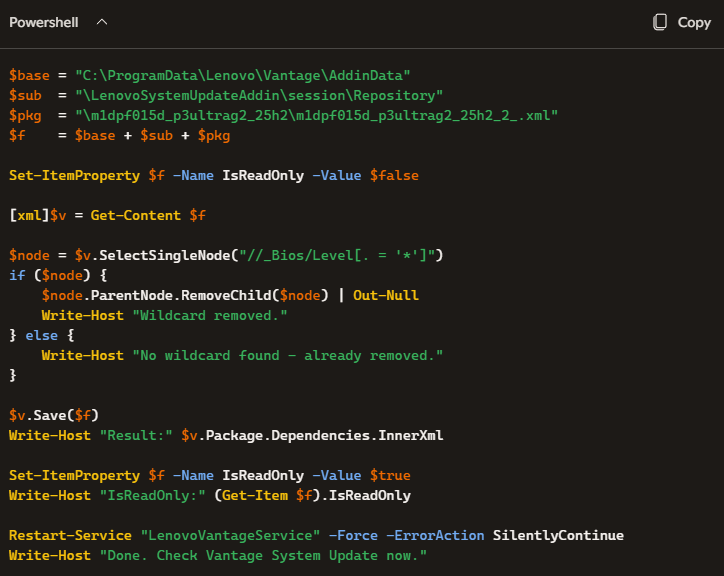
I wrapped the repair into a short PowerShell script called fix_dt.ps1. The logic is straightforward: clear the file’s read-only attribute, load the XML into an XmlDocument object, locate the offending node using an XPath query, remove it, save the file, restore read-only protection, then restart the LenovoVantageService so Vantage picks up the change cleanly.
The lines that do the heavy lifting are (edit to remove line breaks):
$node = $v.SelectSingleNode("//_Bios/Level[. = '*']")

if ($node)

{ $node.ParentNode.RemoveChild($node) | Out-Null }
Setting the file back to read-only afterward is an important step. It prevents Vantage from silently re-downloading a fresh copy of the XML on its next catalog sync and re-introducing the wildcard. Sadly, that would undo the fix entirely.
To run the script, open an elevated PowerShell prompt and execute:
powershell -ExecutionPolicy Bypass -File

"C:\Temp\fix_dt.ps1"
| Note: Run this from an elevated (Run as Administrator) PowerShell session. The script must stop and restart the LenovoVantageService, which requires administrator rights. Edit so it runs on one line. |
Lessons Learned
This exercise surfaced a few things worth minfing for anyone who’s doing deep Vantage troubleshooting:
- Vantage and the standalone System Update utility maintain completely separate state databases and catalog evaluation pipelines. Agreement between them is not guaranteed. Disagreement is a useful diagnostic clue, not a dead end.
- The “editable” SQLite database is a red herring for display suppression. Vantage ignores it when rendering the System Update panel. Don’t waste time on this.
- A single bogus wildcard in a machine-type applicability list causes a laptop-only driver to haunt a desktop indefinitely. The fix is in the XML, not in the database.
- When the official UI offers no suppress or hide option for a persistently wrong update, the XML repository is the right lever to pull. Appearances aside, it’s not the SQLite layer above it at fault.
Ultimately, this is a reminder that catalog quality control matters. One stray “*” in a dependency block can send thousands of ThinkStation owners chasing a ghost driver that will never install. If you’ve hit the same Lenovo Vantage false update on a different ThinkStation model, or if you’ve spotted a similar wildcard problem in another Vantage package XML, please drop a comment here. I’d love to know how broadly this catalog bug extends beyond the P3 Ultra Gen 2.
Here in Windows-World, updates sometimes get weird. This time, for once in a blue moon, it’s not WU that’s the culprit. It’s Lenovo. That makes me oddly glad. Go figure!

