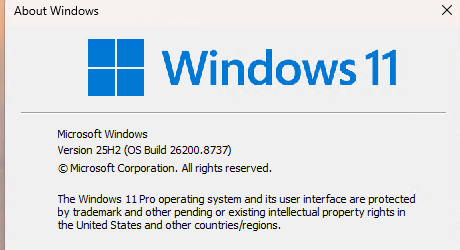
Here’s an odd one. I just fixed a broken boot environment on my ThinkPad X12 (Gen 1) Hybrid Tablet. Oddly enough, Winver is now showing Windows 25H2 Build 26200.8737. What makes that odd? Prior to the fix, I’d been running the Beta release, Build 26220.8370. Hence my conclusion that the X12 runs production Win11 after boot repair. All I can say is: WTF?@*
Why X12 Runs Production Win11 After Boot Repair?
That’s the question I asked Copilot right away once I figured things out. Here’s what it said (bold emphasis mine):
bcdboot reconstructed the EFI boot environment from the on-disk Windows 25H2 partition, laying down a clean, production-signed bootloader baseline with no awareness of the machine’s prior Beta channel enrollment. The Garlin script then installed the production-variant SkuSiPolicy.p7b, which writes itself as a UEFI firmware variable and enforces production-level Secure Boot signing rules. This blocked the pre-release trust chain that Beta channel builds rely on, so Windows Update classified the device as a retail endpoint. It then served it the latest production-signed CU, build 26200.8737, not a Beta flight.
Whoa! Who knew that could happen? But sure enough when I visit Settings > Windows Update > Windows Insider Program on the X12, it tells me to “Join the Windows Insider Program.” This PC is clearly unenrolled and running a production build. Amazing!
Plus ça change…
Here in Windows-World, strange is just part of the day-to-day game. This latest little wrinkle, however, ranks pretty high on my own Strange-O-Meter. But as long as the laptop is working and doing what it should, I’m happy. In fact, I’m bemused because the official word is you can’t leave the Insider Builds unless you do so at a precise moment when it’s allowed, or perform a clean install. Seems like — at this moment, at least — here’s another way!

