Now that I’m back to a normal work pattern, I couldn’t help but notice that the power button on my Flo6/MSI B550 Tomahawk PC was blinking this morning. That means it’s sleeping and needs a touch to wake itself back up. Indeed, that blinking power button is the unmistakable signature of S3 sleep — Suspend to RAM — where the system cuts power to everything except memory. Nobody asked it to do that. Time to find out why it thought that was a good idea. Hence, I found myself troubleshooting Flo6 S3 sleep oddities.
Troubleshooting Flo6 S3 Sleep Oddities: Step 1
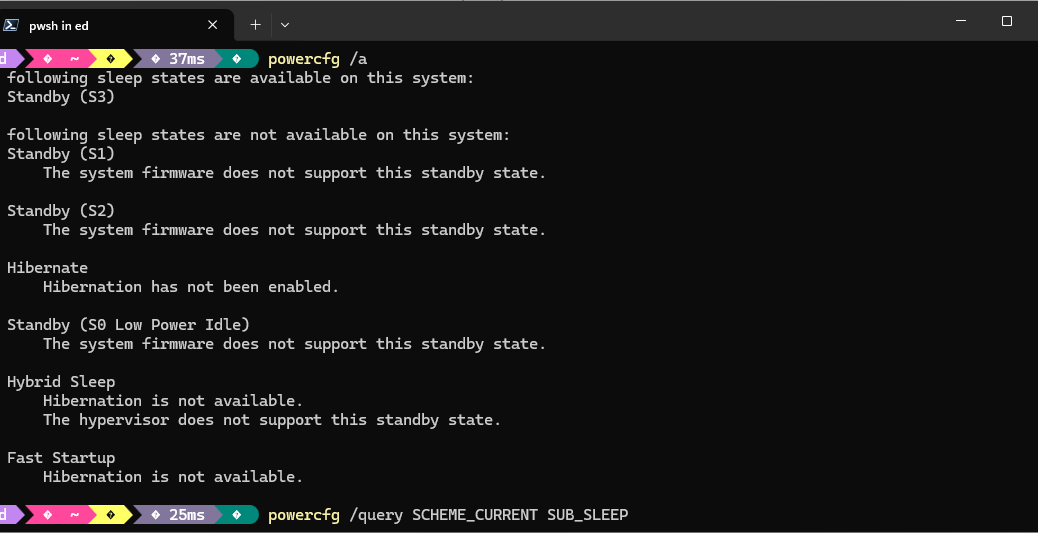
My first move with any uninvited sleep behavior is to open an elevated command prompt and run powercfg /a. This dumps a plain-English summary of every sleep state the OS currently considers available — and, crucially, tells you which ones are actually enabled. The lead-in graphic shows what Flo6 reported.
That told me everything I needed to know at a glance. S3 was alive and well. Hibernate was also active. Windows had a full menu of power-down options available to it, and apparently it was helping itself. The next question was: what power plan setting was pulling the trigger?
Step 2: Drilling deeper
To see exactly what the current power scheme was telling Windows to do with sleep, I queried the sleep sub-group directly with powercfg /query SCHEME_CURRENT SUB_SLEEP. The output is verbose, so here’s the relevant section I was hunting for:
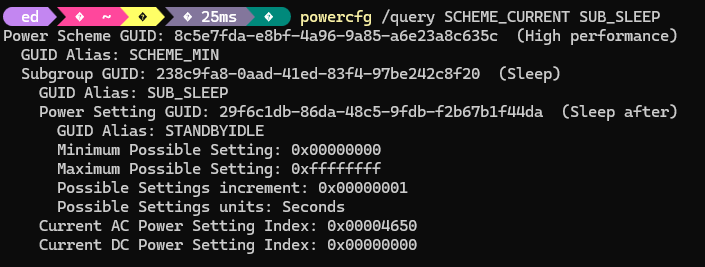
0x00004650 is 18,000 decimal — 5 hours on AC power. So Windows was faithfully sleeping Flo6 after 5 hours of perceived inactivity, exactly as I’d told it to in recovering from a recent, ill-advised troubleshooting test that reset all my sleep options. Nothing malicious, nothing mysterious. Just a setting I’d explicitly configured sitting where I’d put it, also wrong. Time to kill it.
Pulling the Plug on the Sleep/Wake Timers
I wanted three things gone: the Sleep After timer, Hybrid Sleep, and Wake Timers. Setting any timeout value to 0 disables it. I ran the following commands, covering both AC and DC (battery) power states for completeness, even though Flo6 is a desktop that will never run on battery:
 As a belt-and-suspenders measure, I also went into Device Manager, expanded the Universal Serial Bus controllers node, and for each USB Root Hub, opened Properties > Power Management and unchecked Allow the computer to turn off this device to save power. USB Selective Suspend has a well-documented history of nudging systems toward sleep states in ways that aren’t immediately obvious from power plan settings alone. Worth the two minutes it takes to disable it across the board.
The EC Reset: Clearing the Firmware’s Memory
OS-level changes are necessary, but they don’t always flush stale power-state data that’s been cached at the firmware level. The MAG B550 Tomahawk MAX has an Embedded Controller that can hold onto a previous power state even after you’ve changed every relevant Windows setting. The fix is straightforward: shut Flo6 down cleanly, flip the PSU switch off, unplug the AC cord, then hold the case power button for 15 to 30 seconds. This drains the residual charge and forces the EC to reinitialize from scratch. Reconnect everything, power on, and let the board POST fresh. It’s a small step, but it closes a gap that software alone can’t address.
Verdict: Flo6 Should Stay Awake
Hopefully, Flo6 makes it through the night — and several nights after that — without a single uninvited nap. No blinking power button at 6 AM, no dead monitors, no manual wake required. For extra confidence, I’ve got a scheduled Task Scheduler job logging system uptime to a text file every hour overnight. If S3 ever comes back uninvited, I’ll have a timestamp trail to work from. IMO, one week’s worth of clean logs is good enough for me to call this one closed.
If I’ve missed anything, the blinking power button will be back. I hope not, but here in Windows-World anything is possible. If it’s not “case closed” I’ll report back with an addendum here. Fingers crossed that won’t be needed…

