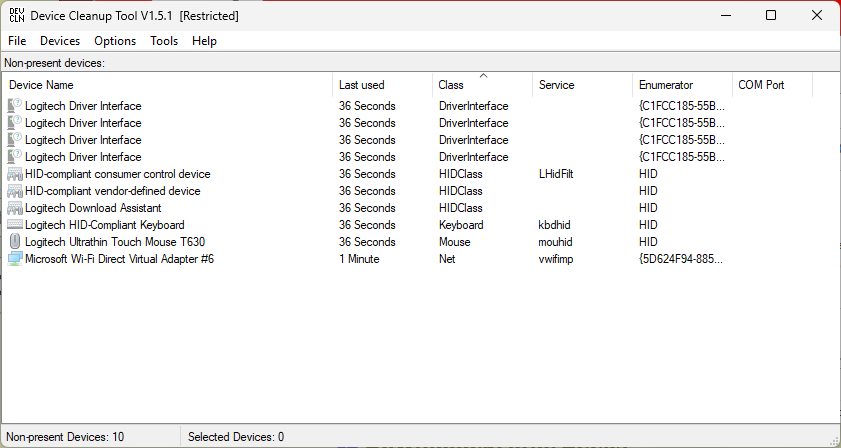
When I switched my production PC, Flo6, from the ASRock to the MSI motherboard on March 21, I left a large crew of ghosts behind. In this case, a ghost is a no-longer-used driver that remains in the driver store even though it’s out of service and irrelevant to the new installation. Thankfully, Copilot helped me remember and find Uwe Sieber’s outstanding Device Cleanup Tool. It specializes in identifying and removing such ghosts. After using the tool, Flo6 gets unghosted, loses 183 drivers (!), and gets considerably slimmed down.
How Flo6 Gets Unghosted, Loses 183 Drivers
At first I tried a tool named GhostBuster. It showed me I had 399 drivers installed on Flo6, of which up to 193 could be removed. But I couldn’t actually make it remove anything. So I asked Copilot for a different option, among which I recognized Uwe Sieber’s aforementioned tool. It worked, too!
Sieber’s Device Cleanup Tool shows ONLY drivers that may be removed. So I removed all of them. Of the 194 in that collection, 11 came back after a reboot (you can see them in the lead-in screencap). That’s how I got to the 183 number for the count of drivers removed from Flo6 overall. I used PowerShell to calculate before and after sizes for the DriverStore. It started out at 10.63 GB, and dropped to 7.87 GB after cleanup. I like that!
One of the consequences of moving from one mobo to another without a clean install is that this kind of cleanup is needed. One of the advantages of that swap is that I didn’t have to clean install the OS. What can I say? I was in a hurry! Here in Windows-World, these are the trade-offs and the consequences we must learn to accept.


My understanding is that Device Cleanup Tool only removes the device configuration entries in the registry…not the underlying drivers.