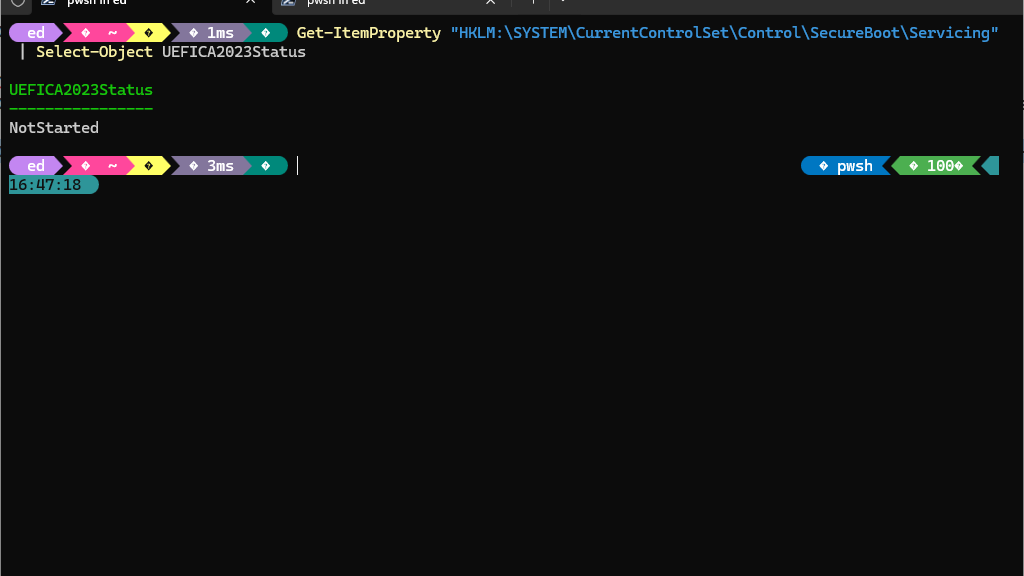
With the introduction of the Windows UEFI Certificate Authority 2023 (CA‑2023), Microsoft updates the Secure Boot trust chain to enhance platform security. As part of this transition, Windows systems may report a registry value under the key HKLM:\SYSTEM\CurrentControlSet\Control\SecureBoot\Servicing named UEFICA2023Status. This value reports the status of the Secure Boot servicing task that migrates systems to the new CA‑2023 trust model. Understanding UEFICA2023Status= NotStarted is important, because it doesn’t mean CA2023 is not in use in the running Secure Boot environment. Let me explain…
What UEFICA2023Status=NotStarted Means
There are two reasons why UEFICA2023Status can take a value of NotStarted. The obvious one is when the CA-2023 certificate is ready to be added to the Secure Boot value stores, and the Servicing Task hasn’t yet been scheduled or run. The other, as I’m about to describe happens when the Windows PC is already up-to-date. Huh?
The UEFICA2023Status value can take on several states, including NotStarted, PendingReboot, Completed, and Failed. A common misconception is that a NotStarted value signals failure to apply the CA‑2023 update. In reality, this value might also mean that the Secure Boot servicing task has not been triggered. Why? Because the system already meets all necessary criteria for CA‑2023 compliance, and that task need not be run.
Specifically, Windows only initiates this servicing task if all of these three conditions are met:
1. The system firmware does not already trust the Microsoft UEFI CA 2023.
2. The EFI System Partition (ESP) does not contain a bootloader signed by the CA‑2023.
3. A servicing stack update or cumulative update requires the migration to complete.
If the system firmware already includes the CA‑2023 certificate and the ESP contains a CA‑2023‑signed bootloader, Windows deems migration unnecessary. In such cases, the registry value remains NotStarted, which is both normal and acceptable. Even so, it took me aback when I checked this value and saw that status (see lead-in graphic). It spurred me to investigate, and led to this very blog post.
As it happens, the BIOS/UEFI flash I conducted to get the MSI MAG Tomahawk B550 motherboard working updated Secure Boot and included the CA-2023 certificate data as well. And, somewhere along the way the EFI partition got rebuilt to include the CA-2023 signed bootloader. My desktop, Flo6, simply doesn’t need Windows to run the UEFICA2023 update task.
Verifying the EFI Bootloader Signature
It’s easy to confirm that the system is booting with a CA‑2023‑signed bootloader. Indeed, one need only examine the signature of the boot manager located on the ESP. This typically resides at S:\EFI\Microsoft\Boot\bootmgfw.efi (where S: is the mounted ESP). Using PowerShell, execute the following one-liner command:
Get-AuthenticodeSignature "S:\EFI\Microsoft\Boot\bootmgfw.efi" | Format-List *
If it’s current, the output shows the [Issuer] as Windows UEFI CA 2023. (Otherwise it shows as Windows UEFI CA 2011.) Seeing CA 2023 here confirms that the firmware uses a bootloader signed with the updated certificate authority.
Comparing with the OS Copy
Windows also maintains an OS copy of the boot manager at C:\Windows\Boot\EFI\bootmgfw.efi. This file is not used for booting but may be referenced during servicing operations. It is common for this file to remain signed by the older Microsoft Windows Production PCA 2011 certificate. This does not impact Secure Boot functionality, because the firmware uses the ESP copy. We’ve just confirmed the the ESP copy is current and correct for CA-2023.
This Time, NotStarted Is All Good
Appearances to the contrary notwithstanding, a UEFICA2023Status value of “NotStarted” does not always indicate a problem. Instead, it can simply reflect that the system complies with the Secure Boot requirements for CA‑2023 (and got there before MS could). We verified the ESP bootloader is signed by the Windows UEFI CA 2023. We also confirmed that the firmware trust store includes the appropriate (2023) certificate. Passing these checks means that users can be confident that the system is operating within the latest, current Secure Boot regime despite this “interesting” status. No further action is required unless future updates say otherwise.

