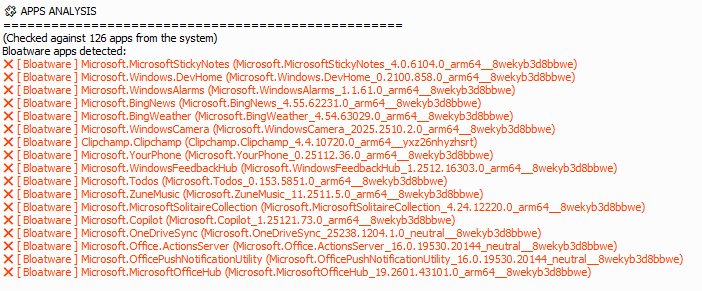
One of the “interesting parts” of new machine intake is the process of removing things the system maker installs that you don’t want. This is often called “debloating” or “degunking.” I’m adding this to my intake process going forward, and reporting on it today, because I’m mostly convinced that the GitHub CrapFixer project does a good job of taking stock and reporting on unwanted apps (among many other things). I just ran it on my newest Copilot+ PC, and I’m pleased to report that CrapFixer Gives ASUS A14 low bloat rating. I’ll explain…
How CrapFixer Gives ASUS A14 Low Bloat Rating
I’m basing my “low bloat rating” on the information that appears in the lead-in graphic. It’s the CrapFixer “Analyze” output that shows up under the “APPS ANALYSIS” heading. Indeed, there are 17 entries there. BUT inspection reveals that none of these items come from third parties: they are items included by default in a normal Windows 11 installation.
That ties into the definition or bloatware or crapware that I think makes most sense. That definition: software apps from third parties that at least some user neither want nor need on their PCs. Frequent examples include:
- Trial AntiVirus Suites: McAfee, Norton, Trend Micro, etc.
- Cloud Storage trials: Dropbox, Box, etc.
- Media/entertainment trials: Netflix, Spotify, etc.
- Game trials or freemium games: Candy Crush, Hidden City, etc.
The ASUS A14 Zenbook includes none of these, except stuff that Microsoft bundles with the OS. That’s about as low as bloat gets. For the record, my recently-added Lenovo ThinkCentre Neo 50q gets the same rating, for the same reason.
Here in Windows-World bloatware is not uncommon on new PCs and laptops. It’s nice when little or none presents. And both ASUS and Lenovo make third-party offers available for owners thru their update apps (MyASUS and Lenovo Vantage, respectively). But they don’t preinstall them on their PCs. Good -oh!

