I’m getting ready to return the sweet little review unit Lenovo sent me six weeks ago. It’s a ThinkPad X13 Gen 6 (see First Look from November 7). It’s endowed with an Intel Core Ultra 7 255U, 16GB RAM, and an 0.5 GB NVMe SSD. For size and heft, it’s a nominal 13″ ultra-portable (933g/2.05 lbs) that’s easy to pack up and take with you wherever you go. As I was preparing a final once-over, I found myself faced with undisappearing X13 Gen 6 PING. Let me explain…
Why I’m Undisappearing X13 Gen 6 PING
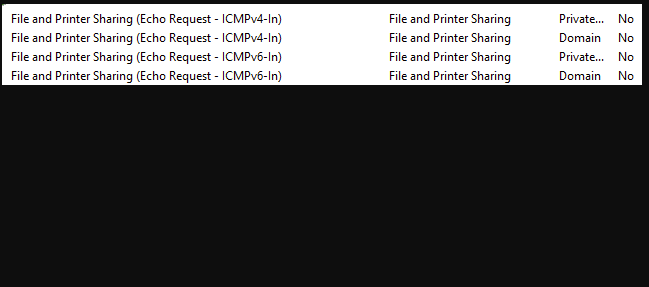
For some odd reason, Lenovo instituted firewall rules on this eval unit that I’ve never run into before. You can see them in the lead-in graphic where they show — in brief — that for both Private and Domain LAN namespaces, inbound PING is disabled for both IPv4 and IPv6. That means this PC won’t respond to incoming PING requests from the LAN. Sigh.
That’s how Advanced IP Scanner finds PCs (among other techniques). It also explains why IPconfig on the X13 Gen 6 happily reported itself at a private IP address, but didn’t show up in the scans that tool made on my desktop. Sigh again.
This is easily fixed by changing those firewall rules to enable (YES) them, instead of disabling (NO) same. But I wonder: why did Lenovo do this? I can see this applying to boundary devices (e.g. firewalls) and servers, but haven’t really run into it much on end-user PCs. They’s usually safe behind one or more layers of external protection (2 in my case), and don’t get external PINGs. Maybe it’s a “coffee shop” scenario…? But PING is disabled on Public networks anyway. Go figure!
Closing Thoughts on the X13 Gen 6 ThinkPad
As I get ready to box this unit up, and ship it off, I’ve come to some conclusions. On the plus side, it’s light, compact and reasonably capable. I’d be inclined to upgrade the 0.5 GB SSD to 1.0 GB or bigger (with budget 2.0 GB units selling for under US$100 right now, that’s not a big stretch). Otherwise, it’s more than acceptable as-is.
On the minus side, the X13 is a little behind the curve technology wise. Alas, this model is NOT Copilot+ capable. With its price now over US$1,500 (+US$8.45 at Best Buy, +US$138.22 at Staples) it’s nowhere near as good a deal as a lightweight Snapdragon X-equipped model in that general price range (e.g. Lenovo ThinkPad 7X or Asus Zenbook A14).
Such models usually come equipped with 1 TB SSDs from the get-go, offer better battery life (12+ hours for SnapdragonX models vs. 7-10 hours for the X13), and are on par or better for performance and capability. That said, ARM PCs still have their Windows quirks and limitations, too. Here in Windows-World choosing a laptop always involves certain trade-offs, eh? I’ve come down on the Copilot+ side of things, and remain amazed that less than 2% of new PC purchased globally qualify as such. Given MS’s emphasis on AI, why buy anything else?

