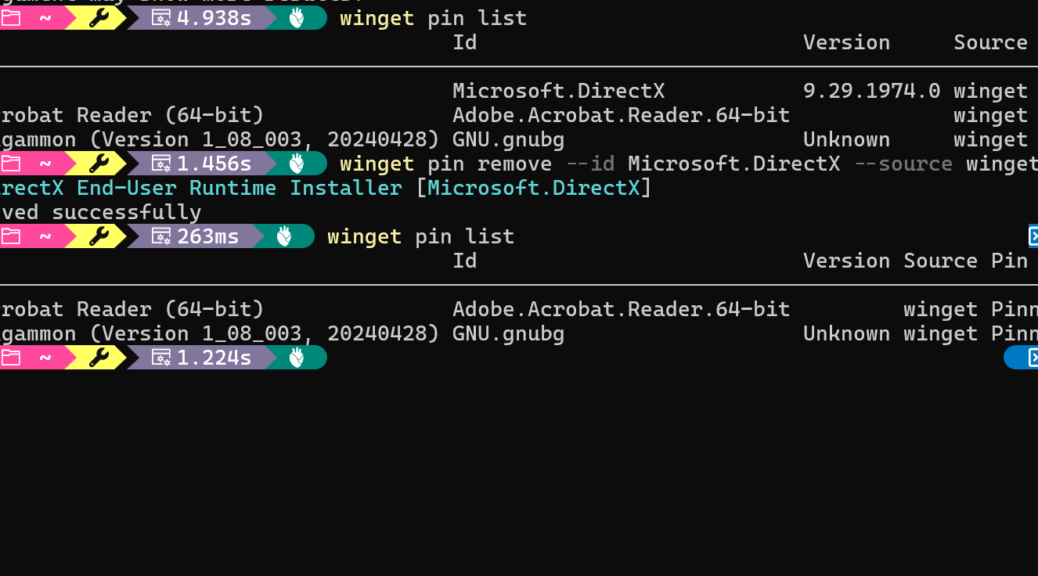
I was doing a routine check of my WinGet pin list on Flo6 just now (ICYMI, Flo6 is my production desktop). After running winget pin list I spotted three pinned packages. Two of them I recognized immediately. Adobe Acrobat Reader (64-bit) and GNU Backgammon I pinned myself, on purpose. But the third one stopped me cold. It showed Microsoft.DirectX at version 9.29.1974.0. I had never pinned that. Why did I see this strange DirectX pin?
How I Got a Strange DirectX Pin on Flo6…
First, let me share some background. Modern DirectX, meaning DirectX 11 and DirectX 12, is baked directly into Windows. Windows Update manages it entirely. Winget does not install, update, or remove it. How, then, did it make its appearance?
The Microsoft.DirectX package from the WinGet community catalog is something else entirely. It refers to the DirectX End-User Runtime redistributable, specifically its June 2010 release. That’s the last one MS ever shipped.
Indeed, Version 9.29.1974.0 is the final, frozen-forever build. It’s unchanged since 2010. Back in the day, games and apps from that era bundled this runtime to pull in legacy components. Think D3DX9, XAudio2, and XInput. On most modern Windows systems, this redistributable is obsolete and irrelevant.
The Source of This Strange Pin May Be…
Here’s where things get weird. The Microsoft.DirectX manifest in the WinGet community catalog had a long-running typo. For a while, it listed the package version as 9.29.1974.1 instead of the correct 9.29.1974.0. A community contributor eventually caught the error and submitted a pull request to fix it.
Once that fix merged into the catalog, WinGet suddenly saw a mismatch on affected machines. The catalog now declared 9.29.1974.0 as current. The installed runtime also reported 9.29.1974.0. So far so good. But the metadata around the install technology did not reconcile cleanly. Windows owns and controls the DirectX runtime. WinGet does not.
Winget could neither upgrade the package nor cleanly resolve the discrepancy. So it did the next best thing. It quietly added a Pinning-type pin to suppress its spurious upgrade prompt. That kept its noise out of winget upgrade --all output. In short, winget added the pin to stop nagging itself about a package it cannot actually manage. I have to laugh about that, give me a moment…
Removing the DirectX Winget Pin Is Safe
The good news here is straightforward. This pin is purely administrative. WinGet created it as a workaround for its own catalog inconsistency. It was never protecting anything vital.
Removing the pin leaves the DirectX runtime alone. The actual runtime stays right where it is. Windows Update continues to manage it, same as always. Better yet, the phantom upgrade version, 9.29.1974.1, is already gone from the WinGet catalog. Removing the pin won’t spur any bogus upgrade attempts. Nothing bad is waiting to happen.
The command to remove it is simple:
winget pin remove --id Microsoft.DirectX --source winget
As you can see in the screenshot above, the operation returns “Pin removed successfully” in under two seconds. A quick follow-up winget pin list confirms the DirectX entry is gone. No drama, no side effects.
Separating Signal from Noise
This episode is a good illustration that WinGet isn’t infallible. Sometimes its catalog or tooling leaves artifacts behind that look alarming but turn out to be harmless. The DirectX pin on Flo6 was exactly that: a breadcrumb left by WinGet’s own error-handling logic, not by anything I did. A single one-liner clears it up in seconds. Now, winget pin list shows only packages I actually chose to pin. That is exactly how it should be, and I am glad to have one less mystery on my machine. That counts as a win, here in Windows-World. Cheers!

