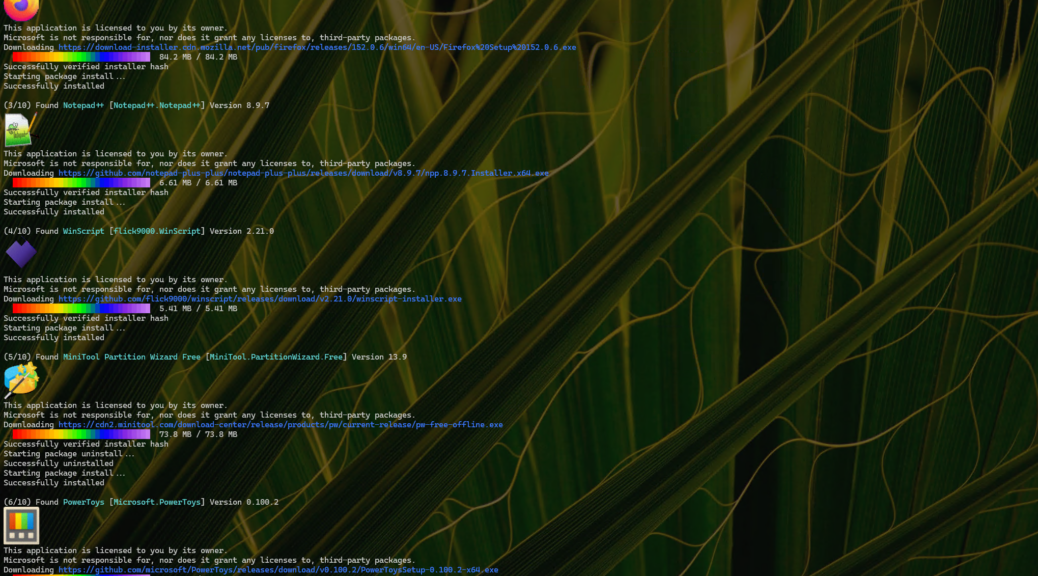
Here’s an interesting and welcome observation. Installing updates this morning, I noticed that 7 of 10 packages showed icons as Winget did its upgrade thing. (And this came from the 2018 vintage ThinkPad X380 Yoga!) Anecdotally, that’s way up from when icons first started showing up Windows Terminal in early March of this year. I’m delighted to see that WinGet shows more icons than ever before. Mostly that happens as more developers start including the necessary image references in their package metadata. In my sample screenshot (5 packages) every one has an associated icon. I’m jazzed!
Why WinGet Shows More Icons Nowadays
Lots of popular apps now include icon Url fields in their metadata (that’s where those images come from: e.g. VLC, Chrome, FireFox, NotePad++, MTPW, etc.). Microsoft has definitely upped its support for icons as well (e.g. Edge, PowerToys, Terminal, VStudio, .NET runtimes, and more). Indeed, there seems to be a growing wave of developer support as more and more packages now sport icons as WinGet interacts with them.
At the same time, says Copilot, “the WinGet backend now caches and serves icons [more] reliably.” These days icons are cached in the content delivery network (CDN), retrieval is faster and better, and broken URLs are getting fixed. The net-net is that more icons are appearing because there are more of them around, and the mechanisms to show them are working better, too.
Here in Windows-World, that counts as progress. Plus, I love the eye-candy that icons provide within the mostly monochrome Windows Terminal environment. How could you not? Good stuff!
If you’ve not yet turned icons on in your Terminal evironment just yet, never fear. I posted about this on April 10 (2026) in an item entitled How to Light Up Winget Icons. Follow its instrux if you’d like to see them for yourself.

