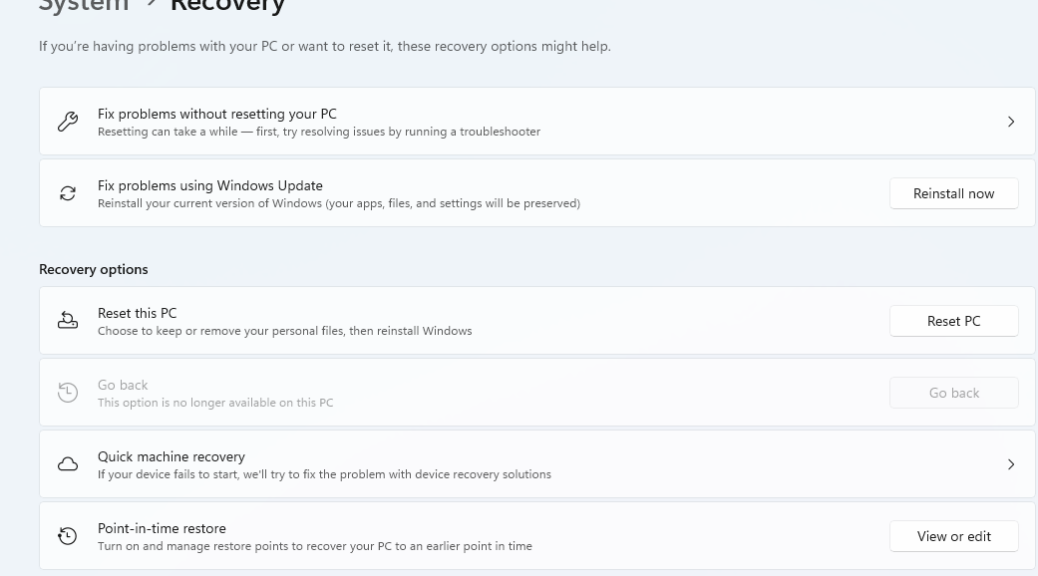
Last Friday, MS released a new Beta Channel build to Insiders. In these insider previews, things of interest do pop up from time to time. Methinks one particular new capability in that release will interest readers. Namely, Build 26220.8062 Settings integrates RPs (Note: I abbreviated Restore Points as RPs here, for brevity). You can see what this looks like in the lead-in screencap. This is fascinating, and I’ll tell you why…
What’s Noteworthy, as Settings Integrates RPs in Build 26220.8062?
Over the past decade, MS has been surely moving functions from Control Panel to Settings. While that pace has been glacial, this marks major movement in that long-persisting icecap. You used to have to work through the “System Protection” tab in the System Properties Control Panel item to handle restore point status and access. No more. As the lead-in graphic shows, it’s now integrated into Settings > Recovery. And there’s more…
If you click the “View or edit” (Restore Points) button at the right of the “Point-in-time restore” item shown above, you’ll get a sub-menu that lets you:
- Turn RP capture on or off
- Manage RP frequency (default is “Every 24 hours”)
- Manage RP retention (default is 72 hours)
- Fix restore point disk usage
- Access a list of available restore points (with time stamps)
Here’s that that looks like on my X380 Yoga test PC:
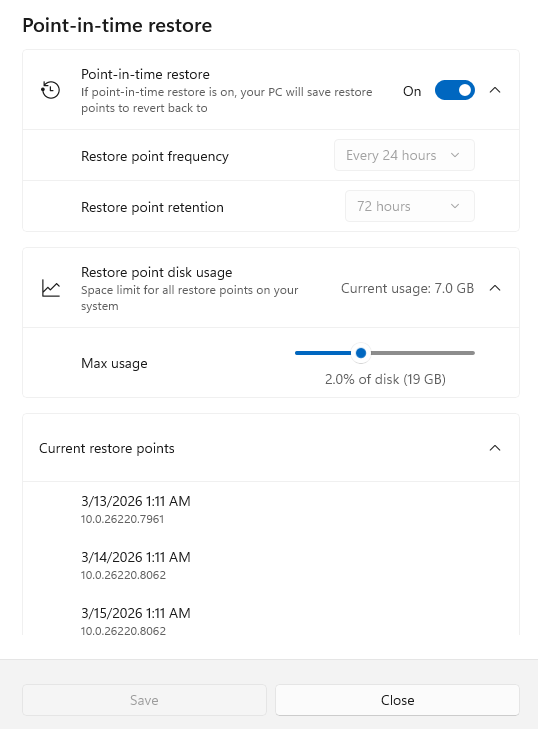
From what I can tell, the upgrade turns RPs on by default. Notice they already consume 7GB of disk space.
This is a major shift in Windows functionality. I checked and the old standby — easily run as SystemPropertiesProtection.exe — remains available in this build. I guess MS will offer them side-by-side for a while as is their usual practice.
Big doings in this latest Beta release. Nice to see another big chunk of Control Panel capability make its way into Settings. Here in Windows-World, that counts as “real news:” now you know!

