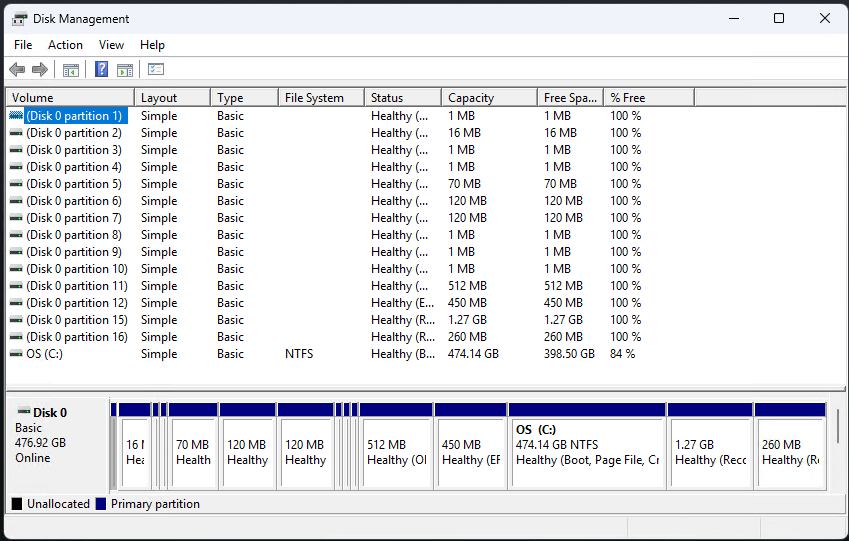
Wow! Wow! Wow! What an adventure I just went through. After examining the weird, seemingly fragmented disk layout shown in the lead-in graphic, I went nuts. I decided to clean install Windows 11. That’s when I learned a bunch of stuff I didn’t want to know. Chief among those things (more to follow): the bizarre ASUS disk layout is intentional. Indeed, it came back after typical clean install manuevers failed repeatedly. Ultimately, I used the “My ASUS in WinRE for USB” app to bring the unit back to life.
Why Say: Bizarre ASUS Disk Layout Is Intentional?
Short answer: because it came back on its own after running a cloud restore on the Windows 11 image on the Zenbook A14. Longer answer: the unit simply wouldn’t boot into any kind of standard recovery media that I could build by hand. I wasted more than a day trying to brute force my way into a clean install, only to realize ASUS has barred the “boot to USB” door very tightly and narrowly. Indeed, I’m very, very glad that I was able to get the unit up and running again. I’d been contemplating a run to a nearby repair shop. I’m glad it didn’t come to that — but it was close!
I’m not sure WTF is going on, that ASUS needs nine OEM partitions on its SSD drive (the 16MB one is undoubtedly the MSR). But I’ll be darned if I was able to figure out how to get rid of them. I think there are two recovery partitions (reagentc says it’s tied to Partition 15) because one is for normal Windows use, the other for ASUS’s no-doubt murky purposes.
If It Ain’t Broke…
Honestly, I should’ve known better. The unit was behaving and peforming as expected. Just because I didn’t — and still don’t — like what I see for disk layout, doesn’t mean I should’ve taken the clean install route. Now I know better.
A painful lesson learned, a day-and-a-half spent chasing phantoms. Sounds like my idea of a good time. Here in Windows-World, I take my jollies where I can find them. Think I’ve had enough of those to last me for a while, though…

