When it comes to my Microsoft Accounts (MSAs), I must laugh at what historian Hayden White unsmilingly called “the burden of history.” That is, it seems I’ve acquired quite a number of MSAs over the years. Thus, I had to shoulder that burden recently when I decided to clean things up a bit. Last week witnessed my own “great MSA massacre of 2026.” Indeed, I rid myself of 4 old MSAs and cleaned up what remained. It wasn’t exactly bloody, as such things go, but it was indeed a burdensome task.
What Spurred the Great MSA Massacre of 2026?
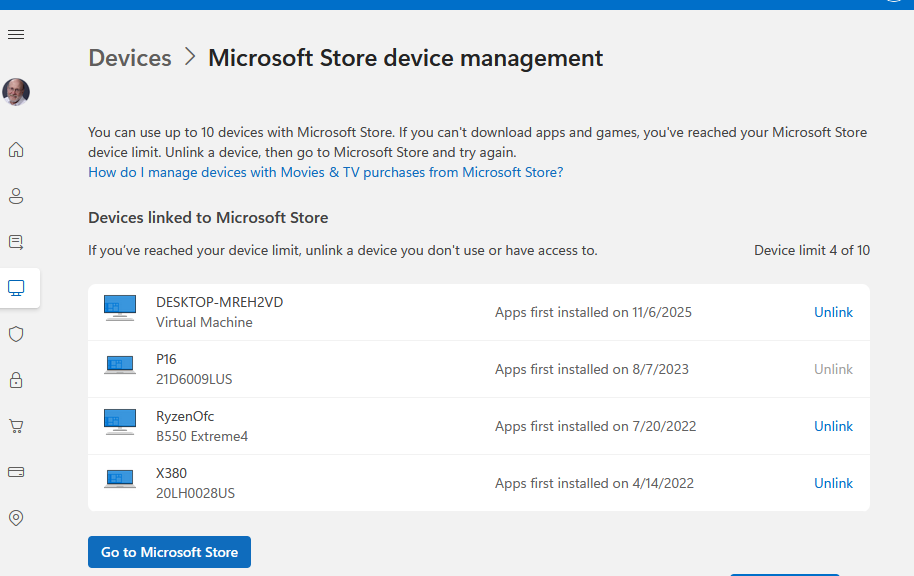
As the lead-in graphic should suggest, the impetus came from devices associated with my many and varied MSAs. Indeed, I discovered numeous evaluation units from Lenovo, Dynabook, HP, MSI, and others. Some went as far back as the early 2020s.
One source of issues is that I didn’t practice good “eval return hygiene” on many loaner units. I would log in to them using an MSA, but didn’t unenroll them from device lists before sending them back. This, it seems, could cause them to persist for up to 6 months after return and presumable oblivion. At least, as far as logins from my MSA were concerned.
I spent about two weeks of concerted effort, visiting the managed devices page for my still-active MSAs. Each day, I would remove all stale entries (I call them “zombies”) only to see them pop up again. But over time, and with grim repetition, I finally consigned those stubborn devices to rest in eternal peace (hopefully).
What’s Left to Do?
I’ve got one MSA that’s a bit of a zombie itself. Its home email server was shut down last year, as its owner went out of business. I want to keep that account alive because it carries 20 years of — please don’t laugh out loud — Microsoft Solitaire history that I don’t want to lose. It’s tied to my cell number, so I can still prove my identity as long as that sticks with me, so I should be good.
I’m now shuffling all of its devices over to my primary MSA, so I can keep the ones I actually use all in one place. Going forward, I have a plan as I return eval units to Lenovo (or whomever else might send me a review unit). I’ll make sure to unenroll them from my registered device and MS Store device lists to keep things current and correct. Copilot opines further it’s a good idea to factory reset those units, too, to wipe all MSA traces. I’ll do that, too.
As IRL, in Windows-World actions have consequences. I’m doing my best to remember that using my MSA to login and play with eval units means I have to manage them more actively as they come and go. Fingers crossed I’ll do that properly from now on…

