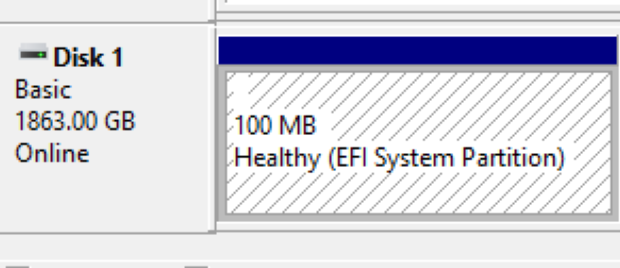
ESP is an abbreviation for the EFI System Partition, where a PC uses its contents to boot a PC far enough along to start loading Windows. For almost as long as I can remember, that partition has been created and sized during Windows installation at 100 MB. But this is changing. Here’s a “known issue” for KB5089549, Microsoft’s May 2026 Patch Tuesday cumulative update for Windows 11. It can fail mid-installation on systems with a critically full EFI System Partition (10 MB or less free space). What do we, and OEMs, do as Windows outgrows 100 MB ESP? Get bigger!
Other Evidence That Windows Outgrows 100 MB ESP
I polled the 7 PCs (2 desktops, 5 laptops) here in my office at Chez Tittel to check their ESPs and observed something interesting. Here’s what I found:
| Name | Year | ESP (MB) |
| X380 | 2018 | 100 |
| X12 Hybrid | 2021 | 100 |
| P16 Gen 1 | 2022 | 100 |
| Tsp3Ultra2 | 2024 | 260 |
| P16 Gen 3 | 2025 | 260 |
| AsusSnap | 2025 | 260 |
| Yog7X2 | 2026 | 450 |
Notice that the ESP sticks at the 100 MB mark until 2024, at which point it jumps to 260 MB. Then, on this year’s May-delivered Lenovo Yoga Slim 7X Gen 11 (X2 Snapdragon) it jumps again to 450 MB. There’s no doubt about it: the EFI is getting bigger!
What is the ESP, Anywho?
The EFI System Partition — ESP, in the shorthand everyone actually uses — is a small, dedicated FAT32 partition that lives on GPT-formatted disks and serves as the staging ground for everything the system needs before the operating system proper gets involved. Boot loaders live there. Firmware drivers live there. UEFI utility executables live there. If the system can’t find and read the ESP at power-on, it goes nowhere. It is, in other words, foundational infrastructure — and like most foundational infrastructure, nobody pays attention to it until something breaks.
Microsoft’s own documentation has recommended a minimum ESP size of 200 MB for UEFI/GPT systems since at least the Windows 8 era, with 260 MB or larger as the preferred target for new installations. That guidance has been sitting in plain sight on Microsoft Learn for years. OEMs, however, have a long tradition of shipping machines with a 100 MB ESP because, at the time those machines were built, Windows fit comfortably within it. The margins were thin, but they existed. That era is over.
Why 100 MB Isn’t Enough Anymore
Every Windows feature update — and, increasingly, every cumulative security update — must write updated boot files, recovery sequences, and language-specific font sets into the ESP. As the Windows boot stack has grown over successive releases, the items demanding ESP real estate have multiplied: Secure Boot validation assets, BitLocker metadata, UEFI capsule drivers, and a collection of per-locale font files for the pre-OS boot interface that can alone consume several dozen megabytes. If 100 MB was ever “enough,” Windows has long since moved those goalposts.
The specific tripwire for KB5089549 is tight, but telling. Microsoft confirmed that the failure triggers when the ESP has 10 MB or less of free space remaining. On a 100 MB partition that has been hosting Windows through several years of cumulative updates, that threshold is entirely realistic. The update proceeds normally through its initial phases — progress bars, the usual theater — and then dies during the restart phase, right around the 35–36% completion mark. The CBS.log entries are unambiguous: SpaceCheck: Insufficient free space and ServicingBootFiles failed. Error = 0x70. The accompanying companion error code, 0xc1900104, surfaces during feature-update upgrade attempts and carries the same root cause. The partition is simply full.
Increasing ESP Lebensraum
The community has converged on two main workarounds, and it is worth being clear-eyed about both of them.
The first is the “fonts delete” trick. You mount the ESP using mountvol Y: /S from an elevated command prompt, navigate to EFI\Microsoft\Boot\Fonts, and delete everything inside — typically recovering somewhere between 30 and 60 MB in a single sweep. It is fast, it is effective, and it is entirely unsupported by Microsoft. The risk is real: those font files support non-English boot environments. If your machine ever needs to display Cyrillic, Japanese, or Arabic characters in the pre-OS recovery interface, you will have a bad time. For an English-only deployment sitting quietly in a US office, the practical risk is low. In any multilingual environment, it should be treated as a last resort only.
Microsoft has also offered its own short-term registry tweak for KB5089549 specifically: running reg add “HKLM\SYSTEM\CurrentControlSet\Control\Bfsvc” /v EspPaddingPercent /t REG_DWORD /d 0 /f from an elevated prompt, followed by a reboot. This reduces the padding buffer the update engine reserves in the ESP, giving just enough headroom to slip the update through. It buys time. It does not fix the underlying problem.
The second, more durable option is partition resizing — shrinking the C: volume and extending the ESP to somewhere between 260 MB and 512 MB. Tools like MiniTool Partition Wizard (MTPW) can accomplish this from within Windows on many configurations. That said, a WinPE offline environment is the proper path since you are modifying a sometimes live boot partition. This is the correct fix. It is also disruptive, carries a non-trivial risk of data loss if anything goes wrong mid-operation, and absolutely requires a verified backup before you touch anything. Done properly, you will not need to revisit this for years. Done carelessly, you will spend an afternoon with recovery media and a sinking feeling. I experienced this myself recently on an ASUS Zenbook A14 laptop.
MS Is Mum on Remediation
Microsoft has not, as of this writing in mid-2026, provided an official, automated remediation path. There is no inbox tool that detects an undersized ESP and expands it gracefully. Ditto no Setup-phase blocker with a clear, actionable error. There is a Known Issue Rollback for KB5089549, which automatically propagates to consumer and unmanaged devices and prevents the broken update state — useful, but it leaves the machine unpatched. Enterprise admins can deploy the associated Group Policy to apply the KIR on managed fleets. None of this changes the underlying geometry of the partition. Something’s got to grow — and soon!

